
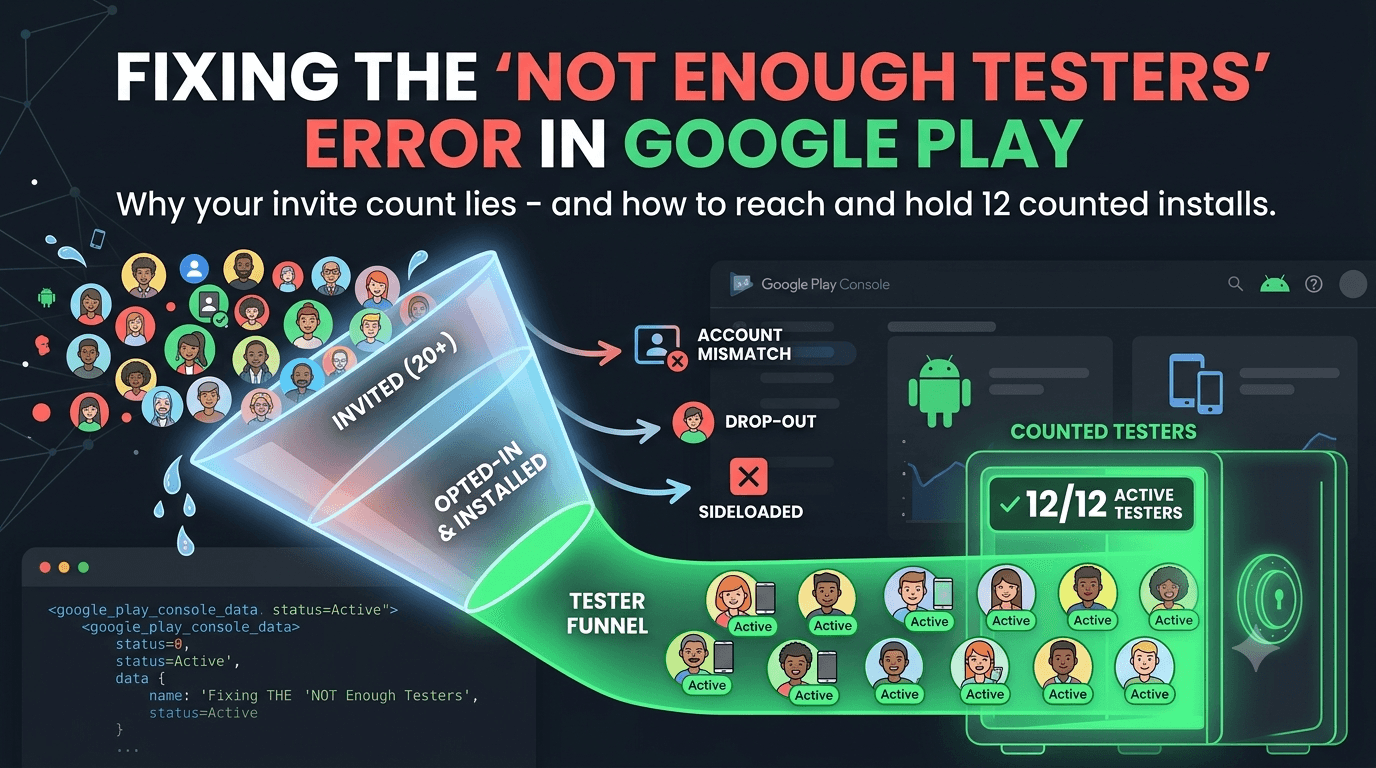
You added testers, but Google Play still says you do not have enough testers. This is almost always about how testers are counted versus how many you invited. This guide explains the difference and shows you how to reach — and hold — the required 12.
Contents
Quick answer
Featured answer: Google counts opted-in testers who installed from Play, not everyone you invited. If your number is short, it is because invitees have not opted in, used the wrong account, or their installs were not counted. Get 12+ genuine opt-ins and hold them for 14 days.
How testers are actually counted
Inviting a tester is not the same as having a counted tester. A tester counts only when they:
- Are on your tester list or in your linked group.
- Accept the opt-in link.
- Install from Google Play on a real device.
- Remain enrolled through the window.
Fake or emulator installs are discarded — see real vs fake testers.
Why your count is short
| Reason | What to check |
|---|---|
| Invited but not opted in | Testers must accept the opt-in link |
| Account mismatch | On-device account must match the list/group |
| Sideloaded installs | Only Play installs count |
| Dropouts | Testers left mid-window |
| Flagged installs | Bots/emulators discarded |
How to reach 12 and hold it
- Recruit 15+ so the counted number stays above 12 — see how many testers.
- Confirm each tester opted in and installed from Play.
- Fix join/install issues — testers can't join, install issues.
- Prevent dropout — retention tips.
Fastest fix: If you simply cannot get 12 real opt-ins, submit your app to FastTesters and get real, worldwide testers who opt in correctly — with a buffer built in.
Invited, opted in, and counted are three different things
The word "tester" hides three distinct states, and confusing them is the root of most "not enough testers" confusion:
- Invited: You added their email to the list or group. This alone counts for nothing.
- Opted in: They accepted the invitation through the opt-in link. Closer, but still not enough.
- Counted: They installed your app from Google Play on a real device with the invited account, and remain enrolled.
Only the third state moves your number. When your count looks low, walk each tester from "invited" to "counted" and you will usually find exactly where the drop-off happens — most often testers who opted in but never completed the install.
How the tester counter updates
The number Google shows is not your invite count — it reflects testers who have genuinely joined and installed. Because of this, the counter can lag behind your actions:
- After a tester opts in and installs, there can be a short delay before the count reflects them.
- If a tester uninstalls or switches accounts, the count can drop later in the window.
- Installs flagged as inauthentic are removed, which can quietly lower your number.
Do not judge your standing on the day you send invitations. Check again after testers have had time to complete the full opt-in and install flow, then monitor daily to catch any decline early.
Keep a live roster
A simple habit prevents surprises: maintain a short list of your testers and confirm each one has (a) opted in and (b) installed from Play. If your roster shows 15 confirmed installs but the console shows 11, the gap points to account mismatches, sideloads, or flagged installs — exactly the issues to investigate. A roster turns a vague "not enough testers" message into a concrete, fixable checklist.
Invited versus opted in versus counted
The heart of this problem is a distinction that trips up nearly every new developer: there is a big difference between testers you invited, testers who opted in, and testers who actually count. Inviting someone — adding their email or sharing the opt-in link — does nothing on its own. The invitation only matters if the person accepts it, installs the app from Google Play with the authorized account, and keeps it installed. Only testers who complete that full journey count toward your 12-tester requirement.
This is why you can invite 20 people and see Google report far fewer. Perhaps only 14 accepted, only 11 installed, and only 9 kept the app. From Google's perspective, you have 9 testers, not 20. The gap between invited and counted is where almost all "not enough testers" frustration lives. Once you internalize that only completed, active installs count, the fix becomes obvious: you need more people to finish the whole process, not just to be invited.
Why your counted number falls short
Several predictable leaks shrink the number between invitation and count. Some invitees never bother to accept — intentions fade. Others accept but hit an account mismatch and cannot install, using a different Google account than the one authorized. Some install but then uninstall to free up space or because they lose interest. And some installs may be discarded if they are not genuine. Each leak is normal, but together they can turn a comfortable-looking invite list into a shortfall.
The practical lesson is that you must plan for attrition at every stage. If you need 12 counted testers, inviting exactly 12 is a recipe for falling short, because you will inevitably lose some at each step. Experienced developers over-recruit deliberately, and they minimize leaks by fixing the most common one — account mismatch — through clear onboarding. See tester cannot install the app for the account-consistency fix that recovers many "lost" testers.
How to reliably reach and hold 12
- Over-recruit. Aim for 15–20 invitations so that after normal attrition you still land above 12 counted.
- Onboard clearly. Tell testers exactly which account to use and to install from Play, eliminating the top leak.
- Confirm installs, not invites. Track how many testers actually appear as installed in your console, and chase the gap.
- Keep a buffer active. Retain extra testers so a mid-window dropout never pushes you below 12.
- Monitor daily. Watch your counted number throughout the 14 days and top up if it slips.
The difference between developers who struggle and those who sail through is rarely effort — it is planning for the invited-to-counted gap. Build in a buffer, remove friction, and watch the number that actually matters.
The fast path when recruiting keeps falling short
If you have invited plenty of people but keep landing below 12 counted, the recruiting-and-retention problem is exactly what a professional testing service solves. Rather than fighting attrition yourself, you submit your opt-in link and real testers are assigned who actually opt in, install from Play, and are kept active above 12 for the full window. This closes the invited-to-counted gap by design, because the service manages the entire journey — not just the invitation — and maintains a buffer against dropouts. For developers stuck watching their counted number stall, it is the most direct way to reach a stable 12+.
Thinking of testers as a funnel
The clearest way to understand and fix a tester shortfall is to picture your testers as a funnel, with people dropping out at each stage. At the top are everyone you invited. Below that are those who accepted the invitation. Below that, those who successfully installed from Play with the right account. And at the bottom, those who kept the app installed and active through the full 14 days — the only group that actually counts. Each stage loses some people, so the number at the bottom is always smaller, often much smaller, than the number at the top.
| Funnel stage | What can go wrong |
|---|---|
| Invited | Never opens the invitation |
| Accepted | Never installs, or account mismatch |
| Installed | Uninstalls or goes inactive |
| Active through 14 days | This is what counts |
Once you see it as a funnel, the strategy is obvious: widen the top (invite more), reduce leakage at each stage (clear onboarding, account consistency), and keep a buffer so the bottom stays above 12 even as people drop. Managing the funnel, not just the invite count, is what reliably gets you to a stable 12+.
How to top up mid-window without breaking anything
If you notice your counted number slipping during the 14 days, you can add testers mid-window to recover — but do it thoughtfully. Adding fresh, genuine testers who opt in and install is perfectly fine and helps restore your buffer. What you must avoid is letting the active count drop below 12 in the first place, since a broken window is far harder to fix than a topped-up one. The practical approach is to monitor daily, and the moment your buffer thins, add a few more testers before you are anywhere near the minimum. Because the requirement is about maintaining 12+ active testers throughout, a proactive top-up keeps your window intact. This constant vigilance is another reason many developers prefer a service that maintains the count automatically, removing the need to babysit the number every day.
Reading your tester count correctly
Part of the confusion around "not enough testers" comes from misreading what your Play Console is actually telling you. The console distinguishes between testers you have added or invited and testers who have genuinely opted in and installed, and it is the latter that matters for the requirement. When you see a number that seems too low, the first step is to understand which number you are looking at — the size of your invite list is not the same as your count of active, installed testers. Confusing the two leads developers to believe they have met the requirement when they have not, or to panic when they actually are fine.
Take the time to identify, in your console, how many testers have actually installed and remain active, because that is the figure Google evaluates. If that number is below 12, you know you have a genuine shortfall to address; if it is comfortably above 12, occasional invite-list noise does not matter. Reading the right metric turns a vague anxiety into a concrete status you can act on. It also tells you whether your problem is recruitment (not enough people in the pipeline) or conversion (people entering but not completing), which point to different fixes.
This clarity is especially valuable during the 14-day window, when you should be monitoring your active count daily. A developer who watches the correct number can react early — topping up before a dip becomes a breach — while one who watches the wrong number may be lulled into false confidence or driven to needless worry. Make it a habit to check the active, installed tester count specifically, and you will always know exactly where you stand relative to the requirement.
Key takeaways
- Only opted-in, installed, active testers count — invitations alone do nothing.
- Expect attrition at every stage: accept, install, and retain.
- Over-recruit to 15–20 so you land comfortably above 12 counted.
- Account mismatch is the top leak; clear onboarding recovers many lost testers.
- Track installs, not invites, and keep a buffer active through day 14.
Frequently asked questions
I invited 20 testers — why does it show fewer?
Only opted-in, Play-installed testers count. Invitations alone do not.
Do emulator testers count?
No. They are detected and excluded.
How many should I recruit?
15+ to reliably keep 12 counted.
Does the count update instantly?
There can be a short delay after testers opt in and install.
Can dropouts lower my count later?
Yes — that is why a buffer matters.
Does the counter include internal testers?
No. Only opted-in closed testers count toward the production access requirement.
Will re-installing help a tester who was dropped?
If a tester uninstalled, having them re-opt-in and install again from Play can restore them to the counted total, assuming their account is still on your list.
Conclusion
"Not enough testers" is a counting problem: you need 12+ genuine opt-ins installed from Play, held for 14 days. Recruit a buffer, fix opt-in and install friction, and prevent dropout. Want counted testers fast? Submit your app today.
Expanded for topical authority — additional practical sections below. Original guide content above is unchanged.
Real-world scenarios: who this matters for
The guidance in this article on Google Play Says Not Enough Testers? Do This applies across many Android product types. Use these scenarios to map the advice to your situation.
| Developer type | Typical challenge | Practical focus |
|---|---|---|
| Indie / solo | Limited tester network and time | Start closed testing early; keep a buffer above 12 opted-in testers; parallelize listing + Data safety work |
| Startup | Launch deadline vs 14-day rule | Treat the window as fixed; recruit in parallel with QA; avoid last-minute track setup |
| Agency / white-label | Multiple client apps, each needing its own test | One closed test per app; standardize opt-in onboarding; track eligibility dates per client |
| Flutter / React Native | Cross-platform build + Play Console quirks | Ship a signed AAB to closed testing; verify installs from Play, not sideload; watch vitals on mid-range devices |
| Native Kotlin | Device/API fragmentation | Cover API levels and OEMs in your tester mix; fix crashes before requesting production |
| Game / Unity | Performance + retention during 14 days | Keep testers engaged so count never dips below 12; monitor ANRs and battery |
| E-commerce / fintech | Policy + payment flows | Test checkout, permissions, and declarations carefully before production access |
| Healthcare / kids / education | Sensitive policies (Families, data) | Align listing, privacy, and content rating with real app behavior during the test window |
Visual placeholder: Scenario matrix infographic — Indie / Startup / Agency / Cross-platform paths for Google Play Says Not Enough Testers? Do This.
Comparison: DIY recruitment vs managed closed testing
When your goal is Google Play production access, the path you choose for testers affects time, risk, and feedback quality. Use this comparison while deciding how to apply Google Play Says Not Enough Testers? Do This.
| Approach | Time to 12 opted-in | Cost | Dropout risk | Feedback quality | Best when |
|---|---|---|---|---|---|
| Friends & family | Days–weeks | $0 | High | Mixed | Tiny MVP, flexible timeline |
| Reddit / Discord / Telegram | Unpredictable | $0–low | High | Variable | You can manage onboarding daily |
| Peer community exchange | Variable | $0 | Medium | Developer-biased | You can test others’ apps in return |
| Managed closed testing (e.g. Fast Testers) | ~1 hour after valid link | $15 one-time / app | Low (buffer of 15) | Real Play installs | You need speed + continuity for 14 days |
Decision tip: If a broken streak would delay revenue or a client deadline, prioritize reliability over $0 recruitment. DIY is fine when you already have engaged testers and can monitor Play Console daily.
Visual placeholder: Comparison diagram — DIY vs community vs managed testing for Google Play Says Not Enough Testers? Do This.
Common mistakes (and how to avoid them)
These mistakes repeatedly show up when developers work through Google Play Says Not Enough Testers? Do This:
- Confusing invited vs opted-in testers — Only testers who open the opt-in link and install from Play count toward 12. Check the opted-in number in Play Console, not your email list.
- Recruiting exactly 12 with no buffer — One uninstall can break continuity. Aim for ~15 active opted-in testers.
- Starting the counted clock late — Listing assets, Data safety, and privacy work should run during the 14 days, not after.
- Using sideloaded APKs or fake installs — They do not satisfy Play’s closed testing expectations and can create account risk.
- Ignoring tester feedback until day 14 — Crashes that drive uninstalls threaten your streak and your review outcome.
- Requesting production access before the continuous streak completes — Eligibility checks fail even if calendar time has passed.
Troubleshooting checklist
If something feels “stuck” while applying Google Play Says Not Enough Testers? Do This, walk this list before changing strategy:
| Symptom | Likely cause | Fix |
|---|---|---|
| Console shows < 12 testers | Invites sent but not opted in | Resend opt-in link; confirm install from Play |
| “Not eligible” after 14 calendar days | Count dipped below 12 mid-window | Restore 12+ and complete a full continuous streak |
| Tester cannot join | Wrong account, Group lag, or track not published | Verify Google account, Group membership, track release |
| App fails to install | Device/API mismatch or signing issue | Check AAB, minSDK, Play App Signing |
| Production still rejected after testing | Policy, declarations, or stability — not the clock | Read the exact reason; fix that category completely |
Visual placeholder: Troubleshooting flowchart for Google Play Says Not Enough Testers? Do This.
Action checklist
Use this checklist alongside the rest of this guide on Google Play Says Not Enough Testers? Do This:
- ☐ Closed testing track created with a signed release (AAB)
- ☐ Opt-in link tested on a fresh Google account
- ☐ At least 12 testers opted in (prefer ~15)
- ☐ Daily check that opted-in count stays ≥ 12 for 14 continuous days
- ☐ Core flows exercised (login, main feature, permissions, offline/online)
- ☐ Crashes / ANRs triaged from tester reports and vitals
- ☐ Store listing, screenshots, and feature graphic drafted
- ☐ Privacy policy + Data safety + content rating aligned with real behavior
- ☐ Production access requested only after eligibility is green
- ☐ Staged rollout plan ready for first public release
Additional FAQs developers ask about Google Play Says Not Enough Testers? Do This
Quick answer: what should I do first?
Confirm you are on a closed testing track with real opted-in installs, keep 12+ testers for 14 continuous days, and fix policy/stability issues in parallel. Then use the detailed sections above for Google Play Says Not Enough Testers? Do This.
Does this apply to organization (company) accounts?
The classic 12×14 closed testing gate is primarily associated with new personal developer accounts. Always verify your account type and current Play Console eligibility messaging for your app.
Do friends and family count as testers?
Yes — if they opt in via your closed testing link and install from Google Play. They only help if they stay opted in for the continuous period.
Can I update the app during the 14 days?
You can usually push updates on the closed track, but unstable releases that cause uninstalls can threaten your tester count. Prefer polishing via internal testing first when possible.
What if production access is still rejected?
Read the exact reason. Incomplete testing is only one category — policy, Data safety mismatches, and crashes are common. Fix the cited issue fully before reapplying.
Is paying for testers allowed?
Using real people who install from Play is what matters. Avoid fake install farms. A one-time managed service that supplies real closed testers is a practical option when DIY recruitment is too slow.
How is Fast Testers different from free communities?
Free communities trade time and mutual availability. Fast Testers assigns about 15 real testers after you submit a valid closed testing link (one-time $15 per app) and includes a production access guarantee under its refund terms.
Where should I go next?
Review the related guides below, then either finish DIY recruitment or start closed testing if you need speed and continuity.
Sources, updates, and how to use this guide
This article on Google Play Says Not Enough Testers? Do This is maintained for Android developers preparing Google Play closed testing and production access. Always cross-check eligibility text inside your own Play Console, because Google’s UI labels and account rules can vary by account type and date.
- Primary official references: Google Play closed testing help, Developer Program Policies, and Play Console eligibility messaging for your app.
- Practical experience lens: guidance here reflects common failure modes indie developers and agencies hit when recruiting testers, maintaining the 14-day streak, and recovering from production-access rejections.
- Last reviewed focus: 12×14 closed testing continuity, real vs fake testers, and parallel listing/compliance work during the window.
Related guides and next steps
Continue building topical depth around Google Play Says Not Enough Testers? Do This with these Fast Testers resources:
- Buy Google Play Testers Is It Safe
- Do Friends Count As Google Play Testers
- Google Play 12 Testers Explained For Indie Developers
- Google Play 12 Testers Policy
- Google Play Closed Testing Email Templates For Testers
- Google Play Closed Testing Guide How To Get 12 Testers For 14 Days
- How Many Testers Do You Need For Google Play
- Is Buying Google Play Testers Worth It
- Pricing — $15 closed testing
- How Fast Testers works
- FAQ
- Developer reviews
- Case studies
- Submit your app / start closed testing
Need reliable testers so your 14-day streak does not stall? Educate first with the guides above, then start when you are ready — one-time pricing, real Play installs, dashboard tracking.
Further expansion — case study, decisions, and expert recommendations. Prior sections remain unchanged.
Case study: indie app that needed 12 testers in under a day
Problem: A Flutter indie developer had a client demo in three weeks. Friends-and-family recruitment stalled at 6 opted-in testers after five days of chasing messages.
Solution: They kept DIY outreach running, but also submitted a valid closed testing opt-in link to a managed service to reach ~15 real Play installs quickly. They used this guide on Google Play Says Not Enough Testers? Do This to brief testers on what to exercise (onboarding, permissions, offline mode) and monitored Play Console daily so the continuous streak would not break.
Result: Opted-in count stabilized above 12 within hours of assignment; 14 continuous days completed; production access requested on schedule.
Lessons learned:
- Recruit a buffer early — waiting until day 10 is the expensive mistake.
- Real Play installs beat large invite lists.
- Managed testing is a timeline tool, not a substitute for fixing product quality.
Decision guide: what should you do next?
Use this decision path when applying Google Play Says Not Enough Testers? Do This:
- Is your account a new personal developer account that still needs production access?
If yes, plan for closed testing with 12+ opted-in testers for 14 continuous days. If no, still test — but confirm the exact eligibility text in Play Console. - Do you already have 12+ reliable people who will install from Play and stay for two weeks?
If yes, DIY can work — add a buffer and monitor daily. If no, use community exchange or a managed closed testing service. - Is your build stable enough that testers will not churn?
If no, run internal testing first. Entering the counted window with crash loops is how streaks die. - Are Data safety, privacy policy, permissions, and listing aligned with real behavior?
If no, fix during the window so production review does not bounce you after the clock. - Has production access been rejected?
Classify: eligibility vs policy vs declarations vs stability. Fix that category completely, then re-test / re-request.
Visual placeholder: Decision tree diagram for Google Play Says Not Enough Testers? Do This (DIY vs managed vs fix-and-retry).
Expert recommendations
- Instrument the streak: Check opted-in count daily for the first week; replace dropouts same day.
- Brief testers once: Send a short checklist (install from Play, open app daily, try core flow, report crashes). Silent testers still count if opted in — engaged testers protect quality.
- Never “solve” recruitment with fake installs: It fails the intent of closed testing and can create account risk.
- Ship a boring-stable build to closed testing: Save experimental features for internal tracks.
- Educate first, then accelerate: If your blocker is simply finding real testers fast, a one-time managed option (Fast Testers: 15 testers, $15/app) is often cheaper than slipping a launch.
For hands-on setup after reading about Google Play Says Not Enough Testers? Do This, see how it works and pricing, or submit your closed testing link when you are ready.
Internal navigation hub — added to strengthen topical connections. Original article content above is unchanged.
Topic cluster: 12 Testers & Production Access
Pillar guide: Start with Google Play – 12 Testers for 14 Days for the full overview, then use the supporting guides below.
- Google Play – 12 Testers for 14 Days (pillar)
- Google Play 12 Testers Explained for Indie Developers
- How Many Testers Do You Need for Google Play?
- Need 12 Testers for Google Play? Here's the Fastest Solution
- How to Get 12 Testers Without Friends or Family
- Do Friends Count as Google Play Testers?
- What Happens After 14 Days of Closed Testing?
- When Can You Request Google Play Production Access?
- The Fastest Way to Get Google Play Production Access
Continue learning
- Google Play Closed Testing Email Templates for Testers — Learn about tester communication for Google Play closed testing. Complete guide for Android developers publish.
- Need 12 Testers for Google Play? Here's the Fastest Solution — Need 12 testers for Google Play closed testing? Learn the fastest, safest way to meet the 12-tester, 14-day re.
- Common Google Play Closed Testing Mistakes to Avoid — The most common Google Play closed testing mistakes — wrong track, too few testers, dropouts, sideloading — an.
- Complete Glossary of Google Play Testing Terms — Learn about testing terminology for Google Play closed testing. Complete guide for Android developers publishi.
- The Fastest Way to Get Google Play Production Access — The fastest way to get Google Play production access: start your 14-day closed test immediately, avoid delays,.
- Google Play Android Vitals During Closed Testing — Learn about vitals monitoring for Google Play closed testing. Complete guide for Android developers publishing.
Next steps
- Ready to run closed testing with real Android testers? Submit your app or see pricing ($15 one-time).
- Compare options on our testing service comparison page, or read developer reviews and case studies.
- Still deciding? Review how Fast Testers works and the FAQ.