
Optimizing your app store listing through systematic Play Store ASO (App Store Optimization) is critical for long-term organic visibility. However, many Android developers sabotage their early growth metrics during the mandatory testing stages. Surviving the release phase requires a clean combination of search-engine-ready text optimization and precise policy verification compliance.
Google Play closed testing is a critical gatekeeping mechanism for new personal developer accounts. This specialized guide teaches you how to design indexable metadata layouts while demonstrating authentic engagement tracking to satisfy automated policy checks natively.
Why This Matters for Android App Developers
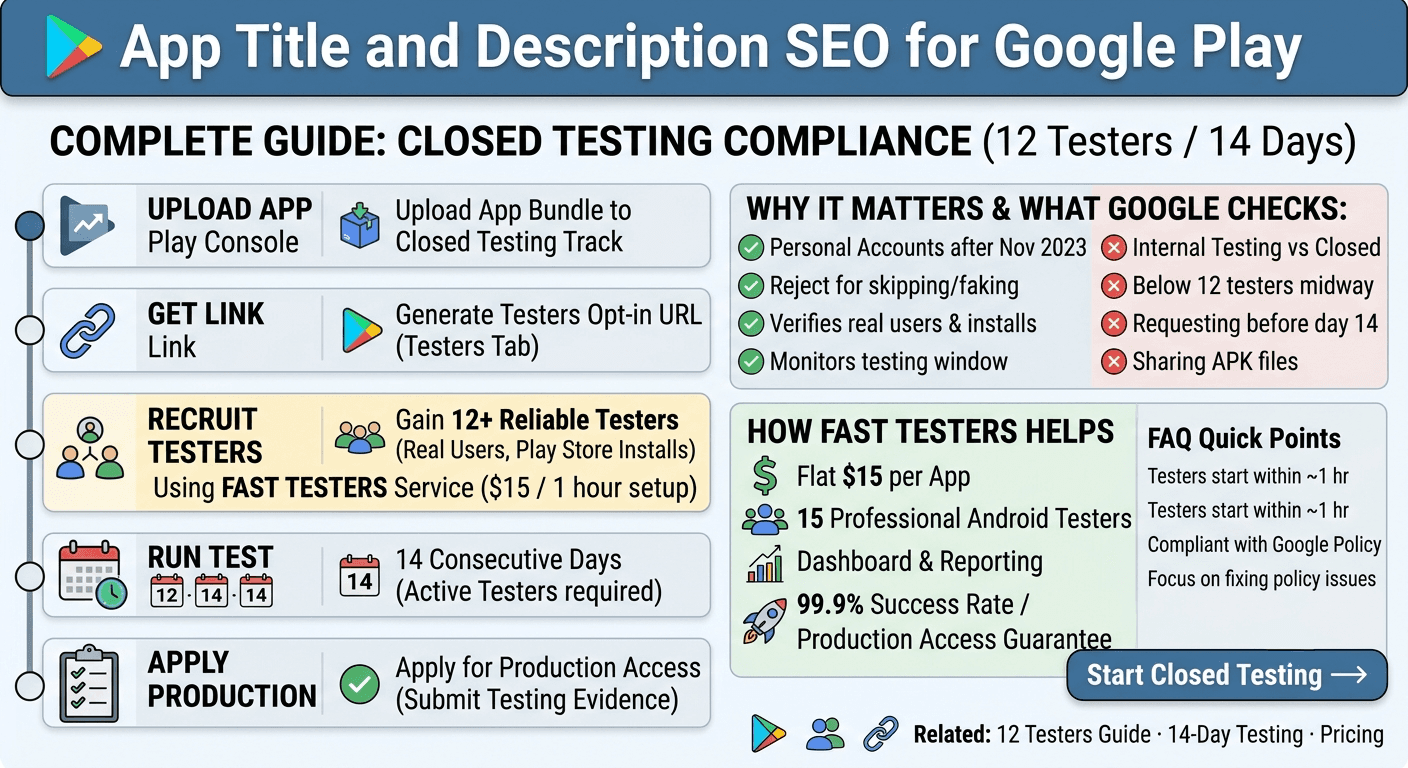
Personal developer accounts registered after November 2023 encounter a strict operational requirement. To qualify for a production release track, you must successfully maintain a closed testing pipeline featuring at least 12 testers for 14 consecutive days.
Critical Warning: Faking validation sessions using emulator installations, local Android Debug Bridge (ADB) side-loading loops, or click-farm automation results in rapid operational flag distribution, rejected production review sequences, and extended publishing delays.
Furthermore, early user retention or engagement behaviors are signals scrutinized by search crawlers. If testers install an app and immediately uninstall it due to performance degradation, your application's early search rank profiles face rapid structural deprecation before public indexing starts.
What Google Evaluates During Compliance Reviews
The Play Console background pipeline monitors automated signals continuously over your 14-day tracking history. Google explicitly evaluates:
- Opt-in Integrity: Real Google Accounts must actively join your tester list via your unique web or Android opt-in portal.
- Active Installs: Device tokens must connect directly to the target testing branch inside the Play Store ecosystem.
- Retention Footprints: Testers must keep the application operational on their hardware across the full 14-day duration without triggered uninstall commands.
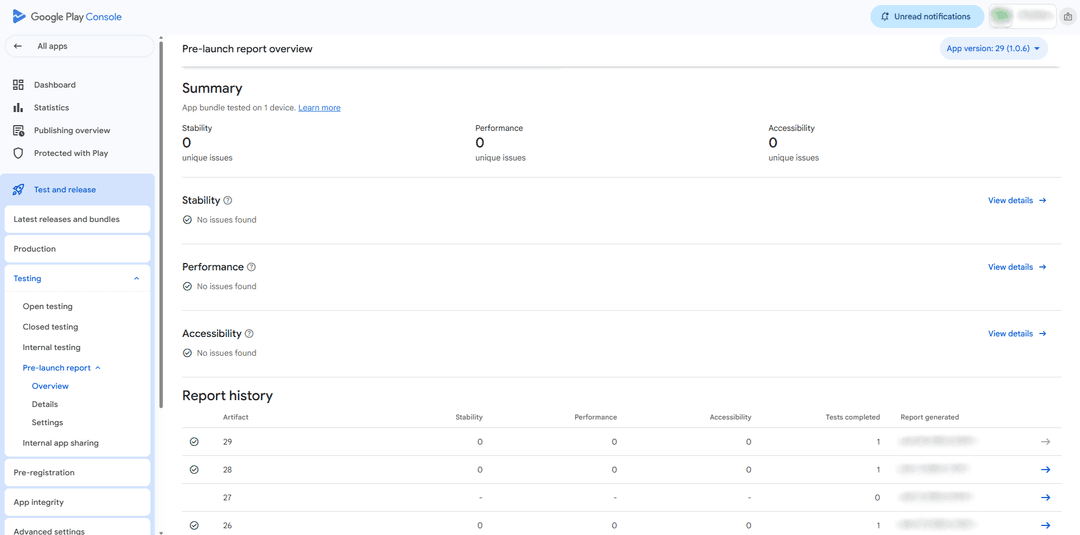
Visualizing the production deployment prerequisites inside the Google Play Console testing dashboard navigation structure.
Step-by-Step Technical Compliance Walkthrough
Follow this exact technical order of operations to launch smoothly without restarting the tracking clock:
- Build Architecture Prep: Upload your signed Android App Bundle (.aab) format binary file directly into the Closed testing track panel inside your dedicated Play Console interface.
- Generate Link Access: Navigate out to the "Testers" sub-navigation container tab and extract the authenticated web opt-in URL invitation link.
- Scale Tester Assignment: Recruit 12 to 15 reliable target end-user testers. Alternatively, leverage Fast Testers to automatically assign 15 active real-world device users in under one hour for a flat one-time payment of $15.
- Continuous Telemetry Monitoring: Keep verification checks alive and review operational installation signals continuously for 14 consecutive days.
- Request Production Promotion: Compile configuration reports and apply cleanly for full ecosystem production deployment pipelines.
Common Operational Mistakes and Prevention
Minor pipeline deployment errors frequently reset your 14-day testing clock back to day zero. Avoid these major configuration risks:
Incorrect Track Targeting
Many individuals waste valuable tracking windows running Internal Testing branches. Internal testing lines do not satisfy the 12-tester validation mandates required by Google's policy team.
Premature Production Review Requests
Triggering the automated review wizard protocol at exactly 14 days without a buffer buffer space can break compliance workflows. Maintain testing links open to prevent dropping below active participant floors.
How Fast Testers Streamlines Publishing Pipelines
Eliminate manual recruitment loops. Fast Testers supplies a dedicated workspace designed to handle system validation hurdles automatically for a flat $15 per app cost profile. No hidden recurring fees or subscriptions required.
Enjoy a comprehensive 99.9% publishing success velocity metrics loop spanning over 1,500 successfully published applications on Google Play. Receive 15 professional Android testers, persistent status dashboard reporting, and a built-in production access compliance guarantee.
Frequently Asked Questions
How fast do tracking validation assignments start?
Device delivery loops typically fully activate inside of a single hour window following successful delivery confirmation patterns for your verified closed testing link asset.
Does using testing networks violate native Google Developer policies?
No. Standard usage loops deploying explicit web invitations targeting authenticated user lists remain completely native to Google Play Console distribution mechanics rules.
What if structural policy rejections trigger on my underlying app design?
Simply perform minor binary hotfixes and re-upload your revised build straight to your established testing track. Your accumulated 14-day verification history is preserved by the Google Play Console system.
Use the testing window to perfect your listing copy
Because a new personal account must complete a closed test with 12 testers opted in for 14 continuous days before production, you have a built-in window to research keywords and refine your title and description before launch. Store listing work is one of the tasks you should run in parallel with the mandatory period, so the clock is doing double duty: satisfying the requirement while you polish the copy that drives discovery. See our closed testing guide and store listing optimization.
Your testers are a useful sounding board here: ask whether your short description makes the app's purpose obvious and whether your title is memorable. If you need a group of real testers to react to your positioning, you can submit your app. See where to find real testers.
ASO fundamentals for title and description
Google Play Store search weighs your app title, short description, and full description, so place your most important keyword naturally in the title and lead the short description with the core value proposition and a primary keyword. Write the full description for humans first — clear, benefit-led, scannable — while weaving in relevant terms your audience actually searches. Avoid keyword stuffing, which reads badly and can violate metadata policies. See Google's metadata policy and feature graphic tips.
Localization multiplies your reach: a localized title and description for each target market consistently outperforms English-only listings and helps regional discoverability. If you serve multiple languages, prepare localized metadata during your window and, where possible, have region-representative testers check that translations read naturally. See multi-language app testing.
Measure and iterate after launch
ASO is not set-and-forget. After launch, watch your listing's search impressions and conversion rate in the Play Console, and iterate on your title and description as you learn which terms bring qualified installs. Small copy changes can meaningfully shift discovery, so treat your metadata as a living asset you refine over time. See post-launch monitoring and competitor analysis.
Coordinate copy with your visual assets so the whole listing tells one story: the title states what the app is, the short description states why to install, and the screenshots and feature graphic show it. A coherent listing, refined during your window and tuned after launch, is what converts search traffic into loyal users. See launch day checklist.
Related guides and resources
- Store listing optimization before launch
- Feature graphic design tips
- Competitor analysis for your launch
- Google Play metadata policy
Keyword research during the window
Good ASO starts with research, and the closed-testing window gives you time to do it properly. Study the terms competitors rank for, the words your target users would naturally search, and the long-tail phrases that describe your specific value. Tools and the Play Store's own autocomplete hint at demand, but your testers are a direct source too — ask them how they would describe your app to a friend, and their phrasing often reveals keywords you would never have guessed. See competitor analysis and where to find real testers.
Prioritize keywords by relevance and realistic reachability rather than chasing the most competitive head terms you cannot rank for as a new app. A precise, relevant listing that ranks for achievable terms drives more qualified installs than a vague one aimed at impossible keywords. Refine this during the window so your launch listing is targeted from day one. See store listing optimization.
Metadata policy and honest copy
Google's metadata policies prohibit keyword stuffing, misleading claims, unauthorized use of others' brands, and deceptive formatting in your title and descriptions. Violations can get your listing rejected or your app enforced against, so write copy that is persuasive and keyword-aware but honest and clean. Describe what your app genuinely does; do not promise features you lack or impersonate popular apps to capture their search traffic. Honest, well-structured copy both satisfies policy and builds user trust. See Google's metadata policy and account termination risks.
Keep your metadata current after launch, updating it as you add features or learn which terms convert. A listing that stays accurate and optimized retains its discovery advantage, while one that drifts stale gradually loses visibility. See post-launch monitoring.
ASO FAQ
Where should my main keyword go?
Naturally in your app title and at the start of your short description, then woven into the full description without stuffing.
Should I localize my listing copy?
Yes, for non-English target markets. Localized metadata outperforms English-only listings and improves regional discoverability.
Is ASO a one-time task?
No. Monitor search impressions and conversion after launch and iterate on your title and description as you learn what drives qualified installs.
How do I find good keywords?
Study competitor terms, Play Store autocomplete, and how your own testers describe the app. Their natural phrasing often reveals keywords you would miss.
Should I target the most competitive keywords?
Not as a new app. Prioritize relevant, reachable terms that bring qualified installs over head terms you realistically cannot rank for yet.
Can bad metadata get my app rejected?
Yes. Keyword stuffing, misleading claims, or impersonating other apps violate metadata policy and can lead to rejection or enforcement.
Bottom line
Your title and description are both a discovery engine and a first impression, so write them to be keyword-aware yet honest and clear, and localize them for the markets you serve. The closed-testing window gives you time to research keywords, draft copy, and test it on real users before launch, then you refine it with real search data afterward. If you want real testers to react to your positioning during the window, you can submit your app. See store listing optimization for the full picture.
Expanded for topical authority — additional practical sections below. Original guide content above is unchanged.
Quick answer
App Title and Description SEO for Google Play matters because Google Play production access for many new personal developer accounts depends on a successful closed test: at least 12 real testers opted in for 14 continuous days, plus a policy-compliant, stable app. Use this guide to execute the steps correctly, avoid streak-breaking mistakes, and decide whether DIY recruitment or a managed closed testing service is the better path for your deadline.
Key takeaways
- App Title and Description SEO for Google Play should be treated as a practical Play Console workflow, not just theory.
- For many new personal accounts, 12 opted-in testers × 14 continuous days on closed testing gates production access.
- Opt-in + install from Play beats “emails invited” every time — verify counts in Console.
- Use the window for QA, listing, and compliance work so review is the only remaining gate.
- Prefer real testers and a buffer above 12; avoid anything that looks like fake engagement.
Real-world scenarios: who this matters for
The guidance in this article on App Title and Description SEO for Google Play applies across many Android product types. Use these scenarios to map the advice to your situation.
| Developer type | Typical challenge | Practical focus |
|---|---|---|
| Indie / solo | Limited tester network and time | Start closed testing early; keep a buffer above 12 opted-in testers; parallelize listing + Data safety work |
| Startup | Launch deadline vs 14-day rule | Treat the window as fixed; recruit in parallel with QA; avoid last-minute track setup |
| Agency / white-label | Multiple client apps, each needing its own test | One closed test per app; standardize opt-in onboarding; track eligibility dates per client |
| Flutter / React Native | Cross-platform build + Play Console quirks | Ship a signed AAB to closed testing; verify installs from Play, not sideload; watch vitals on mid-range devices |
| Native Kotlin | Device/API fragmentation | Cover API levels and OEMs in your tester mix; fix crashes before requesting production |
| Game / Unity | Performance + retention during 14 days | Keep testers engaged so count never dips below 12; monitor ANRs and battery |
| E-commerce / fintech | Policy + payment flows | Test checkout, permissions, and declarations carefully before production access |
| Healthcare / kids / education | Sensitive policies (Families, data) | Align listing, privacy, and content rating with real app behavior during the test window |
Visual placeholder: Scenario matrix infographic — Indie / Startup / Agency / Cross-platform paths for App Title and Description SEO for Google Play.
Closed testing vs other Play tracks (quick reference)
Context for App Title and Description SEO for Google Play: choose the right track so you do not waste the 14-day window on the wrong workflow.
| Track | Purpose | Counts toward 12×14? | Typical use |
|---|---|---|---|
| Internal testing | Fast private builds | No | Shake out bugs before the counted window |
| Closed testing | Private / invite testers | Yes (for new personal accounts) | Meet production-access requirement + QA |
| Open testing | Public beta | Not a substitute for the closed requirement | Broader feedback after closed eligibility |
| Production | Public release | N/A | After access approved + review |
Visual placeholder: Timeline — Internal → Closed (14 days) → Production request → Staged rollout.
Common mistakes (and how to avoid them)
These mistakes repeatedly show up when developers work through App Title and Description SEO for Google Play:
- Confusing invited vs opted-in testers — Only testers who open the opt-in link and install from Play count toward 12. Check the opted-in number in Play Console, not your email list.
- Recruiting exactly 12 with no buffer — One uninstall can break continuity. Aim for ~15 active opted-in testers.
- Starting the counted clock late — Listing assets, Data safety, and privacy work should run during the 14 days, not after.
- Using sideloaded APKs or fake installs — They do not satisfy Play’s closed testing expectations and can create account risk.
- Ignoring tester feedback until day 14 — Crashes that drive uninstalls threaten your streak and your review outcome.
- Requesting production access before the continuous streak completes — Eligibility checks fail even if calendar time has passed.
Troubleshooting checklist
If something feels “stuck” while applying App Title and Description SEO for Google Play, walk this list before changing strategy:
| Symptom | Likely cause | Fix |
|---|---|---|
| Console shows < 12 testers | Invites sent but not opted in | Resend opt-in link; confirm install from Play |
| “Not eligible” after 14 calendar days | Count dipped below 12 mid-window | Restore 12+ and complete a full continuous streak |
| Tester cannot join | Wrong account, Group lag, or track not published | Verify Google account, Group membership, track release |
| App fails to install | Device/API mismatch or signing issue | Check AAB, minSDK, Play App Signing |
| Production still rejected after testing | Policy, declarations, or stability — not the clock | Read the exact reason; fix that category completely |
Visual placeholder: Troubleshooting flowchart for App Title and Description SEO for Google Play.
Action checklist
Use this checklist alongside the rest of this guide on App Title and Description SEO for Google Play:
- ☐ Closed testing track created with a signed release (AAB)
- ☐ Opt-in link tested on a fresh Google account
- ☐ At least 12 testers opted in (prefer ~15)
- ☐ Daily check that opted-in count stays ≥ 12 for 14 continuous days
- ☐ Core flows exercised (login, main feature, permissions, offline/online)
- ☐ Crashes / ANRs triaged from tester reports and vitals
- ☐ Store listing, screenshots, and feature graphic drafted
- ☐ Privacy policy + Data safety + content rating aligned with real behavior
- ☐ Production access requested only after eligibility is green
- ☐ Staged rollout plan ready for first public release
Additional FAQs developers ask about App Title and Description SEO for Google Play
Quick answer: what should I do first?
Confirm you are on a closed testing track with real opted-in installs, keep 12+ testers for 14 continuous days, and fix policy/stability issues in parallel. Then use the detailed sections above for App Title and Description SEO for Google Play.
Does this apply to organization (company) accounts?
The classic 12×14 closed testing gate is primarily associated with new personal developer accounts. Always verify your account type and current Play Console eligibility messaging for your app.
Do friends and family count as testers?
Yes — if they opt in via your closed testing link and install from Google Play. They only help if they stay opted in for the continuous period.
Can I update the app during the 14 days?
You can usually push updates on the closed track, but unstable releases that cause uninstalls can threaten your tester count. Prefer polishing via internal testing first when possible.
What if production access is still rejected?
Read the exact reason. Incomplete testing is only one category — policy, Data safety mismatches, and crashes are common. Fix the cited issue fully before reapplying.
Is paying for testers allowed?
Using real people who install from Play is what matters. Avoid fake install farms. A one-time managed service that supplies real closed testers is a practical option when DIY recruitment is too slow.
How is Fast Testers different from free communities?
Free communities trade time and mutual availability. Fast Testers assigns about 15 real testers after you submit a valid closed testing link (one-time $15 per app) and includes a production access guarantee under its refund terms.
Where should I go next?
Review the related guides below, then either finish DIY recruitment or start closed testing if you need speed and continuity.
Sources, updates, and how to use this guide
This article on App Title and Description SEO for Google Play is maintained for Android developers preparing Google Play closed testing and production access. Always cross-check eligibility text inside your own Play Console, because Google’s UI labels and account rules can vary by account type and date.
- Primary official references: Google Play closed testing help, Developer Program Policies, and Play Console eligibility messaging for your app.
- Practical experience lens: guidance here reflects common failure modes indie developers and agencies hit when recruiting testers, maintaining the 14-day streak, and recovering from production-access rejections.
- Last reviewed focus: 12×14 closed testing continuity, real vs fake testers, and parallel listing/compliance work during the window.
Related guides and next steps
Continue building topical depth around App Title and Description SEO for Google Play with these Fast Testers resources:
- Ad Supported Apps And Google Play Ad Policy Testing
- Agency Guide Testing Client Apps On Google Play
- Android Tv Apps And Google Play Testing Tracks
- App Rejected Google Play
- Buy Google Play Testers Is It Safe
- Case Study Recovering From Google Play Rejection
- Closed Testing Vs Open Testing On Google Play
- Common Google Play Closed Testing Mistakes
- Pricing — $15 closed testing
- How Fast Testers works
- FAQ
- Developer reviews
- Case studies
- Submit your app / start closed testing
Need reliable testers so your 14-day streak does not stall? Educate first with the guides above, then start when you are ready — one-time pricing, real Play installs, dashboard tracking.
Related: Also see Government App Distribution on Google Play for more detail on this topic.
Internal navigation hub — added to strengthen topical connections. Original article content above is unchanged.
Continue learning
- Feature Graphic Design Tips for Google Play — Learn about feature graphic design for Google Play closed testing. Complete guide for Android developers publi.
- First App on Google Play: Complete Checklist — Learn about first-time publishing for Google Play closed testing. Complete guide for Android developers publis.
- Google Play Approval Time: How Long Does It Take? — How long does Google Play approval take in 2026? Realistic timelines for closed testing, production review, an.
- Google Play Console Beginner Guide — A beginner guide to Google Play Console: create your account, set up your first app, understand testing tracks.
- Google Play Review Process Explained — How the Google Play review process works: what reviewers check, how long it takes, why apps get flagged, and h.
- Google Play Store Submission Guide — A step-by-step Google Play Store submission guide: create your app, upload the bundle, complete forms, run clo.
Next steps
- Ready to run closed testing with real Android testers? Submit your app or see pricing ($15 one-time).
- Compare options on our testing service comparison page, or read developer reviews and case studies.
- Still deciding? Review how Fast Testers works and the FAQ.