
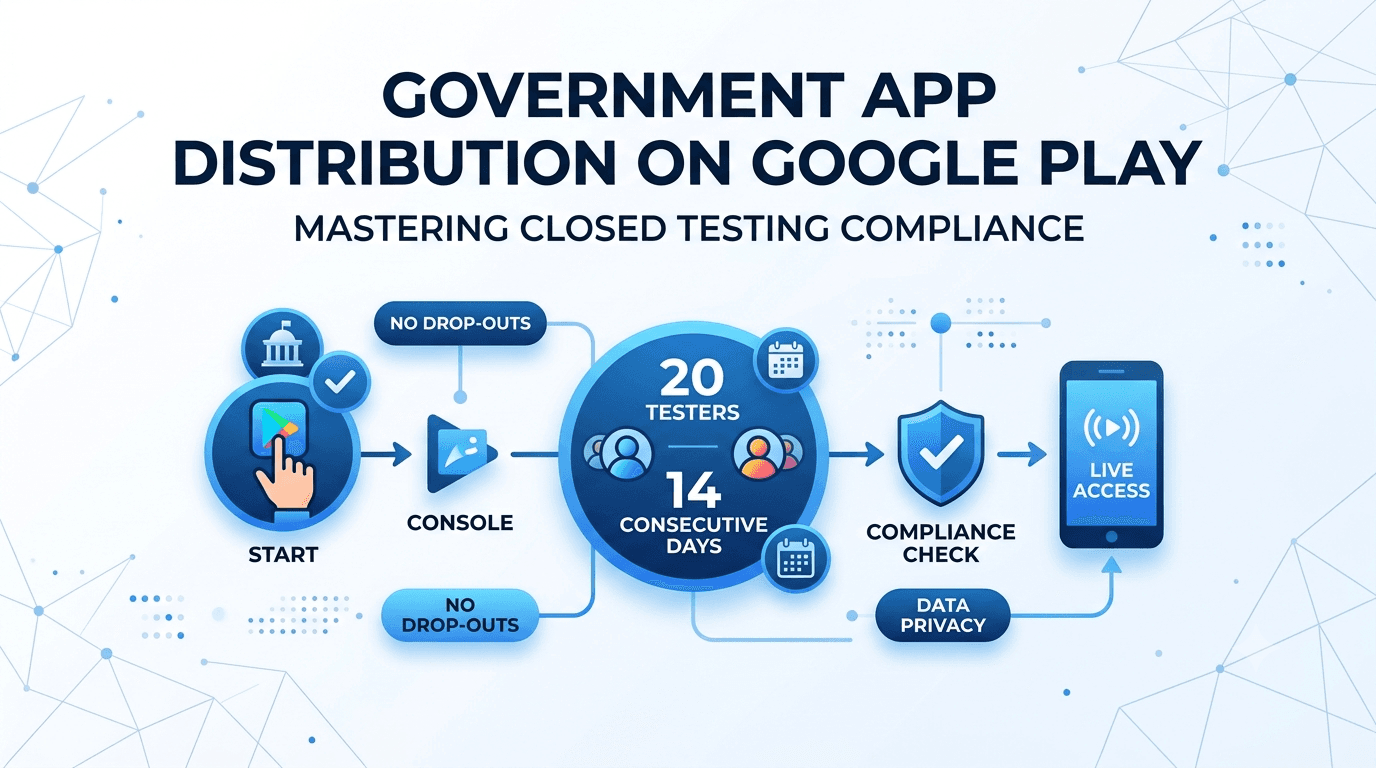
Deploying public service and government app distribution campaigns on the Google Play Store requires navigating strict compliance frameworks. Google Play closed testing is now a mandatory milestone for new personal developer accounts. This guide outlines how to seamlessly manage government apps through this process without delaying your launch or spending weeks recruiting user groups.
Why Closed Testing Matters for Public Sector Apps
To improve software quality and ecosystem security, Google requires personal developer accounts created after November 2023 to run a strict baseline test. Before requesting production access, you must run a closed testing track with at least 20 testers who have been opted-in for 14 consecutive days.
For high-stakes projects like public utility utilities, municipal trackers, or official civic resources, skipping or manipulating this vetting phase results in immediate rejection, pushing your public rollout back by weeks.
What Google Verifies During the Vetting Period
The automated and manual review systems in the Google Play Console actively check for genuine engagement. To clear the hurdle, your release pipeline must verify that:
- Real users explicitly opt into your closed testing track via web or Android links.
- Testers securely download and install the build directly from the Play Store ecosystem.
- Users remain enrolled and active over the entire testing window.
Note: Emulator instances, sideloaded APK binaries, and automated install farms fail validation and can lead to permanent account suspension.
Unique Challenges for Government & Municipal Apps
While commercial apps can target broad consumer segments for feedback, government-vetted applications face distinct procedural obstacles:
Strict Privacy & Data Rules
Municipal apps often handle highly confidential data like tax portals, identity records, or location services. Finding external testers willing to interact with pre-release builds under strict data guidelines is challenging.
Bureaucratic Delays
Enlisting internal agency workers as testers sounds straightforward, but internal security permissions, device restrictions, and bureaucratic compliance checks often derail launches mid-testing.
Because a single dropout dropping your numbers below the 20-tester requirement resets the whole 14-day testing window, relying on voluntary sign-ups from public officials risks extended project delays.
Step-by-Step Production Compliance Flow
- Upload the Build: Package your application and upload it directly to the Closed testing track inside your Google Play Console.
- Extract the Opt-In Link: Head to the "Testers" sub-tab within your track configuration to generate your dedicated web or Android opt-in URL.
- Onboard Verified Testers: Recruit your base of reliable testers. (Services like Fast Testers can provision your entire required cohort in roughly an hour).
- Track Continuous Retention: Monitor analytics dashboards daily to confirm your base remains actively stable for 14 continuous days.
- Apply for Production Access: Compile your operational feedback and testing logs, then formally apply for full Play Store distribution.
Streamline Your Play Store Verification
Don't let rigid testing requirements stall critical public infrastructure apps. Fast Testers streamlines the workflow by connecting your app to real, verified Android devices instantly.
Start Closed Testing Now →Common Pitfalls to Avoid
- Confusing Tracks: Deploying your builds to the Internal Testing track instead of the designated Closed Testing track. Internal tests do not count toward your production requirements.
- User Churn: Allowing active tester volume to dip below the mandatory limit midway through the active testing cycle, which resets the 14-day clock.
- Premature Applications: Triggering the formal production application request prior to hitting a full, clean 14-day run.
- Sideloading Binaries: Distributing loose APK packages or local file transfers to users instead of relying strictly on Play Store opt-in pathways.
Accelerate Distribution with Fast Testers
Fast Testers offers a streamlined, one-time flat service at just $15 per application, completely removing the headache of manual group recruitment. Developers get access to professional Android testers alongside a tracking dashboard, compliance documentation, and a production access assurance guarantee. With over 1,500 apps successfully pushed to market, it is the most reliable bridge to production.
Frequently Asked Questions
How quickly do testers begin engaging with my app?
Onboarding usually starts within one single hour of submitting your valid closed testing links to our platform.
Does using Fast Testers conflict with Google Play Store policies?
Not at all. Google explicitly designs and encourages the closed testing framework to utilize external invited user pools to collect real feedback before an app goes live globally.
What happens if my government app is rejected over separate content policies?
If your build hits a policy roadblock, simply correct the specific design or metadata issue and submit an updated version. Your completed time spent testing remains valid toward meeting the core account requirements.
The testing requirement still applies
Government and public-sector apps carry extra expectations around security, accessibility, and accountability, but they are not exempt from Google Play's baseline rules. If the app is published from a new personal account, it must still complete a closed test with at least 12 testers opted in for 14 continuous days before production access. For public-sector projects this window is genuinely valuable: it is a chance to validate the app on the real, varied devices citizens actually use before a high-visibility launch. See our closed testing guide and Google's closed testing documentation.
Because government apps often serve broad, diverse populations, device and network diversity among testers matters more than usual. A tester group spanning older phones, budget devices, and constrained networks surfaces the accessibility and performance issues that would otherwise embarrass a public launch. If assembling such a group is hard, you can submit your app to source verified real testers. See low-end device testing.
Heightened compliance and accessibility
Public-sector apps typically face stricter accessibility mandates and data-handling obligations than commercial apps. Your Data safety form and privacy policy must be scrupulously accurate given the sensitivity of citizen data, and accessibility (screen-reader support, sufficient contrast, scalable text) is often a legal requirement rather than a nice-to-have. Use the closed-testing window to verify both, ideally with testers who rely on assistive technology. See accessibility testing and privacy policy requirements.
Data residency and regional legal requirements can also apply, especially where a government mandates that citizen data stay within national borders or comply with specific frameworks. Confirm your data flows and third-party SDKs meet these obligations before launch. See GDPR compliance and Google's Data safety guidance.
Building public trust at launch
For a government app, trust is the product. A crash-ridden or confusing launch does not just cost installs — it undermines confidence in the institution behind it. That is why a thorough closed test, honest declarations, and a careful staged rollout matter even more here than for a typical app. Release gradually, monitor Android vitals and citizen feedback, and fix issues before they scale. See staged rollouts and post-launch monitoring.
Treat the mandatory window as a public-service quality gate: it forces the kind of pre-launch validation that a high-stakes government app should do anyway. Enter production having confirmed the app works, protects data, and is accessible, and your launch reinforces rather than erodes public trust.
Related guides and resources
- Enterprise internal apps vs public Play Store apps
- Accessibility testing for Google Play apps
- GDPR compliance for Android apps
- Google Play developer policies
Procurement, timelines, and expectations
Public-sector projects run on procurement cycles and fixed deadlines, which makes the mandatory 14-day window especially important to communicate early. Stakeholders who expect an app to appear the moment development finishes need to understand that a new-account launch has an unavoidable testing floor plus review time on top. Bake this into project timelines from the start, so a launch date tied to a policy announcement or public event accounts for the window rather than colliding with it. See our agency guide to testing client apps and launching fast.
Contractors delivering government apps should treat the closed test as a defined, scheduled deliverable with its own recruitment and monitoring effort, not an invisible step. Doing so keeps public launches on schedule and avoids the awkward position of a finished app that legally cannot yet go live. See app not eligible for production access.
Security review and hardening
Government apps are high-value targets, so the testing window should include security validation alongside functional testing. Confirm that data in transit is encrypted, that authentication is robust, that the app handles sensitive input safely, and that no debug endpoints or verbose logging leak information. Where an app handles official identity or payments, the bar is higher still, and third-party SDKs must meet the same standard. Use the window to verify these on real devices before exposure to the public. See export compliance and encryption declarations and analytics and SDK testing.
Document your security posture, because public-sector oversight often demands evidence of due diligence. A well-run closed test that includes security checks produces exactly the record that satisfies auditors while protecting citizens. See GDPR compliance.
Government app FAQ
Are government apps exempt from the 14-day closed test?
No. If published from a new personal account, they must complete the 12-tester, 14-day closed test like any other app.
Why is device diversity important for public-sector apps?
Citizens use a wide range of devices, including older and budget phones. Diverse testers surface accessibility and performance issues before a public launch.
What compliance is stricter for government apps?
Accessibility mandates and data-handling obligations are typically stricter, and data residency requirements may apply depending on jurisdiction.
How should procurement timelines account for testing?
Add the 14-day testing floor plus review time on top of development, so a launch tied to a public event does not collide with the mandatory window.
Should security review happen during the window?
Yes. Use the window to verify encryption, authentication, and safe data handling on real devices before the app is exposed to the public.
Do government apps need documented due diligence?
Often yes. A well-run closed test with security and accessibility checks produces the record that satisfies public-sector oversight.
Bottom line
A government app carries higher stakes than a typical launch, but the path to the store runs through the same closed-testing requirement — and that window is an asset for public-sector quality. Use it to validate on diverse citizen devices, verify accessibility and security, and confirm your data handling meets every applicable law, so your launch reinforces public trust rather than undermining it. If assembling a representative, device-diverse tester group is the bottleneck, you can submit your app for verified real testers. See our closed testing guide to plan the window.
Expanded for topical authority — additional practical sections below. Original guide content above is unchanged.
Quick answer
Government App Distribution on Google Play matters because Google Play production access for many new personal developer accounts depends on a successful closed test: at least 12 real testers opted in for 14 continuous days, plus a policy-compliant, stable app. Use this guide to execute the steps correctly, avoid streak-breaking mistakes, and decide whether DIY recruitment or a managed closed testing service is the better path for your deadline.
Key takeaways
- Government App Distribution on Google Play should be treated as a practical Play Console workflow, not just theory.
- For many new personal accounts, 12 opted-in testers × 14 continuous days on closed testing gates production access.
- Opt-in + install from Play beats “emails invited” every time — verify counts in Console.
- Use the window for QA, listing, and compliance work so review is the only remaining gate.
- Prefer real testers and a buffer above 12; avoid anything that looks like fake engagement.
Real-world scenarios: who this matters for
The guidance in this article on Government App Distribution on Google Play applies across many Android product types. Use these scenarios to map the advice to your situation.
| Developer type | Typical challenge | Practical focus |
|---|---|---|
| Indie / solo | Limited tester network and time | Start closed testing early; keep a buffer above 12 opted-in testers; parallelize listing + Data safety work |
| Startup | Launch deadline vs 14-day rule | Treat the window as fixed; recruit in parallel with QA; avoid last-minute track setup |
| Agency / white-label | Multiple client apps, each needing its own test | One closed test per app; standardize opt-in onboarding; track eligibility dates per client |
| Flutter / React Native | Cross-platform build + Play Console quirks | Ship a signed AAB to closed testing; verify installs from Play, not sideload; watch vitals on mid-range devices |
| Native Kotlin | Device/API fragmentation | Cover API levels and OEMs in your tester mix; fix crashes before requesting production |
| Game / Unity | Performance + retention during 14 days | Keep testers engaged so count never dips below 12; monitor ANRs and battery |
| E-commerce / fintech | Policy + payment flows | Test checkout, permissions, and declarations carefully before production access |
| Healthcare / kids / education | Sensitive policies (Families, data) | Align listing, privacy, and content rating with real app behavior during the test window |
Visual placeholder: Scenario matrix infographic — Indie / Startup / Agency / Cross-platform paths for Government App Distribution on Google Play.
Closed testing vs other Play tracks (quick reference)
Context for Government App Distribution on Google Play: choose the right track so you do not waste the 14-day window on the wrong workflow.
| Track | Purpose | Counts toward 12×14? | Typical use |
|---|---|---|---|
| Internal testing | Fast private builds | No | Shake out bugs before the counted window |
| Closed testing | Private / invite testers | Yes (for new personal accounts) | Meet production-access requirement + QA |
| Open testing | Public beta | Not a substitute for the closed requirement | Broader feedback after closed eligibility |
| Production | Public release | N/A | After access approved + review |
Visual placeholder: Timeline — Internal → Closed (14 days) → Production request → Staged rollout.
Common mistakes (and how to avoid them)
These mistakes repeatedly show up when developers work through Government App Distribution on Google Play:
- Confusing invited vs opted-in testers — Only testers who open the opt-in link and install from Play count toward 12. Check the opted-in number in Play Console, not your email list.
- Recruiting exactly 12 with no buffer — One uninstall can break continuity. Aim for ~15 active opted-in testers.
- Starting the counted clock late — Listing assets, Data safety, and privacy work should run during the 14 days, not after.
- Using sideloaded APKs or fake installs — They do not satisfy Play’s closed testing expectations and can create account risk.
- Ignoring tester feedback until day 14 — Crashes that drive uninstalls threaten your streak and your review outcome.
- Requesting production access before the continuous streak completes — Eligibility checks fail even if calendar time has passed.
Troubleshooting checklist
If something feels “stuck” while applying Government App Distribution on Google Play, walk this list before changing strategy:
| Symptom | Likely cause | Fix |
|---|---|---|
| Console shows < 12 testers | Invites sent but not opted in | Resend opt-in link; confirm install from Play |
| “Not eligible” after 14 calendar days | Count dipped below 12 mid-window | Restore 12+ and complete a full continuous streak |
| Tester cannot join | Wrong account, Group lag, or track not published | Verify Google account, Group membership, track release |
| App fails to install | Device/API mismatch or signing issue | Check AAB, minSDK, Play App Signing |
| Production still rejected after testing | Policy, declarations, or stability — not the clock | Read the exact reason; fix that category completely |
Visual placeholder: Troubleshooting flowchart for Government App Distribution on Google Play.
Action checklist
Use this checklist alongside the rest of this guide on Government App Distribution on Google Play:
- ☐ Closed testing track created with a signed release (AAB)
- ☐ Opt-in link tested on a fresh Google account
- ☐ At least 12 testers opted in (prefer ~15)
- ☐ Daily check that opted-in count stays ≥ 12 for 14 continuous days
- ☐ Core flows exercised (login, main feature, permissions, offline/online)
- ☐ Crashes / ANRs triaged from tester reports and vitals
- ☐ Store listing, screenshots, and feature graphic drafted
- ☐ Privacy policy + Data safety + content rating aligned with real behavior
- ☐ Production access requested only after eligibility is green
- ☐ Staged rollout plan ready for first public release
Additional FAQs developers ask about Government App Distribution on Google Play
Quick answer: what should I do first?
Confirm you are on a closed testing track with real opted-in installs, keep 12+ testers for 14 continuous days, and fix policy/stability issues in parallel. Then use the detailed sections above for Government App Distribution on Google Play.
Does this apply to organization (company) accounts?
The classic 12×14 closed testing gate is primarily associated with new personal developer accounts. Always verify your account type and current Play Console eligibility messaging for your app.
Do friends and family count as testers?
Yes — if they opt in via your closed testing link and install from Google Play. They only help if they stay opted in for the continuous period.
Can I update the app during the 14 days?
You can usually push updates on the closed track, but unstable releases that cause uninstalls can threaten your tester count. Prefer polishing via internal testing first when possible.
What if production access is still rejected?
Read the exact reason. Incomplete testing is only one category — policy, Data safety mismatches, and crashes are common. Fix the cited issue fully before reapplying.
Is paying for testers allowed?
Using real people who install from Play is what matters. Avoid fake install farms. A one-time managed service that supplies real closed testers is a practical option when DIY recruitment is too slow.
How is Fast Testers different from free communities?
Free communities trade time and mutual availability. Fast Testers assigns about 15 real testers after you submit a valid closed testing link (one-time $15 per app) and includes a production access guarantee under its refund terms.
Where should I go next?
Review the related guides below, then either finish DIY recruitment or start closed testing if you need speed and continuity.
Sources, updates, and how to use this guide
This article on Government App Distribution on Google Play is maintained for Android developers preparing Google Play closed testing and production access. Always cross-check eligibility text inside your own Play Console, because Google’s UI labels and account rules can vary by account type and date.
- Primary official references: Google Play closed testing help, Developer Program Policies, and Play Console eligibility messaging for your app.
- Practical experience lens: guidance here reflects common failure modes indie developers and agencies hit when recruiting testers, maintaining the 14-day streak, and recovering from production-access rejections.
- Last reviewed focus: 12×14 closed testing continuity, real vs fake testers, and parallel listing/compliance work during the window.
Related guides and next steps
Continue building topical depth around Government App Distribution on Google Play with these Fast Testers resources:
- Ad Supported Apps And Google Play Ad Policy Testing
- Agency Guide Testing Client Apps On Google Play
- Android Tv Apps And Google Play Testing Tracks
- App Rejected Google Play
- App Title And Description Seo For Google Play
- Buy Google Play Testers Is It Safe
- Case Study Recovering From Google Play Rejection
- Closed Testing Vs Open Testing On Google Play
- Pricing — $15 closed testing
- How Fast Testers works
- FAQ
- Developer reviews
- Case studies
- Submit your app / start closed testing
Need reliable testers so your 14-day streak does not stall? Educate first with the guides above, then start when you are ready — one-time pricing, real Play installs, dashboard tracking.
Further expansion — case study, decisions, and expert recommendations. Prior sections remain unchanged.
Case study: first Play launch planned around the closed testing window
Problem: A small SaaS team treated Google Play publishing like iOS TestFlight — they expected to upload and go public the same week. They discovered the personal-account closed testing gate mid-sprint.
Solution: They reframed the sprint around Government App Distribution On Google Play: internal testing for crash triage first, then closed testing with a buffer of testers, while design finished screenshots and legal finished privacy/Data safety in parallel.
Result: The 14-day requirement stopped feeling like “dead time.” When eligibility flipped green, listing and declarations were already ready, so production review was the only remaining gate.
Lessons learned:
- Start the closed track as soon as the build is stable enough to keep installed.
- Parallelize compliance work inside the window.
- Protect the streak like a production SLA.
Decision guide: what should you do next?
Use this decision path when applying Government App Distribution On Google Play:
- Is your account a new personal developer account that still needs production access?
If yes, plan for closed testing with 12+ opted-in testers for 14 continuous days. If no, still test — but confirm the exact eligibility text in Play Console. - Do you already have 12+ reliable people who will install from Play and stay for two weeks?
If yes, DIY can work — add a buffer and monitor daily. If no, use community exchange or a managed closed testing service. - Is your build stable enough that testers will not churn?
If no, run internal testing first. Entering the counted window with crash loops is how streaks die. - Are Data safety, privacy policy, permissions, and listing aligned with real behavior?
If no, fix during the window so production review does not bounce you after the clock. - Has production access been rejected?
Classify: eligibility vs policy vs declarations vs stability. Fix that category completely, then re-test / re-request.
Visual placeholder: Decision tree diagram for Government App Distribution On Google Play (DIY vs managed vs fix-and-retry).
Expert recommendations
- Instrument the streak: Check opted-in count daily for the first week; replace dropouts same day.
- Brief testers once: Send a short checklist (install from Play, open app daily, try core flow, report crashes). Silent testers still count if opted in — engaged testers protect quality.
- Never “solve” recruitment with fake installs: It fails the intent of closed testing and can create account risk.
- Ship a boring-stable build to closed testing: Save experimental features for internal tracks.
- Educate first, then accelerate: If your blocker is simply finding real testers fast, a one-time managed option (Fast Testers: 15 testers, $15/app) is often cheaper than slipping a launch.
For hands-on setup after reading about Government App Distribution On Google Play, see how it works and pricing, or submit your closed testing link when you are ready.
Internal navigation hub — added to strengthen topical connections. Original article content above is unchanged.
Continue learning
- App Title and Description SEO for Google Play — Learn about Play Store ASO for Google Play closed testing. Complete guide for Android developers publishing on.
- Feature Graphic Design Tips for Google Play — Learn about feature graphic design for Google Play closed testing. Complete guide for Android developers publi.
- First App on Google Play: Complete Checklist — Learn about first-time publishing for Google Play closed testing. Complete guide for Android developers publis.
- Google Play Approval Time: How Long Does It Take? — How long does Google Play approval take in 2026? Realistic timelines for closed testing, production review, an.
- Google Play Console Beginner Guide — A beginner guide to Google Play Console: create your account, set up your first app, understand testing tracks.
- Google Play Review Process Explained — How the Google Play review process works: what reviewers check, how long it takes, why apps get flagged, and h.
Next steps
- Ready to run closed testing with real Android testers? Submit your app or see pricing ($15 one-time).
- Compare options on our testing service comparison page, or read developer reviews and case studies.
- Still deciding? Review how Fast Testers works and the FAQ.