
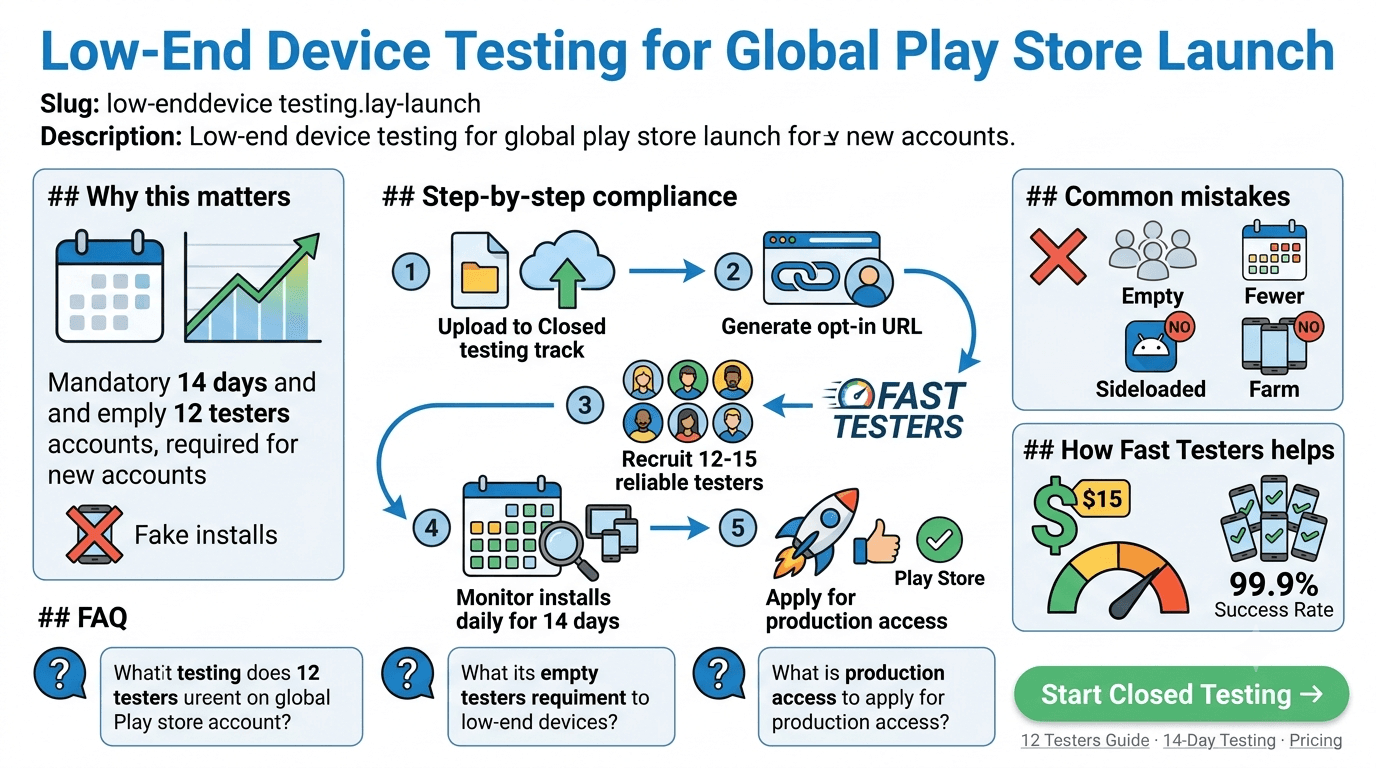
The Reality of Global Device Compatibility
When launching a mobile application globally, assuming your users carry top-tier flagship hardware is a recipe for high crash rates and uninstalls. In emerging markets, which constitute a massive market share on the Google Play Store, low-end devices dominate. These smartphones feature constrained RAM profiles (often 2GB or less), older CPU architectures, and highly strict operating system memory management.
If your application has not undergone rigorous low-end device testing, it may fall victim to the Out-Of-Memory (OOM) killer or suffer crippling frame rate drops. Google's discovery algorithms penalize poor vitals quickly, making early testing essential.
What Google Reviews During Closed Testing
Google Play does not merely track whether you filled out your tester list; automated algorithms actively audit user signals over your testing window. For personal developer accounts, you must maintain active participation to avoid rejection when applying for production track privileges.
The 3 Pillars of Google Play Closed Testing Track compliance.
To pass validation seamlessly, ensure your system covers these checkmarks:
- No Sideloaded Build Tactics: Installs originating via raw APK files or external developer utilities are completely ignored by compliance checkers.
- Zero Emulator Hardware Profiles: Installs from desktop emulators do not possess valid device ecosystem signatures, and will not register toward your metrics.
- Device Diversity Requirements: Your testing pool should include multiple distinct API levels and RAM capacities to gather actionable Google Play Android Vitals data.
Step-by-Step Production Tracking Setup
Moving through the compliance framework efficiently requires careful timing. Follow these steps to prepare your app for production approval:
- Upload Your Release Artifact: Package your app as an Android App Bundle (.aab) and upload it to the Closed testing track inside the Google Play Console.
- Configure the Target Audience List: Under the "Testers" sub-tab, establish a dedicated web tracking list or an invite-only Google Group.
- Retrieve and Distribute the Opt-In Link: Generate your specific Play Store web join URL and share it exclusively with your designated testing cohort.
- Preserve Your Active Pool Size: Maintain a safety margin of active installs to prevent falling below target parameters during the evaluation cycle.
- Document Testing Metrics: Aggregate user logs, bug tickets, and stability reports during the 14-day window. Use this empirical data when submitting your final request for production access.
Core Metrics: Low-End vs. High-End Profiles
| Hardware Tier | Target RAM | Testing Objectives | Critical Play Vitals Metrics |
|---|---|---|---|
| Low-End Android | 1GB - 3GB | Memory leaks, garbage collection spikes, launch times | App Not Responding (ANR) rate, OOM crashes |
| Mid-Tier Android | 4GB - 6GB | Background process execution, battery optimization | Excessive wakeups, background crashes |
| Premium Tier | 8GB+ | High refresh-rate UI fluidity, asset scaling | Slow rendering, frozen frames |
Accelerate Your Launch Strategy via Fast Testers
Sourcing an assortment of varied physical devices to fulfill Google Play’s strict environment parameters manually takes weeks of logistics. Fast Testers eliminates this barrier by providing instant, reliable infrastructure.
For a clear flat rate of $15 per application, the service routes your opt-in link directly to 15 real, distinct hardware devices across different API generations within roughly one hour. This structural approach protects your product against tester dropouts, gives you a pristine dashboard tracking window, and secures a production access pass with a historical success rate over 99.9%.
Frequently Asked Questions
How do device compatibility configurations alter testing validation?
If an app distribution excludes specific architecture profiles within the Play Console Device Catalog, testers with matching devices will see an "Incompatible Version" error. Fast Testers mitigates this by maintaining a broad hardware matrix to ensure compatibility across profiles.
What happens if a policy update flags my deployment mid-test?
Policy adjustments do not cancel your continuous testing data. You can fix any underlying code bugs or update store assets, re-upload to your closed track, and keep your accrued timeline active.
Why are physical devices mandatory over emulated pipelines?
Emulated setups do not mimic true system constraints accurately. Real real-world indicators—such as fluctuating local network latency, background resource constraints, and real CPU thermal throttling—can only be tracked via authentic device hardware.
The testing window is your device-diversity opportunity
The mandatory closed test — 12 testers opted in for 14 continuous days before production for new personal accounts — is your best chance to run your app on a genuinely diverse fleet of devices before a global launch. For emerging markets especially, budget and older devices dominate, and an app that only ever ran on your flagship phone can fail badly there. Recruit testers whose devices reflect your target markets so the window surfaces low-end problems while you can still fix them. See our closed testing guide and testing requirements by country.
Device diversity is exactly what a personal network usually cannot provide. A service that supplies verified real testers across a range of devices closes that gap quickly — you can submit your app to get started. See where to find real testers.
What breaks on low-end devices
Constrained devices expose issues invisible on high-end hardware: memory pressure causing crashes or aggressive background killing, slow CPUs making animations janky, limited storage failing installs or downloads, and older Android versions lacking APIs you assumed. Test cold-start time, memory footprint, and behavior under low storage, and confirm your app degrades gracefully rather than crashing. Poor stability on these devices shows up directly in your Android vitals. See Google's Android vitals documentation and battery usage testing.
Network realities compound device limits in many markets: slow, intermittent, or expensive connectivity means your app must handle poor networks and minimize data use. Validate offline behavior, retries, and payload sizes with testers on real constrained connections. See network condition testing and offline-first testing.
Why this widens your reach
Optimizing for low-end devices is not charity — it is market expansion. Billions of active devices are mid-range or budget, and an app that runs smoothly on them reaches audiences competitors who only target flagships miss. Consider whether an App Bundle with size optimizations, or an instant/lite experience, helps you reach these users. The work you do during your window to run well everywhere pays off in installs and retention across the globe. See Android App Bundle explained and post-launch monitoring.
After launch, keep watching vitals segmented by device and region so regressions on low-end hardware do not creep in with updates. An app that stays lean and stable across the device spectrum keeps its global audience. See staged rollouts.
Related guides and resources
- Network condition testing
- Offline-first app testing
- Testing requirements by country
- Android vitals (Google)
App size and delivery for constrained users
On budget devices with limited storage and expensive data, your app's download and install size directly affects whether users install and keep it. The Android App Bundle helps by delivering only the code and resources each device needs, shrinking effective download size, and features like asset delivery let you defer large content. Audit your bundle during the window: trim unused resources, compress assets, and consider whether a lighter build serves your low-end audience better. A smaller app installs on more devices and survives storage cleanups that purge bloated ones. See Android App Bundle explained and offline-first testing.
Data efficiency matters as much as size: minimize payloads, cache aggressively, and avoid re-downloading content, since users on metered connections notice and abandon data-hungry apps. Validate real data usage with testers on constrained plans during your window. See network condition testing.
Designing for graceful degradation
The principle that makes an app work everywhere is graceful degradation: full experience on capable devices, a still-functional experience on weak ones. That means feature-detecting rather than assuming hardware, providing lower-fidelity fallbacks for heavy animations or effects, and never crashing when a capability is missing. Test the low end explicitly to confirm your app bends instead of breaking under constraint. Users on modest devices will forgive reduced flourish; they will not forgive a crash or an unusable screen. See target API level requirements and Google's performance guidance.
Carry this discipline into every release, since new features are where degradation paths are most often forgotten. Re-testing on constrained devices before each update keeps your global audience served as your app grows. See staged rollouts.
Low-end device FAQ
Why test on budget and older devices?
They dominate many global markets and expose memory, CPU, storage, and API issues invisible on flagship phones, protecting your vitals and reach.
How do I get diverse test devices?
Recruit testers whose devices reflect your target markets, or use a service that supplies verified real testers across a device range.
Does low-end optimization expand my audience?
Yes. Billions of devices are mid-range or budget, so running smoothly on them reaches users that flagship-only apps miss.
Does app size matter on budget devices?
Yes. Limited storage and costly data mean smaller apps install on more devices and survive cleanups. The App Bundle helps shrink download size.
What is graceful degradation?
Delivering the full experience on capable devices and a still-functional, lower-fidelity one on weak devices, never crashing when a capability is missing.
Should I re-test the low end on updates?
Yes. New features often forget degradation paths, so re-test on constrained devices before each release to keep your global audience served.
Bottom line
Testing on low-end devices is market expansion, not an afterthought: billions of budget and older phones run Android, and an app that performs well on them reaches audiences flagship-only apps miss. Use the closed-testing window to run on a diverse device fleet, fix memory, CPU, storage, size, and network issues, and design for graceful degradation so your app bends instead of breaking. To recruit testers whose devices match your target markets, you can submit your app. See network condition testing to cover the connectivity side.
Expanded for topical authority — additional practical sections below. Original guide content above is unchanged.
Quick answer
Low-End Device Testing for Global Play Store Launch matters because Google Play production access for many new personal developer accounts depends on a successful closed test: at least 12 real testers opted in for 14 continuous days, plus a policy-compliant, stable app. Use this guide to execute the steps correctly, avoid streak-breaking mistakes, and decide whether DIY recruitment or a managed closed testing service is the better path for your deadline.
Key takeaways
- Low-End Device Testing for Global Play Store Launch should be treated as a practical Play Console workflow, not just theory.
- For many new personal accounts, 12 opted-in testers × 14 continuous days on closed testing gates production access.
- Opt-in + install from Play beats “emails invited” every time — verify counts in Console.
- Use the window for QA, listing, and compliance work so review is the only remaining gate.
- Prefer real testers and a buffer above 12; avoid anything that looks like fake engagement.
Real-world scenarios: who this matters for
The guidance in this article on Low-End Device Testing for Global Play Store Launch applies across many Android product types. Use these scenarios to map the advice to your situation.
| Developer type | Typical challenge | Practical focus |
|---|---|---|
| Indie / solo | Limited tester network and time | Start closed testing early; keep a buffer above 12 opted-in testers; parallelize listing + Data safety work |
| Startup | Launch deadline vs 14-day rule | Treat the window as fixed; recruit in parallel with QA; avoid last-minute track setup |
| Agency / white-label | Multiple client apps, each needing its own test | One closed test per app; standardize opt-in onboarding; track eligibility dates per client |
| Flutter / React Native | Cross-platform build + Play Console quirks | Ship a signed AAB to closed testing; verify installs from Play, not sideload; watch vitals on mid-range devices |
| Native Kotlin | Device/API fragmentation | Cover API levels and OEMs in your tester mix; fix crashes before requesting production |
| Game / Unity | Performance + retention during 14 days | Keep testers engaged so count never dips below 12; monitor ANRs and battery |
| E-commerce / fintech | Policy + payment flows | Test checkout, permissions, and declarations carefully before production access |
| Healthcare / kids / education | Sensitive policies (Families, data) | Align listing, privacy, and content rating with real app behavior during the test window |
Visual placeholder: Scenario matrix infographic — Indie / Startup / Agency / Cross-platform paths for Low-End Device Testing for Global Play Store Launch.
Comparison: DIY recruitment vs managed closed testing
When your goal is Google Play production access, the path you choose for testers affects time, risk, and feedback quality. Use this comparison while deciding how to apply Low-End Device Testing for Global Play Store Launch.
| Approach | Time to 12 opted-in | Cost | Dropout risk | Feedback quality | Best when |
|---|---|---|---|---|---|
| Friends & family | Days–weeks | $0 | High | Mixed | Tiny MVP, flexible timeline |
| Reddit / Discord / Telegram | Unpredictable | $0–low | High | Variable | You can manage onboarding daily |
| Peer community exchange | Variable | $0 | Medium | Developer-biased | You can test others’ apps in return |
| Managed closed testing (e.g. Fast Testers) | ~1 hour after valid link | $15 one-time / app | Low (buffer of 15) | Real Play installs | You need speed + continuity for 14 days |
Decision tip: If a broken streak would delay revenue or a client deadline, prioritize reliability over $0 recruitment. DIY is fine when you already have engaged testers and can monitor Play Console daily.
Visual placeholder: Comparison diagram — DIY vs community vs managed testing for Low-End Device Testing for Global Play Store Launch.
Common mistakes (and how to avoid them)
These mistakes repeatedly show up when developers work through Low-End Device Testing for Global Play Store Launch:
- Confusing invited vs opted-in testers — Only testers who open the opt-in link and install from Play count toward 12. Check the opted-in number in Play Console, not your email list.
- Recruiting exactly 12 with no buffer — One uninstall can break continuity. Aim for ~15 active opted-in testers.
- Starting the counted clock late — Listing assets, Data safety, and privacy work should run during the 14 days, not after.
- Using sideloaded APKs or fake installs — They do not satisfy Play’s closed testing expectations and can create account risk.
- Ignoring tester feedback until day 14 — Crashes that drive uninstalls threaten your streak and your review outcome.
- Requesting production access before the continuous streak completes — Eligibility checks fail even if calendar time has passed.
Troubleshooting checklist
If something feels “stuck” while applying Low-End Device Testing for Global Play Store Launch, walk this list before changing strategy:
| Symptom | Likely cause | Fix |
|---|---|---|
| Console shows < 12 testers | Invites sent but not opted in | Resend opt-in link; confirm install from Play |
| “Not eligible” after 14 calendar days | Count dipped below 12 mid-window | Restore 12+ and complete a full continuous streak |
| Tester cannot join | Wrong account, Group lag, or track not published | Verify Google account, Group membership, track release |
| App fails to install | Device/API mismatch or signing issue | Check AAB, minSDK, Play App Signing |
| Production still rejected after testing | Policy, declarations, or stability — not the clock | Read the exact reason; fix that category completely |
Visual placeholder: Troubleshooting flowchart for Low-End Device Testing for Global Play Store Launch.
Action checklist
Use this checklist alongside the rest of this guide on Low-End Device Testing for Global Play Store Launch:
- ☐ Closed testing track created with a signed release (AAB)
- ☐ Opt-in link tested on a fresh Google account
- ☐ At least 12 testers opted in (prefer ~15)
- ☐ Daily check that opted-in count stays ≥ 12 for 14 continuous days
- ☐ Core flows exercised (login, main feature, permissions, offline/online)
- ☐ Crashes / ANRs triaged from tester reports and vitals
- ☐ Store listing, screenshots, and feature graphic drafted
- ☐ Privacy policy + Data safety + content rating aligned with real behavior
- ☐ Production access requested only after eligibility is green
- ☐ Staged rollout plan ready for first public release
Additional FAQs developers ask about Low-End Device Testing for Global Play Store Launch
Quick answer: what should I do first?
Confirm you are on a closed testing track with real opted-in installs, keep 12+ testers for 14 continuous days, and fix policy/stability issues in parallel. Then use the detailed sections above for Low-End Device Testing for Global Play Store Launch.
Does this apply to organization (company) accounts?
The classic 12×14 closed testing gate is primarily associated with new personal developer accounts. Always verify your account type and current Play Console eligibility messaging for your app.
Do friends and family count as testers?
Yes — if they opt in via your closed testing link and install from Google Play. They only help if they stay opted in for the continuous period.
Can I update the app during the 14 days?
You can usually push updates on the closed track, but unstable releases that cause uninstalls can threaten your tester count. Prefer polishing via internal testing first when possible.
What if production access is still rejected?
Read the exact reason. Incomplete testing is only one category — policy, Data safety mismatches, and crashes are common. Fix the cited issue fully before reapplying.
Is paying for testers allowed?
Using real people who install from Play is what matters. Avoid fake install farms. A one-time managed service that supplies real closed testers is a practical option when DIY recruitment is too slow.
How is Fast Testers different from free communities?
Free communities trade time and mutual availability. Fast Testers assigns about 15 real testers after you submit a valid closed testing link (one-time $15 per app) and includes a production access guarantee under its refund terms.
Where should I go next?
Review the related guides below, then either finish DIY recruitment or start closed testing if you need speed and continuity.
Sources, updates, and how to use this guide
This article on Low-End Device Testing for Global Play Store Launch is maintained for Android developers preparing Google Play closed testing and production access. Always cross-check eligibility text inside your own Play Console, because Google’s UI labels and account rules can vary by account type and date.
- Primary official references: Google Play closed testing help, Developer Program Policies, and Play Console eligibility messaging for your app.
- Practical experience lens: guidance here reflects common failure modes indie developers and agencies hit when recruiting testers, maintaining the 14-day streak, and recovering from production-access rejections.
- Last reviewed focus: 12×14 closed testing continuity, real vs fake testers, and parallel listing/compliance work during the window.
Related guides and next steps
Continue building topical depth around Low-End Device Testing for Global Play Store Launch with these Fast Testers resources:
- Accessibility Testing Before Play Store Launch
- Battery Usage Testing And Play Store Vitals
- Bootstrapped Developer Play Store Launch On 15
- Closed Testing Vs Open Testing On Google Play
- Customer Support Setup Before Play Store Launch
- E Commerce Android Apps Play Store Testing Tips
- Google Play Internal Testing Vs Closed Testing
- Google Play Pre Launch Report Vs Closed Testing
- Pricing — $15 closed testing
- How Fast Testers works
- FAQ
- Developer reviews
- Case studies
- Submit your app / start closed testing
Need reliable testers so your 14-day streak does not stall? Educate first with the guides above, then start when you are ready — one-time pricing, real Play installs, dashboard tracking.
Internal navigation hub — added to strengthen topical connections. Original article content above is unchanged.
Continue learning
- Battery Usage Testing and Play Store Vitals — Learn about battery optimization for Google Play closed testing. Complete guide for Android developers publish.
- Google Play Internal Testing vs Closed Testing — Learn about internal vs closed tracks for Google Play closed testing. Complete guide for Android developers pu.
- Sideloading vs Play Store Testing: Why It Matters — Learn about install method compliance for Google Play closed testing. Complete guide for Android developers pu.
- Finance Apps: Google Play Testing and Compliance — Learn about finance app requirements for Google Play closed testing. Complete guide for Android developers pub.
- Google Play Testing Requirements by Country — Learn about regional requirements for Google Play closed testing. Complete guide for Android developers publis.
- Kids Apps and Google Play Families Policy Testing — Learn about family policy apps for Google Play closed testing. Complete guide for Android developers publishin.
Next steps
- Ready to run closed testing with real Android testers? Submit your app or see pricing ($15 one-time).
- Compare options on our testing service comparison page, or read developer reviews and case studies.
- Still deciding? Review how Fast Testers works and the FAQ.