
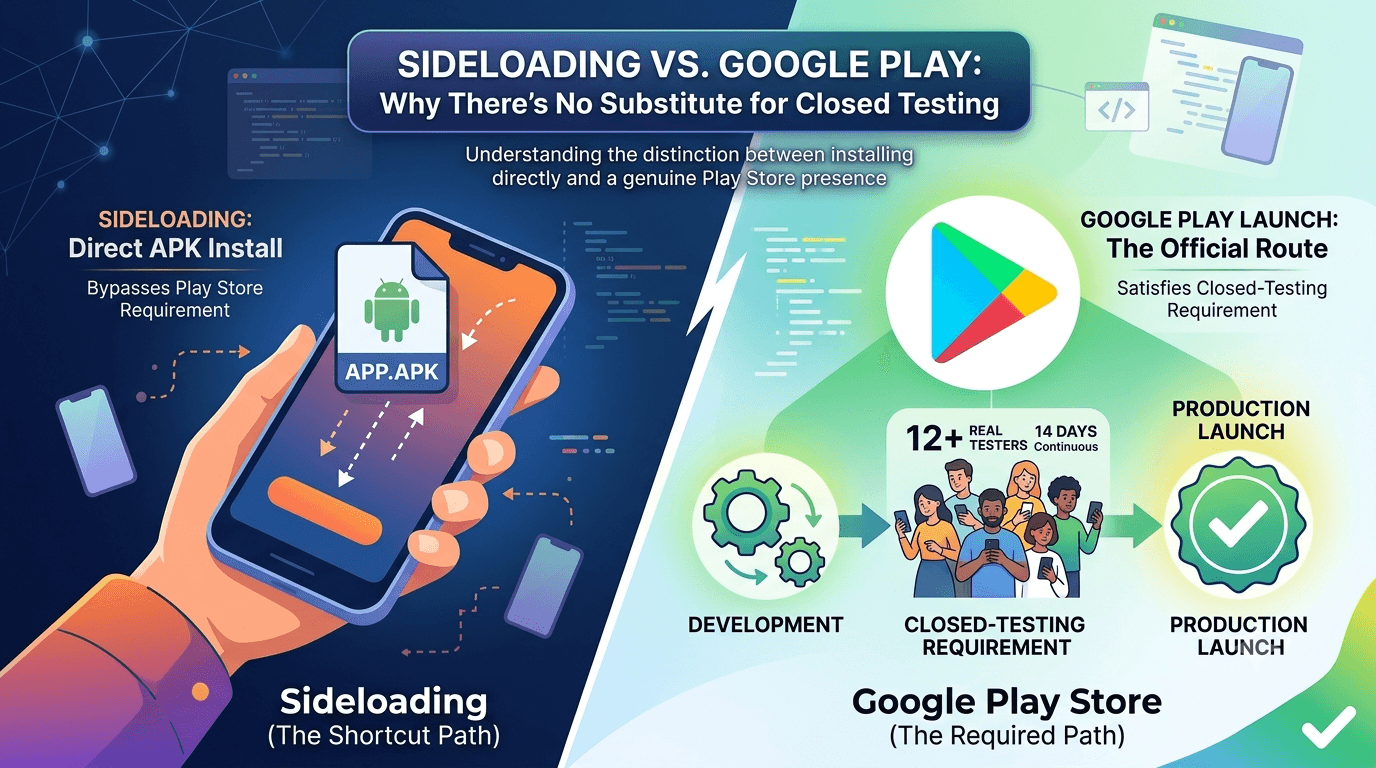
When faced with Google Play's closed-testing requirement, some developers wonder whether they can skip it by distributing their app another way — sideloading APKs directly, or using alternative stores. It is worth understanding clearly what sideloading is, how it differs from Play Store testing, and why, if your goal is a successful Google Play launch, there is no substitute for completing the closed-testing requirement. This guide explains the difference and why the 12-tester, 14-day process matters for a real Play Store presence.
Sideloading and Play Store distribution serve different purposes, and conflating them leads to confusion about the requirement. Understanding the distinction helps you plan realistically rather than chasing a shortcut that does not lead where you want to go.
What sideloading is
Sideloading means installing an app directly from an APK file rather than through an app store, bypassing the Play Store entirely. Android allows this (with the user enabling installation from unknown sources), and it is useful for internal distribution, personal testing, or getting a build onto a device quickly. Sideloading is not against the rules — it is a legitimate part of the Android ecosystem — but it is fundamentally different from publishing on Google Play.
The key point is that sideloading does not put your app on the Play Store. Users must manually obtain and install the APK, there is no store listing, no discovery, no automatic updates through Play, and none of the trust signals of a Play Store presence. For internal testing it is handy, but as a distribution strategy for a public app it is a poor substitute for the Play Store that most users rely on. See internal vs closed testing.
Why sideloading is not a shortcut
Some developers hope sideloading lets them avoid the closed-testing requirement. It is true that sideloading does not require closed testing — but that is because sideloading is not Play Store publishing at all. If your goal is to be on the Play Store, where the vast majority of Android users discover and install apps, you must publish there, and publishing from a new personal account requires the closed test. Sideloading does not get you onto the Play Store; it sidesteps it entirely, which is not the same as satisfying its requirements.
In other words, sideloading is not a shortcut to a Play Store launch — it is a different path that leads somewhere else. If you want the reach, discovery, trust, and automatic updates of Google Play, there is no way around completing the closed-testing requirement. Understanding this prevents wasted effort chasing a workaround that cannot deliver what you actually want. See the closed testing guide.
Where sideloading fits in testing
Sideloading does have a legitimate role in your testing process. During development, sideloading a build onto your own devices is a fast way to check functionality before you push to a Play testing track. It is useful for quick iteration, internal QA, and getting builds to close collaborators without the opt-in overhead of the Play tracks. Many developers sideload during early development and then move to Play's internal and closed tracks as they approach launch.
| Method | Best for |
|---|---|
| Sideloading APK | Quick dev checks, internal QA |
| Play internal testing | Fast staging with trusted testers |
| Play closed testing | The production-access requirement |
| Play open testing | Broader public beta |
Sideloading complements Play testing early on but does not replace the closed-testing requirement. See the testing checklist.
Why the Play Store is worth the requirement
The closed-testing requirement is real work, but the Play Store is worth it. Google Play is where the overwhelming majority of Android users find and install apps, it provides automatic updates, safety scanning, billing infrastructure, discovery, and the trust that comes with an official store listing. Alternative distribution — sideloading or third-party stores — reaches a tiny fraction of that audience and lacks these benefits. For almost any public app, a Play Store presence is essential, which makes the closed-testing requirement a necessary and worthwhile investment.
Rather than viewing the requirement as an obstacle to avoid, treat it as the entry fee for access to the largest app marketplace in the world. The 14-day window also delivers genuine value if you use it well, producing a more stable, better-tested app. Framed this way, completing closed testing is simply part of doing a proper Play Store launch, not a hurdle to engineer around. See what happens after 14 days.
Meeting the requirement
Since there is no substitute, the practical path is to complete the closed test efficiently: recruit 12+ committed, device-diverse testers, keep them opted in for 14 continuous days with a buffer above the minimum, use your testing tracks properly, and prepare your listing in parallel. Sideloading can help you validate builds during development, but the counted window happens on the Play closed track. See how to create a closed testing track.
If recruiting testers is your obstacle — the most common reason developers look for shortcuts in the first place — a service that supplies verified real testers solves it directly, letting you satisfy the requirement rather than trying to avoid it. You can submit your app to get started, and read where to find real testers.
Real-device testing still matters
Whichever method you use during development, real-device testing across diverse hardware remains essential, and the closed-testing window is where you get it at scale with real users. Sideloading onto your own one or two devices tells you little about how your app behaves across the market; the closed test, with device-diverse real testers, is what surfaces the compatibility, performance, and reliability issues that matter. This is another reason the requirement is valuable rather than merely obligatory.
Use the window as genuine QA: brief testers, gather feedback, ship fixes, and monitor Android vitals. Entering production with a clean stability profile across diverse devices is a real benefit of doing closed testing properly, and it is something sideloading to yourself simply cannot provide. See Android vitals during closed testing.
Common misconceptions about the requirement
Much of the confusion around sideloading stems from misconceptions about what the closed-testing requirement is for. Some developers believe it is an arbitrary hurdle, or that any form of testing they have already done should count. In fact, the requirement exists to ensure apps from new personal accounts are genuinely tested by real people before reaching the public, and it is satisfied specifically through the Play closed-testing track — not through sideloaded installs, personal testing, or usage on your own devices. Understanding this clears up why sideloading cannot substitute for it.
Another misconception is that the requirement can be gamed with fake or throwaway testers. Google has signals to detect inauthentic testing, and shortcuts of this kind risk your account rather than helping. The productive interpretation is straightforward: the requirement wants real testers using your app for real, and meeting it honestly — with genuine, device-diverse testers — is both the compliant path and the one that actually improves your app. See how Google detects fake testers.
Using the window well instead of avoiding it
Once you accept that the closed test is unavoidable for a Play Store launch, the smart move is to make it valuable rather than merely endure it. The 14 days are a genuine opportunity to test your app across real, device-diverse users, gather feedback, fix issues, and enter production with a stable, polished app. Developers who reframe the requirement this way stop looking for workarounds like sideloading and instead invest the time in quality, which pays off in better early reviews and fewer post-launch fires.
Brief your testers, give them clear things to try, respond to their feedback, and monitor Android vitals for stability. This turns the mandatory window into the most useful pre-launch testing many indie developers ever do. Far from being the obstacle that tempts people toward sideloading, the closed test — used well — is one of the highest-leverage steps in a proper launch. See the testing checklist and Android vitals during closed testing.
Alternative stores and their requirements
Beyond sideloading, some developers consider alternative app stores. These exist and can complement a Play Store presence, but they reach a small fraction of the Android audience and come with their own submission rules, review processes, and audiences. They are not a way to escape Google's requirement if your goal is Google Play specifically; they are separate channels. For most developers, the Play Store is the primary target, and alternative stores are at best a supplement, not a replacement.
If you do distribute through other channels, treat each on its own terms and do not assume testing or approval in one carries over to another. Your Play Store launch still requires the closed test regardless of what you do elsewhere. Keeping these channels mentally separate prevents the confusion that leads developers to think they have found a shortcut when they have simply changed destinations. See publishing on Google Play.
A realistic timeline for a Play Store launch
Since the closed test is required, plan for it. Budget a few days up front to finalize your build, recruit and onboard device-diverse testers, and confirm opt-ins before your continuous window begins; the 14 days then run while you fix issues; and production review after you request access takes additional days. Realistically, a Play Store launch from a new personal account takes three to four weeks end to end, not the 14 days alone. Planning for this beats hunting for a workaround that does not exist.
The developers who launch on time front-load recruitment, since finding testers is the most common reason people look for shortcuts. Resolving it early — through your network or a service supplying verified real testers — removes the very bottleneck that makes sideloading tempting, and lets you satisfy the requirement smoothly. See getting 12 testers without friends or family.
Security and trust considerations
One reason the Play Store is worth the closed-testing requirement is the security and trust layer it provides. Apps distributed through Play are scanned by Google Play Protect, benefit from a verified store presence, and update automatically through a channel users trust. Sideloaded apps carry none of these assurances: users must disable a safety setting to install them, receive no automatic updates, and have no store-backed signal that the app is safe. For most users, an app that must be sideloaded feels risky, which limits its reach far more than the closed test ever would.
From a user's perspective, then, the closed-testing requirement is part of what makes Play apps trustworthy in the first place. By ensuring apps from new accounts are genuinely tested before release, it contributes to the overall quality and safety of the store. Viewed this way, satisfying the requirement is not just a gate you pass through but part of earning the trust that a Play Store listing confers — trust that sideloading simply cannot replicate. See publishing on Google Play.
Key takeaways
- Sideloading is not a shortcut — it bypasses the Play Store rather than satisfying it.
- A Play Store launch requires the closed test on a new personal account.
- Sideloading is useful for quick dev checks but not for public distribution.
- The Play Store's reach and trust make the requirement worthwhile.
- Real-device testing at scale happens in the closed-testing window.
Frequently asked questions
Can I avoid closed testing by sideloading?
Only by not being on the Play Store at all. Sideloading bypasses Play; it does not satisfy the requirement for a Play Store launch.
Is sideloading against Google's rules?
No. Sideloading is a legitimate part of Android, useful for development and internal testing, but it is not Play Store publishing.
When should I sideload during development?
For quick functionality checks and internal QA before moving to Play's internal and closed testing tracks.
Why is the Play Store worth the requirement?
It offers reach, discovery, automatic updates, safety scanning, billing, and trust that alternative distribution cannot match.
What if recruiting testers is my problem?
Use a service that supplies verified real testers, so you satisfy the requirement directly instead of seeking a workaround.
Do alternative app stores avoid the requirement?
They are separate channels reaching a small fraction of users. They do not satisfy Google Play's requirement if your goal is a Play Store presence.
How long does a Play Store launch really take?
Realistically three to four weeks end to end from a new personal account — recruitment, the 14-day window, and production review — not the 14 days alone.
Can fake testers get me through faster?
No. Google has signals to detect inauthentic testing, and shortcuts risk your account. Real, device-diverse testers are the compliant and effective path.
Expanded for topical authority — additional practical sections below. Original guide content above is unchanged.
Quick answer
Sideloading vs Play Store Testing: Why It Matters matters because Google Play production access for many new personal developer accounts depends on a successful closed test: at least 12 real testers opted in for 14 continuous days, plus a policy-compliant, stable app. Use this guide to execute the steps correctly, avoid streak-breaking mistakes, and decide whether DIY recruitment or a managed closed testing service is the better path for your deadline.
Real-world scenarios: who this matters for
The guidance in this article on Sideloading vs Play Store Testing: Why It Matters applies across many Android product types. Use these scenarios to map the advice to your situation.
| Developer type | Typical challenge | Practical focus |
|---|---|---|
| Indie / solo | Limited tester network and time | Start closed testing early; keep a buffer above 12 opted-in testers; parallelize listing + Data safety work |
| Startup | Launch deadline vs 14-day rule | Treat the window as fixed; recruit in parallel with QA; avoid last-minute track setup |
| Agency / white-label | Multiple client apps, each needing its own test | One closed test per app; standardize opt-in onboarding; track eligibility dates per client |
| Flutter / React Native | Cross-platform build + Play Console quirks | Ship a signed AAB to closed testing; verify installs from Play, not sideload; watch vitals on mid-range devices |
| Native Kotlin | Device/API fragmentation | Cover API levels and OEMs in your tester mix; fix crashes before requesting production |
| Game / Unity | Performance + retention during 14 days | Keep testers engaged so count never dips below 12; monitor ANRs and battery |
| E-commerce / fintech | Policy + payment flows | Test checkout, permissions, and declarations carefully before production access |
| Healthcare / kids / education | Sensitive policies (Families, data) | Align listing, privacy, and content rating with real app behavior during the test window |
Visual placeholder: Scenario matrix infographic — Indie / Startup / Agency / Cross-platform paths for Sideloading vs Play Store Testing: Why It Matters.
Comparison: DIY recruitment vs managed closed testing
When your goal is Google Play production access, the path you choose for testers affects time, risk, and feedback quality. Use this comparison while deciding how to apply Sideloading vs Play Store Testing: Why It Matters.
| Approach | Time to 12 opted-in | Cost | Dropout risk | Feedback quality | Best when |
|---|---|---|---|---|---|
| Friends & family | Days–weeks | $0 | High | Mixed | Tiny MVP, flexible timeline |
| Reddit / Discord / Telegram | Unpredictable | $0–low | High | Variable | You can manage onboarding daily |
| Peer community exchange | Variable | $0 | Medium | Developer-biased | You can test others’ apps in return |
| Managed closed testing (e.g. Fast Testers) | ~1 hour after valid link | $15 one-time / app | Low (buffer of 15) | Real Play installs | You need speed + continuity for 14 days |
Decision tip: If a broken streak would delay revenue or a client deadline, prioritize reliability over $0 recruitment. DIY is fine when you already have engaged testers and can monitor Play Console daily.
Visual placeholder: Comparison diagram — DIY vs community vs managed testing for Sideloading vs Play Store Testing: Why It Matters.
Common mistakes (and how to avoid them)
These mistakes repeatedly show up when developers work through Sideloading vs Play Store Testing: Why It Matters:
- Confusing invited vs opted-in testers — Only testers who open the opt-in link and install from Play count toward 12. Check the opted-in number in Play Console, not your email list.
- Recruiting exactly 12 with no buffer — One uninstall can break continuity. Aim for ~15 active opted-in testers.
- Starting the counted clock late — Listing assets, Data safety, and privacy work should run during the 14 days, not after.
- Using sideloaded APKs or fake installs — They do not satisfy Play’s closed testing expectations and can create account risk.
- Ignoring tester feedback until day 14 — Crashes that drive uninstalls threaten your streak and your review outcome.
- Requesting production access before the continuous streak completes — Eligibility checks fail even if calendar time has passed.
Troubleshooting checklist
If something feels “stuck” while applying Sideloading vs Play Store Testing: Why It Matters, walk this list before changing strategy:
| Symptom | Likely cause | Fix |
|---|---|---|
| Console shows < 12 testers | Invites sent but not opted in | Resend opt-in link; confirm install from Play |
| “Not eligible” after 14 calendar days | Count dipped below 12 mid-window | Restore 12+ and complete a full continuous streak |
| Tester cannot join | Wrong account, Group lag, or track not published | Verify Google account, Group membership, track release |
| App fails to install | Device/API mismatch or signing issue | Check AAB, minSDK, Play App Signing |
| Production still rejected after testing | Policy, declarations, or stability — not the clock | Read the exact reason; fix that category completely |
Visual placeholder: Troubleshooting flowchart for Sideloading vs Play Store Testing: Why It Matters.
Action checklist
Use this checklist alongside the rest of this guide on Sideloading vs Play Store Testing: Why It Matters:
- ☐ Closed testing track created with a signed release (AAB)
- ☐ Opt-in link tested on a fresh Google account
- ☐ At least 12 testers opted in (prefer ~15)
- ☐ Daily check that opted-in count stays ≥ 12 for 14 continuous days
- ☐ Core flows exercised (login, main feature, permissions, offline/online)
- ☐ Crashes / ANRs triaged from tester reports and vitals
- ☐ Store listing, screenshots, and feature graphic drafted
- ☐ Privacy policy + Data safety + content rating aligned with real behavior
- ☐ Production access requested only after eligibility is green
- ☐ Staged rollout plan ready for first public release
Additional FAQs developers ask about Sideloading vs Play Store Testing: Why It Matters
Quick answer: what should I do first?
Confirm you are on a closed testing track with real opted-in installs, keep 12+ testers for 14 continuous days, and fix policy/stability issues in parallel. Then use the detailed sections above for Sideloading vs Play Store Testing: Why It Matters.
Does this apply to organization (company) accounts?
The classic 12×14 closed testing gate is primarily associated with new personal developer accounts. Always verify your account type and current Play Console eligibility messaging for your app.
Do friends and family count as testers?
Yes — if they opt in via your closed testing link and install from Google Play. They only help if they stay opted in for the continuous period.
Can I update the app during the 14 days?
You can usually push updates on the closed track, but unstable releases that cause uninstalls can threaten your tester count. Prefer polishing via internal testing first when possible.
What if production access is still rejected?
Read the exact reason. Incomplete testing is only one category — policy, Data safety mismatches, and crashes are common. Fix the cited issue fully before reapplying.
Is paying for testers allowed?
Using real people who install from Play is what matters. Avoid fake install farms. A one-time managed service that supplies real closed testers is a practical option when DIY recruitment is too slow.
How is Fast Testers different from free communities?
Free communities trade time and mutual availability. Fast Testers assigns about 15 real testers after you submit a valid closed testing link (one-time $15 per app) and includes a production access guarantee under its refund terms.
Where should I go next?
Review the related guides below, then either finish DIY recruitment or start closed testing if you need speed and continuity.
Sources, updates, and how to use this guide
This article on Sideloading vs Play Store Testing: Why It Matters is maintained for Android developers preparing Google Play closed testing and production access. Always cross-check eligibility text inside your own Play Console, because Google’s UI labels and account rules can vary by account type and date.
- Primary official references: Google Play closed testing help, Developer Program Policies, and Play Console eligibility messaging for your app.
- Practical experience lens: guidance here reflects common failure modes indie developers and agencies hit when recruiting testers, maintaining the 14-day streak, and recovering from production-access rejections.
- Last reviewed focus: 12×14 closed testing continuity, real vs fake testers, and parallel listing/compliance work during the window.
Related guides and next steps
Continue building topical depth around Sideloading vs Play Store Testing: Why It Matters with these Fast Testers resources:
- Accessibility Testing Before Play Store Launch
- Battery Usage Testing And Play Store Vitals
- Closed Testing Vs Open Testing On Google Play
- E Commerce Android Apps Play Store Testing Tips
- Google Play Internal Testing Vs Closed Testing
- Low End Device Testing For Global Play Store Launch
- Testing Utility Apps Play Store Compliance Tips
- Wear Os Companion Apps And Play Store Testing
- Pricing — $15 closed testing
- How Fast Testers works
- FAQ
- Developer reviews
- Case studies
- Submit your app / start closed testing
Need reliable testers so your 14-day streak does not stall? Educate first with the guides above, then start when you are ready — one-time pricing, real Play installs, dashboard tracking.
Internal navigation hub — added to strengthen topical connections. Original article content above is unchanged.
Topic cluster: Testing Tracks Compared
Pillar guide: Start with Google Play Internal Testing vs Closed Testing for the full overview, then use the supporting guides below.
- Google Play Internal Testing vs Closed Testing (pillar)
- Closed Testing vs Open Testing on Google Play
- How to Create an Internal Testing Track in Play Console
- Internal Testing vs Production Release on Google Play
- Closed Testing vs Firebase App Distribution
- Closed Testing vs TestFlight: Android vs iOS Beta
- Google Play Pre-Launch Report vs Closed Testing
Continue learning
- Battery Usage Testing and Play Store Vitals — Learn about battery optimization for Google Play closed testing. Complete guide for Android developers publish.
- Google Play Internal Testing vs Closed Testing — Learn about internal vs closed tracks for Google Play closed testing. Complete guide for Android developers pu.
- Low-End Device Testing for Global Play Store Launch — Learn about device compatibility for Google Play closed testing. Complete guide for Android developers publish.
- Finance Apps: Google Play Testing and Compliance — Learn about finance app requirements for Google Play closed testing. Complete guide for Android developers pub.
- Google Play Testing Requirements by Country — Learn about regional requirements for Google Play closed testing. Complete guide for Android developers publis.
- Kids Apps and Google Play Families Policy Testing — Learn about family policy apps for Google Play closed testing. Complete guide for Android developers publishin.
Next steps
- Ready to run closed testing with real Android testers? Submit your app or see pricing ($15 one-time).
- Compare options on our testing service comparison page, or read developer reviews and case studies.
- Still deciding? Review how Fast Testers works and the FAQ.