
Developers moving between platforms often compare Google Play closed testing with Apple's TestFlight. They serve similar goals — getting a build to beta testers — but the rules differ significantly, especially around production requirements. This guide explains closed testing vs TestFlight for developers shipping on Android.
Contents
Quick answer
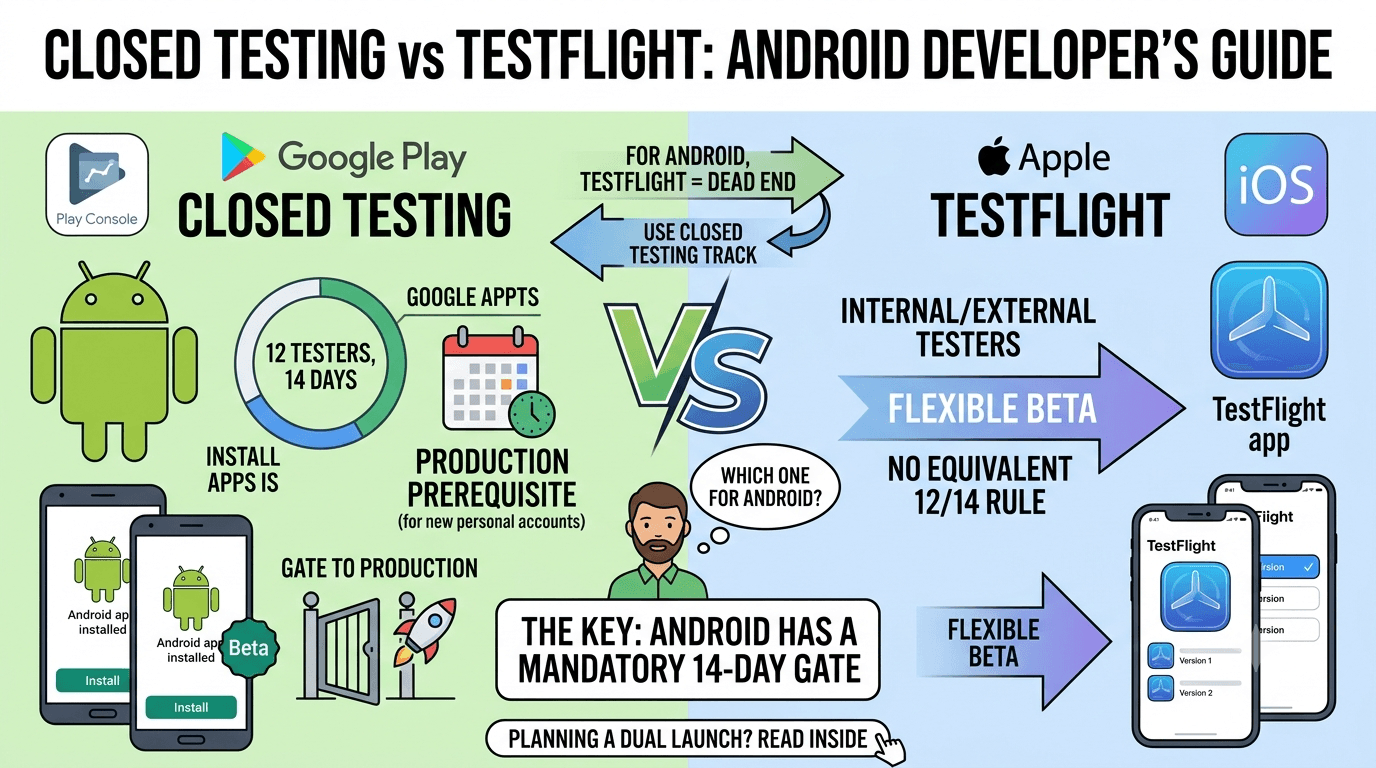
Featured answer: TestFlight is Apple's iOS beta platform; closed testing is Google Play's beta track. The biggest difference for Android is that new personal Google Play accounts must complete closed testing with 12 testers for 14 days before production — a requirement TestFlight does not impose in the same way.
TestFlight in brief
TestFlight distributes iOS betas to internal and external testers, with builds reviewed for external testing. It is Apple-only and does not apply to Google Play submissions.
Closed testing in brief
Closed testing distributes your Android app through Google Play to opted-in testers, and it is the gate to production for new personal accounts. See requirements 2026.
Key differences
| Factor | Closed testing (Android) | TestFlight (iOS) |
|---|---|---|
| Platform | Google Play | Apple App Store |
| Production prerequisite | 12 testers, 14 days (new personal accounts) | No equivalent 12/14 rule |
| Distribution | Through Play | Through TestFlight app |
| Tester limits | Invited testers | Internal + external limits |
What Android developers should know
- You cannot use TestFlight for Android — it is iOS only.
- For Google Play, closed testing is mandatory for new personal accounts.
- Only real testers who install from Play count — real vs fake testers.
- Plan for the fixed 14-day window — timelines.
Tip: If you are used to TestFlight's flexibility, Google's 12-tester rule can catch you off guard. Submit your app to get real testers and clear the requirement quickly.
Cross-platform launch planning
If you ship on both platforms, the biggest mistake is assuming the beta processes are interchangeable. They are not, and planning as if they were leads to a delayed Android launch. Keep these differences front of mind:
- Separate builds and pipelines. Each platform uses its own artifact, signing, and distribution — there is no shared beta.
- Different prerequisites. On Android, a new personal account faces the 12-tester, 14-day rule before production; iOS has no identical gate.
- Different tester logistics. TestFlight testers install via the TestFlight app; closed testers must install from Google Play through an opt-in link.
- Different timelines. Because of the fixed 14-day window, your Android launch often needs a head start relative to iOS.
The practical takeaway: schedule your Android closed test early so its fixed window does not become the bottleneck for a coordinated cross-platform launch. Developers who plan the Android side first tend to hit simultaneous launches; those who treat it as an afterthought usually see Android slip. If tester recruitment is your Android bottleneck, solving it in advance keeps both platforms aligned.
What TestFlight is and why it is iOS-only
TestFlight is Apple's official beta testing platform for iOS apps. It lets developers distribute pre-release builds to testers, who install a companion app and receive beta versions to try before an app reaches the App Store. Many developers coming from the Apple ecosystem, or building for both platforms, instinctively look for "TestFlight for Android" — but TestFlight is exclusive to Apple's platforms and cannot be used to test Android apps at all. It is tied to Apple's systems and the App Store, with no Android counterpart under the same name.
This means that if you are testing an Android app, TestFlight is simply not an option, and searching for a way to use it is a dead end. The good news is that Android has its own equivalent within Google Play, so you are not missing a capability — you just access it through a different platform. Understanding this upfront saves cross-platform developers from confusion when they cannot find TestFlight in the Android world.
The Android equivalent of TestFlight
Android's answer to TestFlight is the testing tracks built into Google Play: internal, closed, and open testing. These serve the same fundamental purpose as TestFlight — distributing pre-release builds to testers before public launch — but through Google Play rather than a separate app. Internal testing offers fast distribution to a small trusted group, closed testing supports invited testers and is the track that satisfies the production requirement for new personal accounts, and open testing provides a public beta open to anyone.
For a developer familiar with TestFlight, the closest conceptual match is Google Play's closed and open testing tracks. Testers opt in via a link and install through the Play Store, receiving updates automatically — much like TestFlight's flow, just within Google's ecosystem. Once you map TestFlight's role onto Play's testing tracks, the transition is straightforward. The key addition to learn is the closed testing requirement, which has no direct TestFlight equivalent. See internal vs closed testing.
The requirement difference that matters
The most important thing for cross-platform developers to understand is that Android imposes a specific requirement that iOS does not. For new personal Google Play accounts, you must complete a closed test with 12 testers over 14 consecutive days before you can apply for production access. Apple's TestFlight has no equivalent mandatory 12-tester, 14-day gate for reaching the App Store. This means your Android launch carries a fixed testing obligation that your iOS launch does not, and planning for it is essential.
Developers who assume the two platforms work the same way are often surprised by this Android-specific hurdle. Where TestFlight beta testing is optional on iOS, closed testing is mandatory on Android for new personal accounts. Budgeting time for the fixed 14-day window — and for recruiting the 12 real testers it requires — is therefore a critical part of any Android launch plan, and it is the piece most likely to catch an iOS-first developer off guard. See closed testing requirements.
What cross-platform developers should know
If you are shipping on both platforms, plan each ecosystem's testing separately because the mechanics and requirements differ. On iOS, you will use TestFlight, and beta testing is largely at your discretion. On Android, you will use Google Play's testing tracks, and you must satisfy the closed testing requirement to unlock production on a new personal account. Trying to force one platform's tools onto the other only causes frustration; instead, learn each platform's native path.
The tester-sourcing challenge also differs. On Android specifically, the 12-tester requirement means you need a dozen real testers ready for a fixed 14-day window, which is a common bottleneck. A professional testing service can supply real Android testers within about an hour, removing that bottleneck so your Android launch is not held up while your iOS build sails through TestFlight. Coordinating the two timelines — with Android's fixed testing window as the longer pole — is the key to a smooth simultaneous launch. See where to find real Android testers.
Mapping TestFlight habits to Android
Developers experienced with TestFlight have habits and expectations that mostly transfer to Android, with a few important adjustments. On TestFlight, you are used to uploading a build, adding testers by email or via a public link, and pushing updates that testers receive automatically. Google Play's testing tracks work similarly: you upload a build, add testers via a list, Google Group, or opt-in link, and updates roll out through Play. So the fundamental rhythm — distribute a build, gather testers, iterate — is familiar. The main new concept is the ladder of tracks (internal, closed, open) versus TestFlight's more unified model.
The adjustments that matter most are around the requirement and the install flow. Unlike TestFlight, where beta testing is optional, Android's closed testing is mandatory for new personal accounts, with the 12-tester, 14-day rule. And where TestFlight testers install through the TestFlight app, Android testers install directly from the Play Store via the opt-in flow — there is no separate testing app to download. Once you internalize these differences, your TestFlight experience becomes an asset rather than a source of confusion, because the underlying concepts of beta distribution carry over cleanly.
For cross-platform teams, the practical implication is to run two parallel but distinct testing processes and coordinate their timelines. Your iOS TestFlight beta can proceed on its own schedule, while your Android closed test must accommodate the fixed 14-day window and the need for 12 real testers. Because the Android testing requirement is the longer, less flexible pole, plan your simultaneous launch around it — and consider a service to supply Android testers quickly so that side does not lag behind your iOS build. See closed testing requirements.
Practical tips for cross-platform launches
If you are shipping the same app on both iOS and Android, a few practical habits make coordinating the two testing processes far easier. First, start your Android closed test as early as possible, because it is the longer, less flexible pole with its fixed 14-day window — the iOS TestFlight beta can flex around it more freely. Second, prepare your testers for each platform separately, since TestFlight and Play use different mechanisms; do not assume a tester on one platform can help on the other. Third, keep your builds in sync so that testers on both platforms are validating equivalent functionality.
Coordination also means aligning your timelines deliberately. If you want a simultaneous launch, count backward from your target date and ensure your Android closed test — plus its production review — fits within the schedule, since it is the constraint most likely to slip. Securing your Android testers in advance removes the biggest risk to that timeline. A professional service can supply Android testers within about an hour, so your Android side does not lag while your iOS TestFlight beta proceeds. This lets both platforms reach launch together rather than one waiting weeks for the other.
Finally, document each platform's process so you can repeat it for future updates. Cross-platform publishing is inherently more complex, but once you have a clear playbook — TestFlight for iOS beta, Play closed testing for the Android requirement, coordinated timelines with Android as the long pole — subsequent releases become routine. The upfront effort of understanding both systems pays off every time you ship to both stores. See where to find real Android testers.
Key takeaways
- TestFlight is iOS-only and cannot test Android apps.
- Android's equivalent is Google Play's testing tracks — internal, closed, and open.
- Closed testing is the track that unlocks production for new personal accounts.
- Android imposes a 12-tester, 14-day requirement that iOS/TestFlight does not.
- Plan each platform's testing separately, with Android's fixed window as the long pole.
Frequently asked questions
Can I use TestFlight for an Android app?
No. TestFlight is exclusive to iOS.
What is the Android equivalent of TestFlight?
Google Play's testing tracks — internal, closed, and open testing. Closed testing is the track that satisfies the production requirement for new personal accounts.
Does Android require beta testing like iOS does not?
Yes. New personal Google Play accounts must complete a 12-tester, 14-day closed test before production — an obligation iOS and TestFlight do not impose.
Does TestFlight have a 12-tester rule?
Not in the same way. The 12-tester, 14-day requirement is specific to Google Play.
What is the Android equivalent of TestFlight?
Google Play's testing tracks — internal, closed, and open.
Which track counts for production on Android?
Closed testing for new personal accounts.
Do iOS and Android betas need different builds?
Yes — each platform uses its own build and distribution.
Should I launch on both platforms at once?
You can, but plan the Android side first. The fixed 14-day closed test means Android often needs a head start to land a coordinated, simultaneous launch across both stores.
Is closed testing stricter than TestFlight?
For new personal accounts, the production prerequisite makes it feel stricter.
Key takeaways
- TestFlight is Apple's iOS beta platform; closed testing is Google Play's beta track.
- TestFlight cannot be used for Android apps.
- New personal Google Play accounts face the 12-tester, 14-day rule before production.
- Each platform uses its own build, signing, and distribution.
- Schedule the Android closed test early so its fixed window is not the bottleneck.
Conclusion
TestFlight and closed testing serve the same purpose on different platforms, but Android's production prerequisite is the key distinction. If you are launching on Google Play, plan for the 12-tester, 14-day closed test. Need testers fast? Submit your app today.
Expanded for topical authority — additional practical sections below. Original guide content above is unchanged.
Real-world scenarios: who this matters for
The guidance in this article on Closed Testing vs TestFlight: Android vs iOS Beta applies across many Android product types. Use these scenarios to map the advice to your situation.
| Developer type | Typical challenge | Practical focus |
|---|---|---|
| Indie / solo | Limited tester network and time | Start closed testing early; keep a buffer above 12 opted-in testers; parallelize listing + Data safety work |
| Startup | Launch deadline vs 14-day rule | Treat the window as fixed; recruit in parallel with QA; avoid last-minute track setup |
| Agency / white-label | Multiple client apps, each needing its own test | One closed test per app; standardize opt-in onboarding; track eligibility dates per client |
| Flutter / React Native | Cross-platform build + Play Console quirks | Ship a signed AAB to closed testing; verify installs from Play, not sideload; watch vitals on mid-range devices |
| Native Kotlin | Device/API fragmentation | Cover API levels and OEMs in your tester mix; fix crashes before requesting production |
| Game / Unity | Performance + retention during 14 days | Keep testers engaged so count never dips below 12; monitor ANRs and battery |
| E-commerce / fintech | Policy + payment flows | Test checkout, permissions, and declarations carefully before production access |
| Healthcare / kids / education | Sensitive policies (Families, data) | Align listing, privacy, and content rating with real app behavior during the test window |
Visual placeholder: Scenario matrix infographic — Indie / Startup / Agency / Cross-platform paths for Closed Testing vs TestFlight: Android vs iOS Beta.
Comparison: DIY recruitment vs managed closed testing
When your goal is Google Play production access, the path you choose for testers affects time, risk, and feedback quality. Use this comparison while deciding how to apply Closed Testing vs TestFlight: Android vs iOS Beta.
| Approach | Time to 12 opted-in | Cost | Dropout risk | Feedback quality | Best when |
|---|---|---|---|---|---|
| Friends & family | Days–weeks | $0 | High | Mixed | Tiny MVP, flexible timeline |
| Reddit / Discord / Telegram | Unpredictable | $0–low | High | Variable | You can manage onboarding daily |
| Peer community exchange | Variable | $0 | Medium | Developer-biased | You can test others’ apps in return |
| Managed closed testing (e.g. Fast Testers) | ~1 hour after valid link | $15 one-time / app | Low (buffer of 15) | Real Play installs | You need speed + continuity for 14 days |
Decision tip: If a broken streak would delay revenue or a client deadline, prioritize reliability over $0 recruitment. DIY is fine when you already have engaged testers and can monitor Play Console daily.
Visual placeholder: Comparison diagram — DIY vs community vs managed testing for Closed Testing vs TestFlight: Android vs iOS Beta.
Common mistakes (and how to avoid them)
These mistakes repeatedly show up when developers work through Closed Testing vs TestFlight: Android vs iOS Beta:
- Confusing invited vs opted-in testers — Only testers who open the opt-in link and install from Play count toward 12. Check the opted-in number in Play Console, not your email list.
- Recruiting exactly 12 with no buffer — One uninstall can break continuity. Aim for ~15 active opted-in testers.
- Starting the counted clock late — Listing assets, Data safety, and privacy work should run during the 14 days, not after.
- Using sideloaded APKs or fake installs — They do not satisfy Play’s closed testing expectations and can create account risk.
- Ignoring tester feedback until day 14 — Crashes that drive uninstalls threaten your streak and your review outcome.
- Requesting production access before the continuous streak completes — Eligibility checks fail even if calendar time has passed.
Troubleshooting checklist
If something feels “stuck” while applying Closed Testing vs TestFlight: Android vs iOS Beta, walk this list before changing strategy:
| Symptom | Likely cause | Fix |
|---|---|---|
| Console shows < 12 testers | Invites sent but not opted in | Resend opt-in link; confirm install from Play |
| “Not eligible” after 14 calendar days | Count dipped below 12 mid-window | Restore 12+ and complete a full continuous streak |
| Tester cannot join | Wrong account, Group lag, or track not published | Verify Google account, Group membership, track release |
| App fails to install | Device/API mismatch or signing issue | Check AAB, minSDK, Play App Signing |
| Production still rejected after testing | Policy, declarations, or stability — not the clock | Read the exact reason; fix that category completely |
Visual placeholder: Troubleshooting flowchart for Closed Testing vs TestFlight: Android vs iOS Beta.
Action checklist
Use this checklist alongside the rest of this guide on Closed Testing vs TestFlight: Android vs iOS Beta:
- ☐ Closed testing track created with a signed release (AAB)
- ☐ Opt-in link tested on a fresh Google account
- ☐ At least 12 testers opted in (prefer ~15)
- ☐ Daily check that opted-in count stays ≥ 12 for 14 continuous days
- ☐ Core flows exercised (login, main feature, permissions, offline/online)
- ☐ Crashes / ANRs triaged from tester reports and vitals
- ☐ Store listing, screenshots, and feature graphic drafted
- ☐ Privacy policy + Data safety + content rating aligned with real behavior
- ☐ Production access requested only after eligibility is green
- ☐ Staged rollout plan ready for first public release
Additional FAQs developers ask about Closed Testing vs TestFlight: Android vs iOS Beta
Quick answer: what should I do first?
Confirm you are on a closed testing track with real opted-in installs, keep 12+ testers for 14 continuous days, and fix policy/stability issues in parallel. Then use the detailed sections above for Closed Testing vs TestFlight: Android vs iOS Beta.
Does this apply to organization (company) accounts?
The classic 12×14 closed testing gate is primarily associated with new personal developer accounts. Always verify your account type and current Play Console eligibility messaging for your app.
Do friends and family count as testers?
Yes — if they opt in via your closed testing link and install from Google Play. They only help if they stay opted in for the continuous period.
Can I update the app during the 14 days?
You can usually push updates on the closed track, but unstable releases that cause uninstalls can threaten your tester count. Prefer polishing via internal testing first when possible.
What if production access is still rejected?
Read the exact reason. Incomplete testing is only one category — policy, Data safety mismatches, and crashes are common. Fix the cited issue fully before reapplying.
Is paying for testers allowed?
Using real people who install from Play is what matters. Avoid fake install farms. A one-time managed service that supplies real closed testers is a practical option when DIY recruitment is too slow.
How is Fast Testers different from free communities?
Free communities trade time and mutual availability. Fast Testers assigns about 15 real testers after you submit a valid closed testing link (one-time $15 per app) and includes a production access guarantee under its refund terms.
Where should I go next?
Review the related guides below, then either finish DIY recruitment or start closed testing if you need speed and continuity.
Sources, updates, and how to use this guide
This article on Closed Testing vs TestFlight: Android vs iOS Beta is maintained for Android developers preparing Google Play closed testing and production access. Always cross-check eligibility text inside your own Play Console, because Google’s UI labels and account rules can vary by account type and date.
- Primary official references: Google Play closed testing help, Developer Program Policies, and Play Console eligibility messaging for your app.
- Practical experience lens: guidance here reflects common failure modes indie developers and agencies hit when recruiting testers, maintaining the 14-day streak, and recovering from production-access rejections.
- Last reviewed focus: 12×14 closed testing continuity, real vs fake testers, and parallel listing/compliance work during the window.
Related guides and next steps
Continue building topical depth around Closed Testing vs TestFlight: Android vs iOS Beta with these Fast Testers resources:
- Analytics Sdk Testing During Closed Testing
- Closed Testing Vs Open Testing On Google Play
- Google Play Internal Testing Vs Closed Testing
- App Bundle Vs Apk For Closed Testing Releases
- Ar Vr Android Apps And Closed Testing Requirements
- Closed Testing Completed But Still Rejected
- Closed Testing Track Not Showing
- Closed Testing Vs Apk Sharing
- Pricing — $15 closed testing
- How Fast Testers works
- FAQ
- Developer reviews
- Case studies
- Submit your app / start closed testing
Need reliable testers so your 14-day streak does not stall? Educate first with the guides above, then start when you are ready — one-time pricing, real Play installs, dashboard tracking.
Further expansion — case study, decisions, and expert recommendations. Prior sections remain unchanged.
Case study: first Play launch planned around the closed testing window
Problem: A small SaaS team treated Google Play publishing like iOS TestFlight — they expected to upload and go public the same week. They discovered the personal-account closed testing gate mid-sprint.
Solution: They reframed the sprint around Closed Testing Vs TestFlight: Android Vs IOS Beta: internal testing for crash triage first, then closed testing with a buffer of testers, while design finished screenshots and legal finished privacy/Data safety in parallel.
Result: The 14-day requirement stopped feeling like “dead time.” When eligibility flipped green, listing and declarations were already ready, so production review was the only remaining gate.
Lessons learned:
- Start the closed track as soon as the build is stable enough to keep installed.
- Parallelize compliance work inside the window.
- Protect the streak like a production SLA.
Decision guide: what should you do next?
Use this decision path when applying Closed Testing Vs TestFlight: Android Vs IOS Beta:
- Is your account a new personal developer account that still needs production access?
If yes, plan for closed testing with 12+ opted-in testers for 14 continuous days. If no, still test — but confirm the exact eligibility text in Play Console. - Do you already have 12+ reliable people who will install from Play and stay for two weeks?
If yes, DIY can work — add a buffer and monitor daily. If no, use community exchange or a managed closed testing service. - Is your build stable enough that testers will not churn?
If no, run internal testing first. Entering the counted window with crash loops is how streaks die. - Are Data safety, privacy policy, permissions, and listing aligned with real behavior?
If no, fix during the window so production review does not bounce you after the clock. - Has production access been rejected?
Classify: eligibility vs policy vs declarations vs stability. Fix that category completely, then re-test / re-request.
Visual placeholder: Decision tree diagram for Closed Testing Vs TestFlight: Android Vs IOS Beta (DIY vs managed vs fix-and-retry).
Expert recommendations
- Instrument the streak: Check opted-in count daily for the first week; replace dropouts same day.
- Brief testers once: Send a short checklist (install from Play, open app daily, try core flow, report crashes). Silent testers still count if opted in — engaged testers protect quality.
- Never “solve” recruitment with fake installs: It fails the intent of closed testing and can create account risk.
- Ship a boring-stable build to closed testing: Save experimental features for internal tracks.
- Educate first, then accelerate: If your blocker is simply finding real testers fast, a one-time managed option (Fast Testers: 15 testers, $15/app) is often cheaper than slipping a launch.
For hands-on setup after reading about Closed Testing Vs TestFlight: Android Vs IOS Beta, see how it works and pricing, or submit your closed testing link when you are ready.
Internal navigation hub — added to strengthen topical connections. Original article content above is unchanged.
Topic cluster: Testing Tracks Compared
Pillar guide: Start with Google Play Internal Testing vs Closed Testing for the full overview, then use the supporting guides below.
- Google Play Internal Testing vs Closed Testing (pillar)
- Closed Testing vs Open Testing on Google Play
- How to Create an Internal Testing Track in Play Console
- Internal Testing vs Production Release on Google Play
- Closed Testing vs Firebase App Distribution
- Sideloading vs Play Store Testing: Why It Matters
- Google Play Pre-Launch Report vs Closed Testing
Continue learning
- Closed Testing Track Not Showing in Play Console? — Closed testing track not showing in Google Play Console? Learn why the track or tab is missing and how to crea.
- Closed Testing vs APK Sharing: What Counts? — Closed testing vs APK sharing for Google Play: why sideloaded APKs do not count toward production access and h.
- Closed Testing vs Firebase App Distribution — Closed testing vs Firebase App Distribution: what each is for, why Firebase does not satisfy Google Play produ.
- Common Google Play Closed Testing Mistakes to Avoid — The most common Google Play closed testing mistakes — wrong track, too few testers, dropouts, sideloading — an.
- Google Play Android Vitals During Closed Testing — Learn about vitals monitoring for Google Play closed testing. Complete guide for Android developers publishing.
- Google Play Closed Testing Complete Guide — A comprehensive walkthrough of the entire closed testing process..
Next steps
- Ready to run closed testing with real Android testers? Submit your app or see pricing ($15 one-time).
- Compare options on our testing service comparison page, or read developer reviews and case studies.
- Still deciding? Review how Fast Testers works and the FAQ.