
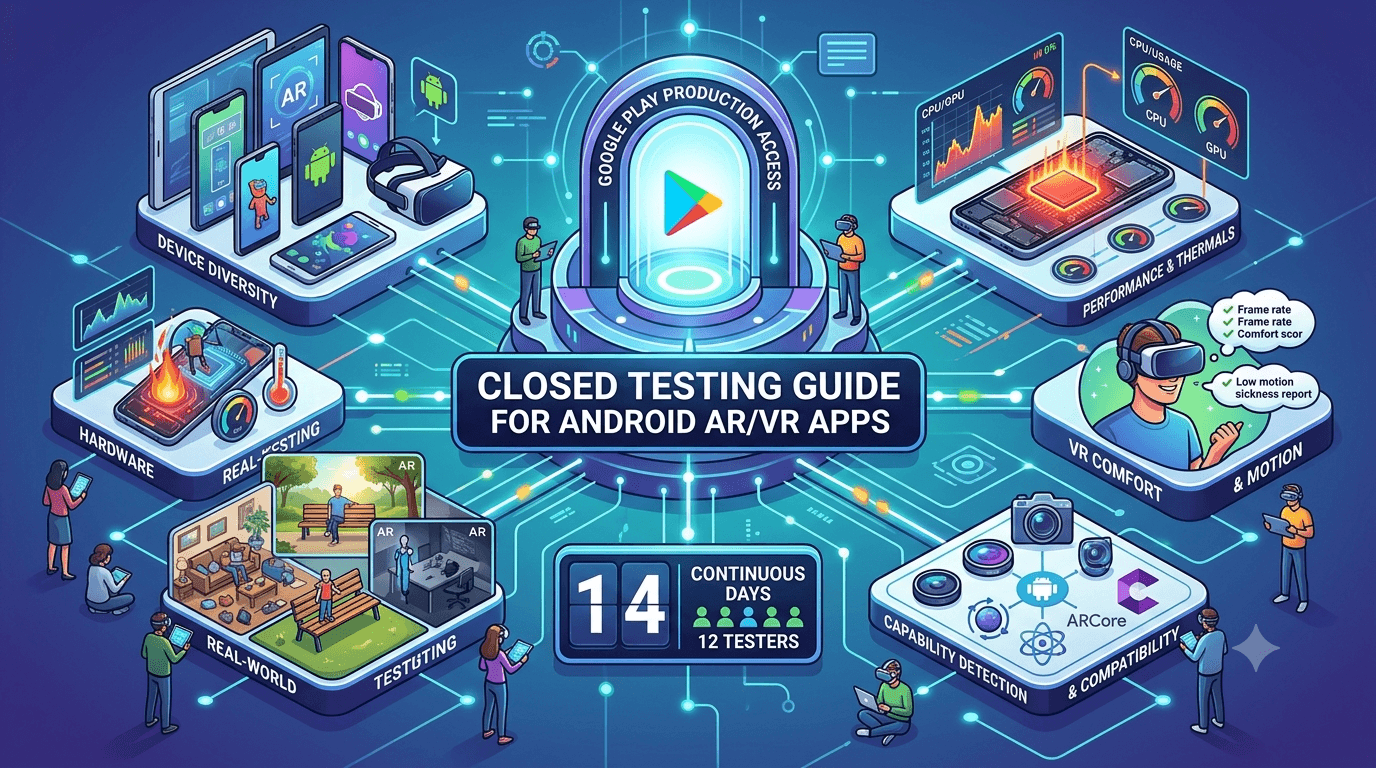
Augmented and virtual reality apps push Android hardware harder than almost any other category, relying on cameras, motion sensors, real-time rendering, and demanding performance to create immersive experiences. Before an AR or VR app published from a new personal account can reach production, it must complete a closed test with at least 12 testers opted in for 14 continuous days — and AR/VR apps benefit enormously from device-diverse, real-world testing given how hardware-dependent they are. This guide covers closed testing for AR/VR apps and the category-specific issues to prioritize during your window.
The closed-testing process is the same as for any app, but AR/VR apps stress performance, sensors, and the physical environment in ways ordinary apps do not. Using your testing window to validate the experience across varied devices and real spaces is what turns the mandatory wait into genuine preparation for a demanding category.
The requirement applies to AR/VR apps
There is no exemption for AR/VR apps. The closed-testing requirement is tied to your developer account type, so an AR/VR app on a new personal account must complete a closed test with 12+ testers for 14 continuous days before production access. See the closed testing guide. Given how much AR/VR relies on hardware capabilities, device diversity is especially important.
Standard advice applies: recruit committed, device-diverse testers, keep your count above 12, and prepare your listing in parallel. AR/VR apps additionally need testing across real environments and a range of device capabilities.
Device capabilities and compatibility
AR and VR features depend on specific hardware capabilities — motion sensors, camera quality, processing power, and in the case of AR, support for frameworks like ARCore. Not every device supports these equally, and some do not support them at all. You must correctly declare your hardware requirements so your app only appears to compatible devices, and you must test that your app detects capabilities and degrades gracefully when something is missing. An AR app that crashes or misbehaves on an unsupported device generates poor reviews and review friction. See Google's ARCore documentation.
| AR/VR test focus | Why it matters |
|---|---|
| Capability detection | Graceful behavior on limited devices |
| ARCore / framework support | Availability varies by device |
| Sensor accuracy | Tracking quality varies by hardware |
| Performance / thermals | Demanding rendering; devices overheat |
| Camera / environment | Lighting and space affect AR |
Device-diverse testing reveals compatibility and performance issues you cannot see on one device. See low-end device testing.
Performance and thermal testing
AR/VR is among the most performance-intensive things a phone can do, combining camera processing, sensor fusion, and real-time 3D rendering. This taxes the CPU, GPU, and battery heavily, and devices can overheat and throttle during sustained use, degrading the experience. Test frame rate, tracking stability, battery drain, and thermal behavior during realistic sessions, especially on mid-range devices where performance headroom is limited. An AR/VR experience that stutters or overheats quickly loses users.
Because performance varies so much across hardware, device-diverse testing is essential: an experience that runs beautifully on a flagship may be unusable on a mid-range phone. During your closed test, have testers use the app in realistic sessions and report stutter, tracking loss, overheating, and battery drain. The Play Console's Android vitals will surface stability data. Validating performance and thermals across devices is what ensures your AR/VR app is enjoyable rather than frustrating for the range of users you target. See performance testing.
Testing across real environments
AR apps in particular depend on the physical environment: lighting, available space, surfaces, and movement all affect tracking and the experience. An AR app tested only in your well-lit office may behave very differently in a dim room, a cluttered space, or outdoors. VR apps depend on the user having safe space to move and on comfortable, motion-sickness-aware design. These are things you can only validate by having real testers use the app in their own varied environments.
During your window, encourage testers to use the app in different settings and report where tracking degrades or the experience breaks down. For VR, gather feedback on comfort and motion sickness, which are critical to retention and vary by person. Real-world, real-environment testing is exactly what the closed-testing window provides, and for AR/VR it surfaces the environmental and comfort issues that lab testing never would. See camera-permission testing.
Setting up your closed-testing track
Once your signed release build is ready, create a closed-testing track in the Play Console and upload it, add testers by email or Google Group, and share the opt-in link each tester must use before installing. Correct configuration matters because the 14-day clock counts only opted-in testers, and a misconfigured track is a common reason developers realize late that their timer never started. Confirm your device-compatibility declarations are correct so the app reaches only capable devices, and install on a real device to verify before inviting your group. See how to create a closed testing track.
Give testers clear onboarding instructions covering the opt-in flow and what to test — different environments, sustained sessions, and comfort. Every failed opt-in is a tester who does not count toward your 12, so smooth guidance maximizes active testers from day one and gives you the device- and environment-diverse coverage AR/VR needs.
Recruiting and managing the window
You need 12+ committed, device-diverse testers for 14 continuous days, and for AR/VR, capable and varied devices plus varied real environments matter greatly. Recruit a buffer above 12, keep testers engaged with clear tasks and quick responses, and direct them to test in different settings and report performance and comfort. Monitor your active count in the Play Console and recruit replacements early if it slips.
If assembling a device-diverse group is your bottleneck, a service that supplies verified real testers on varied hardware solves it quickly. You can submit your app to get started, and read where to find real testers and how to keep testers engaged.
Common reasons AR/VR apps struggle
AR/VR apps hit both policy and quality pitfalls. On policy, camera and sensor permissions must be justified, and incorrect device-compatibility declarations can surface the app to unsupported devices where it fails. On quality, the most damaging issues are poor performance on mid-range devices, tracking that breaks in real environments, and motion sickness or discomfort in VR — all of which generate harsh reviews. Because the experience is so hardware- and environment-dependent, these problems are easy to miss without diverse real-world testing.
Use your window to audit against these pitfalls: justify permissions, verify compatibility declarations, validate performance and thermals across devices, and gather comfort feedback for VR. Catching these before launch protects both review and early reviews. See app not eligible for production access.
From closed testing to production
When your 14 continuous days with 12+ testers complete, request production access in the Play Console. For an AR/VR app, confirm compatibility declarations, permissions, performance across devices, and comfort are all solid before you submit. Preparing your listing in parallel during the window lets you submit immediately rather than losing more time. See what happens after 14 days.
Making the 14-day window count
Because the requirement forces you to test anyway, extract genuine value from the window rather than treating it as a formality. For an AR/VR app, that means proving performance and tracking hold up across devices and real environments, and that the experience is comfortable. Brief your testers clearly, ask them to use the app in different settings and for sustained sessions, and treat their reports as a chance to harden a demanding experience before it reaches the public.
A well-run window turns a mandatory delay into a materially better product. Enter production having resolved the performance cliffs, tracking failures, and comfort issues your testers surfaced, and you avoid the harsh reviews that AR/VR apps attract when they stutter, overheat, or cause discomfort. The 14 days are an investment in an experience that is hardware- and environment-sensitive by nature. See the testing checklist.
Turning tester feedback into fixes
The value of your closed test scales with how well you capture and act on feedback. Give testers a frictionless way to report problems and ask specific questions: did the app run smoothly, did tracking hold in your environment, did the device overheat, did anything feel uncomfortable or nauseating? Concrete questions produce the actionable reports that let you fix the performance, tracking, and comfort issues most likely to hurt an AR/VR app.
Then close the loop: when you ship a build addressing reported issues, tell testers what changed and ask them to reconfirm on their device and in their space. This validates fixes across diverse hardware and environments and keeps testers engaged. An AR/VR app that enters production having already resolved its performance and comfort problems launches ready to impress rather than frustrate. See fixing crashes before production.
A realistic timeline for your launch
Plan backward from the 14-day minimum. Expect several days up front to finalize your build, recruit and onboard device-diverse testers, and confirm opt-ins before your continuous window truly begins. The 14 days then run while you fix issues and ship updates, and production review takes additional days. Budgeting three to four weeks end to end, rather than exactly 14, keeps your AR/VR launch aligned with reality, especially since performance fixes across devices often need iteration.
Developers who hit their dates front-load recruitment. Because AR/VR depends so heavily on device diversity and varied environments, and that coverage is hard to assemble alone, resolving your tester source early through your network or a service supplying verified real testers on varied hardware is the highest-leverage step for keeping your launch on schedule. See getting 12 testers without friends or family.
Use internal testing before your closed test
The Play Console's internal testing track is faster than the closed track and ideal for a first pass. For an AR/VR app, use it to shake out obvious crashes, capability-detection problems, and performance issues with a small trusted group before your counted 14-day window begins. Catching a crash on an unsupported device privately, rather than during your closed test, protects your testers' goodwill and prevents losing days of your continuous window to a build with basic problems.
A practical rhythm is to validate each release candidate on the internal track, confirm performance and tracking on a couple of real devices, then promote it to the closed track where your counted testers live. This staging discipline keeps the closed track stable and your feedback focused on real quality. Treating internal testing as staging and closed testing as the requirement keeps your window productive. See internal vs closed testing.
After launch: monitoring performance
Your closed test is the start of quality assurance, not the end. After launch, keep watching Android vitals for crashes and ANRs, and pay attention to reviews, which for AR/VR apps often center on performance, overheating, and comfort. New devices constantly appear with different capabilities, so treat monitoring as ongoing and address emerging issues with updates. An AR/VR app that stays responsive across the evolving device landscape keeps its audience; one that degrades loses it. See battery usage testing and vitals.
Key takeaways
- AR/VR apps must meet the 12-tester, 14-day requirement like any app.
- Declare device capabilities correctly and degrade gracefully on limited hardware.
- Test performance and thermals across devices, especially mid-range.
- Test in varied real environments — lighting, space, movement.
- Gather comfort/motion-sickness feedback for VR.
Frequently asked questions
Do AR/VR apps need closed testing?
Yes. On a new personal account, the 12-tester, 14-day requirement applies to AR/VR apps.
Why is device diversity so important for AR/VR?
These apps depend on sensors, cameras, and performance that vary widely, so only varied real hardware reveals the true experience.
How do I handle unsupported devices?
Declare your hardware requirements so the app reaches only capable devices, and detect capabilities to degrade gracefully.
What should I test for VR specifically?
Comfort and motion sickness, safe movement space, and performance during sustained sessions, gathering real user feedback.
Why test AR in different environments?
Lighting, space, and surfaces affect tracking. An app that works in your office may fail in dim or cluttered real spaces.
Expanded for topical authority — additional practical sections below. Original guide content above is unchanged.
Quick answer
AR/VR Android Apps and Closed Testing Requirements matters because Google Play production access for many new personal developer accounts depends on a successful closed test: at least 12 real testers opted in for 14 continuous days, plus a policy-compliant, stable app. Use this guide to execute the steps correctly, avoid streak-breaking mistakes, and decide whether DIY recruitment or a managed closed testing service is the better path for your deadline.
Real-world scenarios: who this matters for
The guidance in this article on AR/VR Android Apps and Closed Testing Requirements applies across many Android product types. Use these scenarios to map the advice to your situation.
| Developer type | Typical challenge | Practical focus |
|---|---|---|
| Indie / solo | Limited tester network and time | Start closed testing early; keep a buffer above 12 opted-in testers; parallelize listing + Data safety work |
| Startup | Launch deadline vs 14-day rule | Treat the window as fixed; recruit in parallel with QA; avoid last-minute track setup |
| Agency / white-label | Multiple client apps, each needing its own test | One closed test per app; standardize opt-in onboarding; track eligibility dates per client |
| Flutter / React Native | Cross-platform build + Play Console quirks | Ship a signed AAB to closed testing; verify installs from Play, not sideload; watch vitals on mid-range devices |
| Native Kotlin | Device/API fragmentation | Cover API levels and OEMs in your tester mix; fix crashes before requesting production |
| Game / Unity | Performance + retention during 14 days | Keep testers engaged so count never dips below 12; monitor ANRs and battery |
| E-commerce / fintech | Policy + payment flows | Test checkout, permissions, and declarations carefully before production access |
| Healthcare / kids / education | Sensitive policies (Families, data) | Align listing, privacy, and content rating with real app behavior during the test window |
Visual placeholder: Scenario matrix infographic — Indie / Startup / Agency / Cross-platform paths for AR/VR Android Apps and Closed Testing Requirements.
Comparison: DIY recruitment vs managed closed testing
When your goal is Google Play production access, the path you choose for testers affects time, risk, and feedback quality. Use this comparison while deciding how to apply AR/VR Android Apps and Closed Testing Requirements.
| Approach | Time to 12 opted-in | Cost | Dropout risk | Feedback quality | Best when |
|---|---|---|---|---|---|
| Friends & family | Days–weeks | $0 | High | Mixed | Tiny MVP, flexible timeline |
| Reddit / Discord / Telegram | Unpredictable | $0–low | High | Variable | You can manage onboarding daily |
| Peer community exchange | Variable | $0 | Medium | Developer-biased | You can test others’ apps in return |
| Managed closed testing (e.g. Fast Testers) | ~1 hour after valid link | $15 one-time / app | Low (buffer of 15) | Real Play installs | You need speed + continuity for 14 days |
Decision tip: If a broken streak would delay revenue or a client deadline, prioritize reliability over $0 recruitment. DIY is fine when you already have engaged testers and can monitor Play Console daily.
Visual placeholder: Comparison diagram — DIY vs community vs managed testing for AR/VR Android Apps and Closed Testing Requirements.
Common mistakes (and how to avoid them)
These mistakes repeatedly show up when developers work through AR/VR Android Apps and Closed Testing Requirements:
- Confusing invited vs opted-in testers — Only testers who open the opt-in link and install from Play count toward 12. Check the opted-in number in Play Console, not your email list.
- Recruiting exactly 12 with no buffer — One uninstall can break continuity. Aim for ~15 active opted-in testers.
- Starting the counted clock late — Listing assets, Data safety, and privacy work should run during the 14 days, not after.
- Using sideloaded APKs or fake installs — They do not satisfy Play’s closed testing expectations and can create account risk.
- Ignoring tester feedback until day 14 — Crashes that drive uninstalls threaten your streak and your review outcome.
- Requesting production access before the continuous streak completes — Eligibility checks fail even if calendar time has passed.
Troubleshooting checklist
If something feels “stuck” while applying AR/VR Android Apps and Closed Testing Requirements, walk this list before changing strategy:
| Symptom | Likely cause | Fix |
|---|---|---|
| Console shows < 12 testers | Invites sent but not opted in | Resend opt-in link; confirm install from Play |
| “Not eligible” after 14 calendar days | Count dipped below 12 mid-window | Restore 12+ and complete a full continuous streak |
| Tester cannot join | Wrong account, Group lag, or track not published | Verify Google account, Group membership, track release |
| App fails to install | Device/API mismatch or signing issue | Check AAB, minSDK, Play App Signing |
| Production still rejected after testing | Policy, declarations, or stability — not the clock | Read the exact reason; fix that category completely |
Visual placeholder: Troubleshooting flowchart for AR/VR Android Apps and Closed Testing Requirements.
Action checklist
Use this checklist alongside the rest of this guide on AR/VR Android Apps and Closed Testing Requirements:
- ☐ Closed testing track created with a signed release (AAB)
- ☐ Opt-in link tested on a fresh Google account
- ☐ At least 12 testers opted in (prefer ~15)
- ☐ Daily check that opted-in count stays ≥ 12 for 14 continuous days
- ☐ Core flows exercised (login, main feature, permissions, offline/online)
- ☐ Crashes / ANRs triaged from tester reports and vitals
- ☐ Store listing, screenshots, and feature graphic drafted
- ☐ Privacy policy + Data safety + content rating aligned with real behavior
- ☐ Production access requested only after eligibility is green
- ☐ Staged rollout plan ready for first public release
Additional FAQs developers ask about AR/VR Android Apps and Closed Testing Requirements
Quick answer: what should I do first?
Confirm you are on a closed testing track with real opted-in installs, keep 12+ testers for 14 continuous days, and fix policy/stability issues in parallel. Then use the detailed sections above for AR/VR Android Apps and Closed Testing Requirements.
Does this apply to organization (company) accounts?
The classic 12×14 closed testing gate is primarily associated with new personal developer accounts. Always verify your account type and current Play Console eligibility messaging for your app.
Do friends and family count as testers?
Yes — if they opt in via your closed testing link and install from Google Play. They only help if they stay opted in for the continuous period.
Can I update the app during the 14 days?
You can usually push updates on the closed track, but unstable releases that cause uninstalls can threaten your tester count. Prefer polishing via internal testing first when possible.
What if production access is still rejected?
Read the exact reason. Incomplete testing is only one category — policy, Data safety mismatches, and crashes are common. Fix the cited issue fully before reapplying.
Is paying for testers allowed?
Using real people who install from Play is what matters. Avoid fake install farms. A one-time managed service that supplies real closed testers is a practical option when DIY recruitment is too slow.
How is Fast Testers different from free communities?
Free communities trade time and mutual availability. Fast Testers assigns about 15 real testers after you submit a valid closed testing link (one-time $15 per app) and includes a production access guarantee under its refund terms.
Where should I go next?
Review the related guides below, then either finish DIY recruitment or start closed testing if you need speed and continuity.
Sources, updates, and how to use this guide
This article on AR/VR Android Apps and Closed Testing Requirements is maintained for Android developers preparing Google Play closed testing and production access. Always cross-check eligibility text inside your own Play Console, because Google’s UI labels and account rules can vary by account type and date.
- Primary official references: Google Play closed testing help, Developer Program Policies, and Play Console eligibility messaging for your app.
- Practical experience lens: guidance here reflects common failure modes indie developers and agencies hit when recruiting testers, maintaining the 14-day streak, and recovering from production-access rejections.
- Last reviewed focus: 12×14 closed testing continuity, real vs fake testers, and parallel listing/compliance work during the window.
Related guides and next steps
Continue building topical depth around AR/VR Android Apps and Closed Testing Requirements with these Fast Testers resources:
- Google Play Closed Testing For Saas Android Apps
- Kotlin Android Apps Closed Testing Best Practices
- Analytics Sdk Testing During Closed Testing
- Android Tv Apps And Google Play Testing Tracks
- Closed Testing Vs Open Testing On Google Play
- E Commerce Android Apps Play Store Testing Tips
- Functional Testing For Android Apps
- Google Play Android Vitals During Closed Testing
- Pricing — $15 closed testing
- How Fast Testers works
- FAQ
- Developer reviews
- Case studies
- Submit your app / start closed testing
Need reliable testers so your 14-day streak does not stall? Educate first with the guides above, then start when you are ready — one-time pricing, real Play installs, dashboard tracking.
Internal navigation hub — added to strengthen topical connections. Original article content above is unchanged.
Continue learning
- Android TV Apps and Google Play Testing Tracks — Learn about Android TV testing for Google Play closed testing. Complete guide for Android developers publishin.
- E-commerce Android Apps: Play Store Testing Tips — Learn about e-commerce testing for Google Play closed testing. Complete guide for Android developers publishin.
- Offline-First Apps and Closed Testing Best Practices — Learn about offline app testing for Google Play closed testing. Complete guide for Android developers publishi.
- RTL Language Support Testing for Android Apps — Learn about RTL layout testing for Google Play closed testing. Complete guide for Android developers publishin.
- Social Apps and Google Play Closed Testing Volume — Learn about social app testing for Google Play closed testing. Complete guide for Android developers publishin.
- Testing IoT Companion Android Apps — Learn about IoT app testing for Google Play closed testing. Complete guide for Android developers publishing o.
Next steps
- Ready to run closed testing with real Android testers? Submit your app or see pricing ($15 one-time).
- Compare options on our testing service comparison page, or read developer reviews and case studies.
- Still deciding? Review how Fast Testers works and the FAQ.