
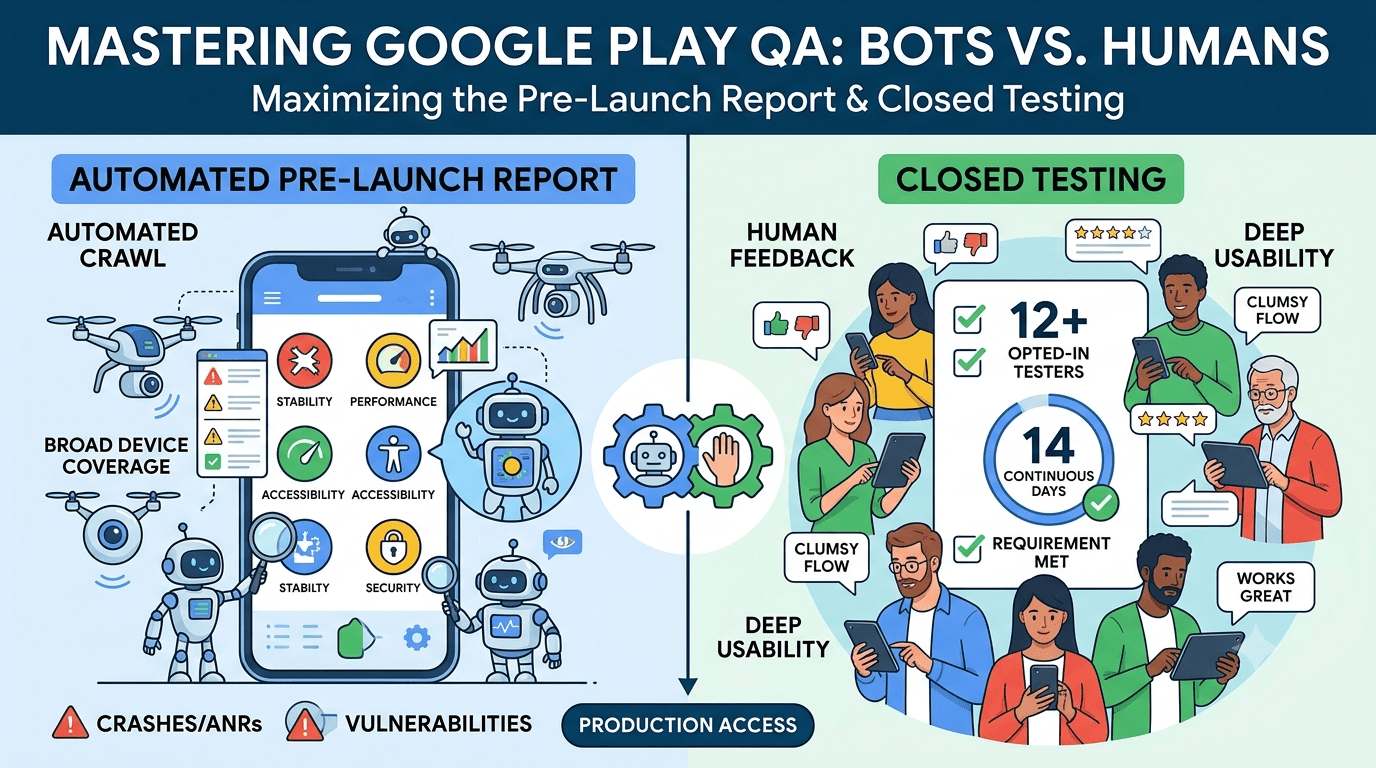
Google Play offers two very different pre-release quality tools that developers often confuse: the automated pre-launch report, where Google's bots crawl your app on real devices, and closed testing, where real human testers use your app over time. They serve complementary purposes, and understanding the difference — and using both well — gives you the most thorough pre-launch quality assurance. Crucially, only closed testing satisfies the requirement that an app from a new personal account complete a test with at least 12 testers opted in for 14 continuous days before production access. This guide compares the pre-launch report and closed testing and explains how to use each.
The closed-testing process is mandatory for new personal accounts, while the pre-launch report is an automated bonus you get when you upload builds. Using them together — bots for broad automated coverage, humans for real judgment — turns your testing period into comprehensive quality assurance.
Only closed testing meets the requirement
It is essential to understand that the pre-launch report does not count toward the 12-tester, 14-day requirement. That requirement is satisfied only by real testers opting into your closed (or open) test and remaining active for the continuous period. The pre-launch report is automated crawling that runs on your uploaded builds regardless, providing useful signal but not fulfilling the human-testing obligation. See the closed testing guide.
So while you should absolutely use the pre-launch report, do not mistake a clean report for having met the requirement. You still need 12+ committed, device-diverse testers for 14 continuous days. Standard advice applies: recruit a buffer, keep your count above 12, and prepare your listing in parallel. See what happens after 14 days.
What the pre-launch report does
When you upload a build to a testing track, Google automatically runs it on a set of real devices in their lab, crawling through your app's screens and reporting on stability (crashes and ANRs), performance, accessibility, security vulnerabilities, and screenshots across devices. It is a fast, free, automated sweep that catches obvious crashes, glaring accessibility issues, and security warnings without any effort on your part. Review it in the Play Console after each upload. See Google's pre-launch report documentation.
The pre-launch report is excellent at breadth: it exercises your app across many device models you do not own and flags problems you might never encounter otherwise. But it is a bot — it clicks around somewhat randomly, cannot log in to complex flows without configured credentials, cannot judge whether a feature actually works as intended, and does not use your app the way a real person with real goals does. It is a valuable first filter, not a substitute for human testing. See fixing crashes before production.
What closed testing adds
Closed testing brings what bots cannot: real humans using your app with intent, over days, across their own devices and real conditions. Testers complete actual workflows, notice when something is confusing or subtly wrong, provide qualitative feedback, exercise login and payment flows a bot cannot, and reveal issues that only emerge with sustained real-world use. This human judgment is why Google made closed testing the requirement — automated crawling alone does not prove an app is ready for real users.
| Aspect | Pre-launch report | Closed testing |
|---|---|---|
| Who tests | Automated bots | Real people |
| Meets requirement | No | Yes |
| Coverage | Broad device sweep | Deep real use |
| Judges intent | No | Yes |
| Complex flows | Limited | Full |
The two are complementary, not interchangeable. See internal vs closed testing.
Using both together
The best pre-launch quality strategy uses both tools in sequence and in parallel. Upload each build and review its pre-launch report first, fixing the crashes, ANRs, and security or accessibility flags it surfaces — this cheaply eliminates obvious problems before human testers waste time on them. Then let your closed testers exercise the app deeply over the 14-day window, catching the functional, experiential, and edge-case issues the bots missed. Feed everything both sources surface into your fixes, redeploy, and confirm the improvements in the next report and with testers.
Think of the pre-launch report as your automated safety net and closed testing as your real-world validation. The report tells you your app does not crash on device X; your testers tell you it actually works and feels good to use. Neither alone is sufficient — a bot cannot confirm your checkout works, and your testers cannot cover every device model in Google's lab. Combining them during your window gives you both breadth and depth, and that is how you enter production genuinely confident. See the testing checklist.
Setting up your tracks
Once your signed release build is ready, create a closed-testing track in the Play Console and upload it, which automatically triggers a pre-launch report while your human testers opt in via the shared link. Correct configuration matters because the 14-day clock counts only opted-in testers, and a misconfigured track is a common reason developers realize late that their timer never started. Review the pre-launch report on each upload and act on its findings. See how to create a closed testing track.
Give testers clear onboarding instructions so they opt in correctly and exercise the deep, intentional flows the bots cannot. Every failed opt-in is a tester who does not count toward your 12, so smooth guidance maximizes active testers from day one while the pre-launch report handles broad device coverage in the background.
Recruiting and managing the window
You need 12+ committed, device-diverse testers for 14 continuous days, since the pre-launch report cannot substitute for them. Recruit a buffer above 12, keep testers engaged with clear tasks and quick responses, and use the report to pre-clean builds so testers focus on meaningful issues. Monitor your active count in the Play Console and recruit replacements early if it slips.
If assembling a reliable, device-diverse group is your bottleneck, a service that supplies verified real testers solves it quickly — the part the pre-launch report cannot do for you. You can submit your app to get started, and read where to find real testers and how to keep testers engaged.
Making the 14-day window count
Because the requirement forces you to run closed testing anyway, extract maximum value by pairing it with the pre-launch report on every build. Clear the automated findings first, then let your human testers dig into real workflows, and treat both streams of feedback as chances to enter production more confidently. A well-run window uses bots for breadth and humans for depth, giving you the most thorough pre-launch assurance possible.
Enter production having cleared your pre-launch reports and validated your app with real testers, and you launch on the strongest possible quality footing. The 14 days, used with both tools, are an investment that pays off in fewer post-launch surprises. See the Play Console beginner guide.
Turning both sources into fixes
Combine the two feedback streams deliberately. The pre-launch report gives you device-specific crash stacks, ANR traces, and flagged warnings; your testers give you qualitative reports on what confused or failed them. Triage both together, fix the highest-impact issues, and redeploy. Ask specific questions of testers to complement the report's automated findings, since the two illuminate different problems.
When you ship a fix, confirm it both in the next pre-launch report and with your testers, closing the loop on both fronts. An app that enters production having resolved the issues surfaced by bots and humans alike launches far more robust than one relying on either source alone. See updating mid-testing.
After launch: vitals continue the story
Your closed test and pre-launch reports are the start of quality assurance, not the end. After launch, Android vitals takes over as your ongoing, real-world equivalent, reporting crashes, ANRs, and performance from your actual user base across every device. Keep watching vitals and reviews, and continue uploading builds that generate pre-launch reports for each update. An app that maintains this discipline of automated plus human plus field monitoring stays healthy as it grows. See post-launch monitoring.
Configuring the pre-launch report
You can get much more from the pre-launch report by configuring it rather than leaving it at defaults. Provide test credentials so Google's bots can log in and crawl past your authentication wall, which otherwise blocks them from most of your app; supply demo mode instructions or scripted actions to steer the crawl toward important flows; and choose which device set the report runs on. Without credentials, the report only sees your login screen, so this single step dramatically increases the coverage the bots achieve. Configure these options in the Play Console before or shortly after your first upload.
Also review the report's settings for which checks and locales you care about, and enable pre-launch reports for the tracks you use. A well-configured report crawls deeper, exercises more of your real functionality, and surfaces far more useful findings than an unconfigured one that bounces off your login screen. Spending a few minutes on configuration turns the pre-launch report from a shallow sweep into a genuinely broad automated test that complements your human testers. See login testing.
Where automated crawling falls short
Even well configured, the pre-launch report has inherent limits you should understand so you do not over-rely on it. Bots crawl somewhat randomly and shallowly, so they may never reach a deeply nested screen or trigger a specific sequence that causes a bug. They cannot judge whether a feature produces the correct result, whether a layout looks good, or whether a flow is confusing — they only detect crashes, ANRs, and flagged categories. They cannot complete a real purchase, follow a multi-step onboarding with logic, or notice that your app is technically working but practically unusable.
These gaps are precisely what your human closed testers fill. A tester notices that the checkout total is wrong, that the onboarding is bewildering, or that a feature does not do what it claims — judgments no bot can make. Understanding these limits keeps you from mistaking a clean pre-launch report for a validated app, and reinforces why the 14-day human test is the requirement rather than the automated crawl. Use the report for breadth, but trust your testers for whether the app is actually good. See pre-production checks.
Key takeaways
- Only closed testing meets the 12-tester, 14-day requirement — the pre-launch report does not.
- The pre-launch report is automated device breadth — crashes, ANRs, security, accessibility.
- Closed testing is human depth — real workflows, judgment, and complex flows.
- Use both together — clear the report first, then validate with testers.
- Android vitals continues the same monitoring after launch.
Frequently asked questions
Does the pre-launch report count toward the 14-day requirement?
No. Only real testers opted into your closed or open test for 14 continuous days satisfy the requirement. The report is automated and does not count.
What does the pre-launch report check?
Stability (crashes and ANRs), performance, accessibility, security vulnerabilities, and screenshots across a range of real lab devices.
Why can't bots replace human testers?
Bots crawl somewhat randomly, cannot judge intent, struggle with complex login or payment flows, and do not use the app with real goals.
Should I use both tools?
Yes. Clear the pre-launch report's automated findings first, then let human testers validate real workflows deeply during the window.
Where do I find the pre-launch report?
In the Play Console after uploading a build to a testing track. It runs automatically on Google's lab devices.
What continues this after launch?
Android vitals reports crashes, ANRs, and performance from your real users, and you can keep generating pre-launch reports for each update.
How do I let the bots log in?
Provide test credentials in the pre-launch report settings so Google's bots can crawl past your authentication wall and exercise more of your app.
Can I choose which devices the report uses?
Yes. The pre-launch report settings let you select a device set, so you can target the models most relevant to your audience.
Is a clean pre-launch report enough to launch?
No. It means no obvious crashes on the crawled devices, but only human testers confirm your features work and the app is genuinely usable.
Do internal and open testing also get reports?
Pre-launch reports run on builds uploaded to testing tracks, so enable them for the tracks you use to get automated coverage on each build.
Expanded for topical authority — additional practical sections below. Original guide content above is unchanged.
Quick answer
Google Play Pre-Launch Report vs Closed Testing matters because Google Play production access for many new personal developer accounts depends on a successful closed test: at least 12 real testers opted in for 14 continuous days, plus a policy-compliant, stable app. Use this guide to execute the steps correctly, avoid streak-breaking mistakes, and decide whether DIY recruitment or a managed closed testing service is the better path for your deadline.
Real-world scenarios: who this matters for
The guidance in this article on Google Play Pre-Launch Report vs Closed Testing applies across many Android product types. Use these scenarios to map the advice to your situation.
| Developer type | Typical challenge | Practical focus |
|---|---|---|
| Indie / solo | Limited tester network and time | Start closed testing early; keep a buffer above 12 opted-in testers; parallelize listing + Data safety work |
| Startup | Launch deadline vs 14-day rule | Treat the window as fixed; recruit in parallel with QA; avoid last-minute track setup |
| Agency / white-label | Multiple client apps, each needing its own test | One closed test per app; standardize opt-in onboarding; track eligibility dates per client |
| Flutter / React Native | Cross-platform build + Play Console quirks | Ship a signed AAB to closed testing; verify installs from Play, not sideload; watch vitals on mid-range devices |
| Native Kotlin | Device/API fragmentation | Cover API levels and OEMs in your tester mix; fix crashes before requesting production |
| Game / Unity | Performance + retention during 14 days | Keep testers engaged so count never dips below 12; monitor ANRs and battery |
| E-commerce / fintech | Policy + payment flows | Test checkout, permissions, and declarations carefully before production access |
| Healthcare / kids / education | Sensitive policies (Families, data) | Align listing, privacy, and content rating with real app behavior during the test window |
Visual placeholder: Scenario matrix infographic — Indie / Startup / Agency / Cross-platform paths for Google Play Pre-Launch Report vs Closed Testing.
Comparison: DIY recruitment vs managed closed testing
When your goal is Google Play production access, the path you choose for testers affects time, risk, and feedback quality. Use this comparison while deciding how to apply Google Play Pre-Launch Report vs Closed Testing.
| Approach | Time to 12 opted-in | Cost | Dropout risk | Feedback quality | Best when |
|---|---|---|---|---|---|
| Friends & family | Days–weeks | $0 | High | Mixed | Tiny MVP, flexible timeline |
| Reddit / Discord / Telegram | Unpredictable | $0–low | High | Variable | You can manage onboarding daily |
| Peer community exchange | Variable | $0 | Medium | Developer-biased | You can test others’ apps in return |
| Managed closed testing (e.g. Fast Testers) | ~1 hour after valid link | $15 one-time / app | Low (buffer of 15) | Real Play installs | You need speed + continuity for 14 days |
Decision tip: If a broken streak would delay revenue or a client deadline, prioritize reliability over $0 recruitment. DIY is fine when you already have engaged testers and can monitor Play Console daily.
Visual placeholder: Comparison diagram — DIY vs community vs managed testing for Google Play Pre-Launch Report vs Closed Testing.
Common mistakes (and how to avoid them)
These mistakes repeatedly show up when developers work through Google Play Pre-Launch Report vs Closed Testing:
- Confusing invited vs opted-in testers — Only testers who open the opt-in link and install from Play count toward 12. Check the opted-in number in Play Console, not your email list.
- Recruiting exactly 12 with no buffer — One uninstall can break continuity. Aim for ~15 active opted-in testers.
- Starting the counted clock late — Listing assets, Data safety, and privacy work should run during the 14 days, not after.
- Using sideloaded APKs or fake installs — They do not satisfy Play’s closed testing expectations and can create account risk.
- Ignoring tester feedback until day 14 — Crashes that drive uninstalls threaten your streak and your review outcome.
- Requesting production access before the continuous streak completes — Eligibility checks fail even if calendar time has passed.
Troubleshooting checklist
If something feels “stuck” while applying Google Play Pre-Launch Report vs Closed Testing, walk this list before changing strategy:
| Symptom | Likely cause | Fix |
|---|---|---|
| Console shows < 12 testers | Invites sent but not opted in | Resend opt-in link; confirm install from Play |
| “Not eligible” after 14 calendar days | Count dipped below 12 mid-window | Restore 12+ and complete a full continuous streak |
| Tester cannot join | Wrong account, Group lag, or track not published | Verify Google account, Group membership, track release |
| App fails to install | Device/API mismatch or signing issue | Check AAB, minSDK, Play App Signing |
| Production still rejected after testing | Policy, declarations, or stability — not the clock | Read the exact reason; fix that category completely |
Visual placeholder: Troubleshooting flowchart for Google Play Pre-Launch Report vs Closed Testing.
Action checklist
Use this checklist alongside the rest of this guide on Google Play Pre-Launch Report vs Closed Testing:
- ☐ Closed testing track created with a signed release (AAB)
- ☐ Opt-in link tested on a fresh Google account
- ☐ At least 12 testers opted in (prefer ~15)
- ☐ Daily check that opted-in count stays ≥ 12 for 14 continuous days
- ☐ Core flows exercised (login, main feature, permissions, offline/online)
- ☐ Crashes / ANRs triaged from tester reports and vitals
- ☐ Store listing, screenshots, and feature graphic drafted
- ☐ Privacy policy + Data safety + content rating aligned with real behavior
- ☐ Production access requested only after eligibility is green
- ☐ Staged rollout plan ready for first public release
Additional FAQs developers ask about Google Play Pre-Launch Report vs Closed Testing
Quick answer: what should I do first?
Confirm you are on a closed testing track with real opted-in installs, keep 12+ testers for 14 continuous days, and fix policy/stability issues in parallel. Then use the detailed sections above for Google Play Pre-Launch Report vs Closed Testing.
Does this apply to organization (company) accounts?
The classic 12×14 closed testing gate is primarily associated with new personal developer accounts. Always verify your account type and current Play Console eligibility messaging for your app.
Do friends and family count as testers?
Yes — if they opt in via your closed testing link and install from Google Play. They only help if they stay opted in for the continuous period.
Can I update the app during the 14 days?
You can usually push updates on the closed track, but unstable releases that cause uninstalls can threaten your tester count. Prefer polishing via internal testing first when possible.
What if production access is still rejected?
Read the exact reason. Incomplete testing is only one category — policy, Data safety mismatches, and crashes are common. Fix the cited issue fully before reapplying.
Is paying for testers allowed?
Using real people who install from Play is what matters. Avoid fake install farms. A one-time managed service that supplies real closed testers is a practical option when DIY recruitment is too slow.
How is Fast Testers different from free communities?
Free communities trade time and mutual availability. Fast Testers assigns about 15 real testers after you submit a valid closed testing link (one-time $15 per app) and includes a production access guarantee under its refund terms.
Where should I go next?
Review the related guides below, then either finish DIY recruitment or start closed testing if you need speed and continuity.
Sources, updates, and how to use this guide
This article on Google Play Pre-Launch Report vs Closed Testing is maintained for Android developers preparing Google Play closed testing and production access. Always cross-check eligibility text inside your own Play Console, because Google’s UI labels and account rules can vary by account type and date.
- Primary official references: Google Play closed testing help, Developer Program Policies, and Play Console eligibility messaging for your app.
- Practical experience lens: guidance here reflects common failure modes indie developers and agencies hit when recruiting testers, maintaining the 14-day streak, and recovering from production-access rejections.
- Last reviewed focus: 12×14 closed testing continuity, real vs fake testers, and parallel listing/compliance work during the window.
Related guides and next steps
Continue building topical depth around Google Play Pre-Launch Report vs Closed Testing with these Fast Testers resources:
- Closed Testing Vs Open Testing On Google Play
- Google Play Internal Testing Vs Closed Testing
- Mvp Launch Strategy With Google Play Closed Testing
- Common Google Play Closed Testing Mistakes
- Google Play Android Vitals During Closed Testing
- Google Play Closed Testing
- Google Play Closed Testing Dashboard Metrics Explained
- Google Play Closed Testing Email Templates For Testers
- Pricing — $15 closed testing
- How Fast Testers works
- FAQ
- Developer reviews
- Case studies
- Submit your app / start closed testing
Need reliable testers so your 14-day streak does not stall? Educate first with the guides above, then start when you are ready — one-time pricing, real Play installs, dashboard tracking.
Internal navigation hub — added to strengthen topical connections. Original article content above is unchanged.
Topic cluster: Testing Tracks Compared
Pillar guide: Start with Google Play Internal Testing vs Closed Testing for the full overview, then use the supporting guides below.
- Google Play Internal Testing vs Closed Testing (pillar)
- Closed Testing vs Open Testing on Google Play
- How to Create an Internal Testing Track in Play Console
- Internal Testing vs Production Release on Google Play
- Closed Testing vs Firebase App Distribution
- Closed Testing vs TestFlight: Android vs iOS Beta
- Sideloading vs Play Store Testing: Why It Matters
Continue learning
- Social Apps and Google Play Closed Testing Volume — Learn about social app testing for Google Play closed testing. Complete guide for Android developers publishin.
- Android TV Apps and Google Play Testing Tracks — Learn about Android TV testing for Google Play closed testing. Complete guide for Android developers publishin.
- Education Apps and Google Play Compliance Testing — Learn about EdTech app testing for Google Play closed testing. Complete guide for Android developers publishin.
- Productivity Apps: Meeting Google Play Testing Rules — Learn about productivity app testing for Google Play closed testing. Complete guide for Android developers pub.
- Tablet Layout Testing for Google Play Apps — Learn about tablet UI testing for Google Play closed testing. Complete guide for Android developers publishing.
- Closed Testing vs Open Testing on Google Play — Learn about testing track differences for Google Play closed testing. Complete guide for Android developers pu.
Next steps
- Ready to run closed testing with real Android testers? Submit your app or see pricing ($15 one-time).
- Compare options on our testing service comparison page, or read developer reviews and case studies.
- Still deciding? Review how Fast Testers works and the FAQ.