
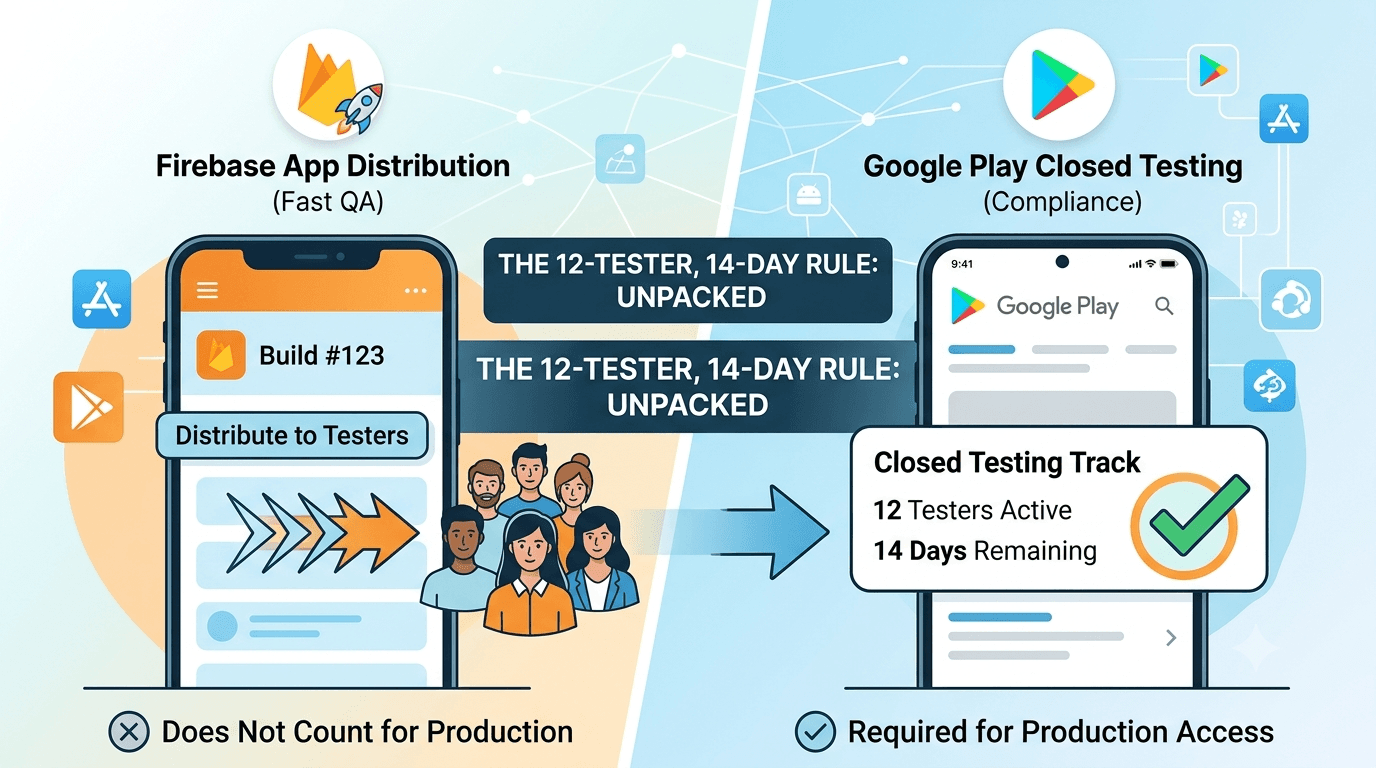
Firebase App Distribution is a favorite tool for getting builds to testers fast, while Google Play closed testing is the requirement for production access. Developers often ask whether Firebase can satisfy the 12-tester rule. This guide compares closed testing vs Firebase App Distribution and shows how they fit together.
Contents
Quick answer
Featured answer: Firebase App Distribution quickly delivers builds to testers for QA, but it does not distribute through Google Play, so it does not count toward production access. Only Play closed testing with 12 testers for 14 days satisfies the requirement.
What Firebase App Distribution is
Firebase App Distribution sends pre-release builds (APK or AAB) directly to testers outside the Play Store, with tools for tester groups and release notes. It is excellent for fast internal QA cycles but operates independently of Google Play.
What closed testing is
Closed testing distributes your app through the Play Store to opted-in testers. It is the only track that counts toward production access. Learn to set it up in how to create a closed testing track.
Why Firebase does not count
- Firebase installs do not go through Google Play, so Google cannot verify them for the requirement.
- The 12-tester, 14-day rule counts Play installs only.
- Firebase is a QA channel, not a compliance mechanism.
Warning: Do not rely on Firebase to meet the production requirement. It is superb for QA but cannot replace closed testing.
Using both together
The smart workflow uses each for its strength:
- Firebase for rapid QA during development — quick builds to your team.
- Closed testing for the 12-tester, 14-day requirement before production.
Tip: Stabilize with Firebase, then run closed testing with real testers. Submit your app to get 12+ real testers for the Play requirement.
Comparison table
| Factor | Firebase App Distribution | Closed testing |
|---|---|---|
| Distribution | Outside Play | Through Google Play |
| Counts toward production | No | Yes |
| Best for | Fast QA | The 12-tester requirement |
| Speed of builds | Very fast | Standard rollout |
A workflow that uses both effectively
The most productive teams treat Firebase and closed testing as consecutive stages rather than competitors. A typical end-to-end flow looks like this:
- Develop and iterate with Firebase App Distribution, pushing frequent builds to your internal team for fast QA.
- Stabilize — fix crashes and broken flows while iteration is cheap and quick.
- Promote the same bundle to your Play closed testing track once the build is solid.
- Run the 14-day closed test with 12+ real testers to satisfy production access.
- Apply for production once the window completes.
This sequencing means you enter the fixed, less flexible closed-testing window with an already-stable app, reducing the chance of surprises during the two weeks that matter most. Firebase absorbs the messy, fast-moving early phase; closed testing handles the formal requirement. Trying to force one tool to do the other's job is what causes wasted effort — respect their distinct roles and both become far more valuable.
What Firebase App Distribution is
Firebase App Distribution is Google's developer tool for getting pre-release builds into testers' hands quickly during development. It lets you upload builds and distribute them to registered testers, who receive notifications and can install the app to try new versions. It integrates smoothly with development workflows and CI pipelines, making it excellent for the iterative, engineering-focused phase of building an app. Because it comes from Google and works well, developers naturally wonder whether it can double as their closed testing solution.
The answer is no, and the reason is the same one that governs APK sharing: Firebase App Distribution is not the Google Play closed testing track. It distributes builds through its own channel, separate from Play's closed testing system. So while it is a genuinely useful development tool, it operates outside the specific mechanism Google uses to verify the closed testing requirement. Understanding this prevents a common and costly misconception.
Why Firebase does not satisfy the requirement
The closed testing requirement is precise: 12 testers must install your app through the Google Play closed testing track and use it for 14 consecutive days before you can apply for production. Firebase App Distribution installs do not occur on the Play closed testing track, so they are not recognized toward this requirement. You could distribute your app to dozens of testers via Firebase and still have zero progress toward production access, because Google measures the requirement specifically through Play's closed testing system.
This trips up developers who assume that any Google testing tool must count, or that testing is testing regardless of channel. But the requirement is not about testing in the abstract — it is about verifiable installs through Play's official closed track, which is how Google confirms genuine, trackable engagement. Firebase serves a different stage and a different purpose. If your goal is unlocking production, Firebase distribution, however convenient, does not move you toward it. See internal vs closed testing for the tracks that do count.
What Firebase is genuinely good at
Recognizing that Firebase does not satisfy the requirement should not lead you to dismiss it — it is excellent at what it is designed for. Firebase App Distribution shines during active development: pushing frequent builds to your team, integrating with continuous-integration pipelines so new builds distribute automatically, and gathering fast feedback from a trusted group of internal testers. Its speed and workflow integration make it a strong tool for the engineering phase, when you are iterating rapidly and want tight feedback loops.
Think of Firebase as complementary to, not competitive with, closed testing. It helps you build a better app during development; closed testing is how you satisfy the production requirement once your app is ready. Used in its proper role, Firebase can make your development smoother, and a smoother development phase means a more stable build going into the closed test that actually counts. The mistake is not using Firebase — it is expecting it to do a job it was never designed for.
Using Firebase and closed testing together
The most effective approach combines both tools according to their strengths. Use Firebase App Distribution during development to iterate quickly with your team and internal testers, catching bugs and refining the app while you are still building it. Then, when your build is stable and you are ready to unlock production, move to Google Play closed testing to run the qualifying 14-day window with 12+ real testers. Each tool handles the stage it is built for, and nothing is wasted.
This sequence also front-loads quality: by the time you begin the closed test that counts, Firebase has already helped you eliminate the obvious problems, so your closed test starts from a solid foundation and produces a cleaner signal. If sourcing 12 reliable testers for the closed phase is your obstacle — as it is for many developers — a professional service can assign real testers within about an hour, letting you start your qualifying window immediately after your Firebase-driven development phase. See where to find real testers.
A concrete Firebase-to-Play workflow
To make the complementary relationship practical, here is how a typical workflow using both tools unfolds. During active development, you wire Firebase App Distribution into your build pipeline so that each new build is automatically distributed to your internal team and trusted testers. They install quickly, try the latest changes, and report issues, giving you the fast, tight feedback loop that engineering-heavy phases demand. You iterate rapidly here, fixing crashes and refining features while the app is still taking shape.
When the app stabilizes and you are ready to pursue production, you switch to Google Play closed testing for the qualifying phase. You prepare a signed app bundle, set up a closed testing track, generate your opt-in link, and recruit 12+ real testers for the mandatory 14-day window. Because Firebase already helped you eliminate the obvious problems, this closed test starts from a solid build and tends to produce a cleaner signal and more useful feedback. The two tools hand off naturally: Firebase for building, closed testing for qualifying.
The one piece Firebase cannot help with is sourcing the 12 real testers for the closed phase, which is where many developers get stuck after a smooth Firebase-driven development cycle. If that is your bottleneck, a professional service can assign real testers within about an hour, letting you move seamlessly from your Firebase development phase into a qualifying closed test without a recruiting delay. This end-to-end workflow — Firebase to build, a service to staff the closed test, Play to qualify — is about as efficient as an Android launch gets. See where to find real testers.
Clearing up the common confusion
The confusion around Firebase and the testing requirement is understandable, so it is worth addressing head-on. Because Firebase is a Google product, and because it distributes apps to testers, developers reasonably assume it must satisfy Google's testing requirement. But "a Google testing tool" and "the Google Play closed testing track" are not the same thing. The requirement is defined specifically in terms of Play's closed testing system, and Firebase App Distribution operates through a separate channel. Being a Google product does not make it count; being the closed testing track is what counts.
This distinction matters because acting on the wrong assumption wastes time. A developer who runs a thorough Firebase distribution believing it satisfies the requirement will discover, when they try to apply for production, that they have no qualifying closed test at all. The fix at that point is to run a proper closed test from scratch — a delay that could have been avoided by understanding the distinction earlier. Clarity here saves you from a demoralizing surprise at the finish line.
The constructive takeaway is to use Firebase for what it is excellent at — development-phase distribution and feedback — while planning separately for the closed test that actually unlocks production. Do not let Firebase's usefulness during development lull you into thinking it covers your production requirement. Keep the two mentally separate: Firebase builds a better app; Play closed testing gets it approved. If sourcing testers for that closed test is your challenge, a service can supply real ones quickly. See closed testing requirements.
Key takeaways
- Firebase App Distribution does not count toward the closed testing requirement.
- Only Play closed testing installs satisfy production access.
- Firebase excels at development — fast builds, CI integration, internal feedback.
- The tools are complementary, not competing.
- Use Firebase to iterate, then closed testing to qualify for production.
Frequently asked questions
Does Firebase satisfy the 12-tester rule?
No. Only Play closed testing counts toward production access.
Is Firebase App Distribution still worth using?
Yes, for development. It excels at fast build distribution, CI integration, and internal feedback — just not for satisfying the production requirement.
Can I use Firebase and closed testing together?
Absolutely. Use Firebase to iterate during development, then move to Play closed testing to run the qualifying 14-day window with real testers.
Is Firebase still worth using?
Yes — for fast internal QA before your closed test.
Can I move a Firebase build to closed testing?
You upload the same app bundle to the closed track in Play Console.
Why does Google require Play installs?
To verify genuine testing through its own systems.
Can I use both at once?
Yes — Firebase for QA, closed testing for the requirement.
Does Firebase help with feedback?
It supports tester feedback, but it does not fulfill the Play requirement.
Key takeaways
- Firebase App Distribution is a fast QA channel outside the Play Store.
- Firebase installs do not count toward the 12-tester, 14-day requirement.
- Only Play closed testing satisfies production access.
- Use Firebase to stabilize, then promote the same bundle to a closed track.
- Respecting each tool's role makes both far more valuable.
Conclusion
Firebase App Distribution and closed testing solve different problems: fast QA versus Google Play compliance. Use Firebase to stabilize, then run a real closed test to satisfy production access. Need testers for the Play requirement? Submit your app today.
Expanded for topical authority — additional practical sections below. Original guide content above is unchanged.
Real-world scenarios: who this matters for
The guidance in this article on Closed Testing vs Firebase App Distribution applies across many Android product types. Use these scenarios to map the advice to your situation.
| Developer type | Typical challenge | Practical focus |
|---|---|---|
| Indie / solo | Limited tester network and time | Start closed testing early; keep a buffer above 12 opted-in testers; parallelize listing + Data safety work |
| Startup | Launch deadline vs 14-day rule | Treat the window as fixed; recruit in parallel with QA; avoid last-minute track setup |
| Agency / white-label | Multiple client apps, each needing its own test | One closed test per app; standardize opt-in onboarding; track eligibility dates per client |
| Flutter / React Native | Cross-platform build + Play Console quirks | Ship a signed AAB to closed testing; verify installs from Play, not sideload; watch vitals on mid-range devices |
| Native Kotlin | Device/API fragmentation | Cover API levels and OEMs in your tester mix; fix crashes before requesting production |
| Game / Unity | Performance + retention during 14 days | Keep testers engaged so count never dips below 12; monitor ANRs and battery |
| E-commerce / fintech | Policy + payment flows | Test checkout, permissions, and declarations carefully before production access |
| Healthcare / kids / education | Sensitive policies (Families, data) | Align listing, privacy, and content rating with real app behavior during the test window |
Visual placeholder: Scenario matrix infographic — Indie / Startup / Agency / Cross-platform paths for Closed Testing vs Firebase App Distribution.
Comparison: DIY recruitment vs managed closed testing
When your goal is Google Play production access, the path you choose for testers affects time, risk, and feedback quality. Use this comparison while deciding how to apply Closed Testing vs Firebase App Distribution.
| Approach | Time to 12 opted-in | Cost | Dropout risk | Feedback quality | Best when |
|---|---|---|---|---|---|
| Friends & family | Days–weeks | $0 | High | Mixed | Tiny MVP, flexible timeline |
| Reddit / Discord / Telegram | Unpredictable | $0–low | High | Variable | You can manage onboarding daily |
| Peer community exchange | Variable | $0 | Medium | Developer-biased | You can test others’ apps in return |
| Managed closed testing (e.g. Fast Testers) | ~1 hour after valid link | $15 one-time / app | Low (buffer of 15) | Real Play installs | You need speed + continuity for 14 days |
Decision tip: If a broken streak would delay revenue or a client deadline, prioritize reliability over $0 recruitment. DIY is fine when you already have engaged testers and can monitor Play Console daily.
Visual placeholder: Comparison diagram — DIY vs community vs managed testing for Closed Testing vs Firebase App Distribution.
Common mistakes (and how to avoid them)
These mistakes repeatedly show up when developers work through Closed Testing vs Firebase App Distribution:
- Confusing invited vs opted-in testers — Only testers who open the opt-in link and install from Play count toward 12. Check the opted-in number in Play Console, not your email list.
- Recruiting exactly 12 with no buffer — One uninstall can break continuity. Aim for ~15 active opted-in testers.
- Starting the counted clock late — Listing assets, Data safety, and privacy work should run during the 14 days, not after.
- Using sideloaded APKs or fake installs — They do not satisfy Play’s closed testing expectations and can create account risk.
- Ignoring tester feedback until day 14 — Crashes that drive uninstalls threaten your streak and your review outcome.
- Requesting production access before the continuous streak completes — Eligibility checks fail even if calendar time has passed.
Troubleshooting checklist
If something feels “stuck” while applying Closed Testing vs Firebase App Distribution, walk this list before changing strategy:
| Symptom | Likely cause | Fix |
|---|---|---|
| Console shows < 12 testers | Invites sent but not opted in | Resend opt-in link; confirm install from Play |
| “Not eligible” after 14 calendar days | Count dipped below 12 mid-window | Restore 12+ and complete a full continuous streak |
| Tester cannot join | Wrong account, Group lag, or track not published | Verify Google account, Group membership, track release |
| App fails to install | Device/API mismatch or signing issue | Check AAB, minSDK, Play App Signing |
| Production still rejected after testing | Policy, declarations, or stability — not the clock | Read the exact reason; fix that category completely |
Visual placeholder: Troubleshooting flowchart for Closed Testing vs Firebase App Distribution.
Action checklist
Use this checklist alongside the rest of this guide on Closed Testing vs Firebase App Distribution:
- ☐ Closed testing track created with a signed release (AAB)
- ☐ Opt-in link tested on a fresh Google account
- ☐ At least 12 testers opted in (prefer ~15)
- ☐ Daily check that opted-in count stays ≥ 12 for 14 continuous days
- ☐ Core flows exercised (login, main feature, permissions, offline/online)
- ☐ Crashes / ANRs triaged from tester reports and vitals
- ☐ Store listing, screenshots, and feature graphic drafted
- ☐ Privacy policy + Data safety + content rating aligned with real behavior
- ☐ Production access requested only after eligibility is green
- ☐ Staged rollout plan ready for first public release
Additional FAQs developers ask about Closed Testing vs Firebase App Distribution
Quick answer: what should I do first?
Confirm you are on a closed testing track with real opted-in installs, keep 12+ testers for 14 continuous days, and fix policy/stability issues in parallel. Then use the detailed sections above for Closed Testing vs Firebase App Distribution.
Does this apply to organization (company) accounts?
The classic 12×14 closed testing gate is primarily associated with new personal developer accounts. Always verify your account type and current Play Console eligibility messaging for your app.
Do friends and family count as testers?
Yes — if they opt in via your closed testing link and install from Google Play. They only help if they stay opted in for the continuous period.
Can I update the app during the 14 days?
You can usually push updates on the closed track, but unstable releases that cause uninstalls can threaten your tester count. Prefer polishing via internal testing first when possible.
What if production access is still rejected?
Read the exact reason. Incomplete testing is only one category — policy, Data safety mismatches, and crashes are common. Fix the cited issue fully before reapplying.
Is paying for testers allowed?
Using real people who install from Play is what matters. Avoid fake install farms. A one-time managed service that supplies real closed testers is a practical option when DIY recruitment is too slow.
How is Fast Testers different from free communities?
Free communities trade time and mutual availability. Fast Testers assigns about 15 real testers after you submit a valid closed testing link (one-time $15 per app) and includes a production access guarantee under its refund terms.
Where should I go next?
Review the related guides below, then either finish DIY recruitment or start closed testing if you need speed and continuity.
Sources, updates, and how to use this guide
This article on Closed Testing vs Firebase App Distribution is maintained for Android developers preparing Google Play closed testing and production access. Always cross-check eligibility text inside your own Play Console, because Google’s UI labels and account rules can vary by account type and date.
- Primary official references: Google Play closed testing help, Developer Program Policies, and Play Console eligibility messaging for your app.
- Practical experience lens: guidance here reflects common failure modes indie developers and agencies hit when recruiting testers, maintaining the 14-day streak, and recovering from production-access rejections.
- Last reviewed focus: 12×14 closed testing continuity, real vs fake testers, and parallel listing/compliance work during the window.
Related guides and next steps
Continue building topical depth around Closed Testing vs Firebase App Distribution with these Fast Testers resources:
- Analytics Sdk Testing During Closed Testing
- Closed Testing Vs Open Testing On Google Play
- Google Play Internal Testing Vs Closed Testing
- App Bundle Vs Apk For Closed Testing Releases
- Ar Vr Android Apps And Closed Testing Requirements
- Closed Testing Completed But Still Rejected
- Closed Testing Track Not Showing
- Closed Testing Vs Apk Sharing
- Pricing — $15 closed testing
- How Fast Testers works
- FAQ
- Developer reviews
- Case studies
- Submit your app / start closed testing
Need reliable testers so your 14-day streak does not stall? Educate first with the guides above, then start when you are ready — one-time pricing, real Play installs, dashboard tracking.
Further expansion — case study, decisions, and expert recommendations. Prior sections remain unchanged.
Case study: first Play launch planned around the closed testing window
Problem: A small SaaS team treated Google Play publishing like iOS TestFlight — they expected to upload and go public the same week. They discovered the personal-account closed testing gate mid-sprint.
Solution: They reframed the sprint around Closed Testing Vs Firebase App Distribution: internal testing for crash triage first, then closed testing with a buffer of testers, while design finished screenshots and legal finished privacy/Data safety in parallel.
Result: The 14-day requirement stopped feeling like “dead time.” When eligibility flipped green, listing and declarations were already ready, so production review was the only remaining gate.
Lessons learned:
- Start the closed track as soon as the build is stable enough to keep installed.
- Parallelize compliance work inside the window.
- Protect the streak like a production SLA.
Decision guide: what should you do next?
Use this decision path when applying Closed Testing Vs Firebase App Distribution:
- Is your account a new personal developer account that still needs production access?
If yes, plan for closed testing with 12+ opted-in testers for 14 continuous days. If no, still test — but confirm the exact eligibility text in Play Console. - Do you already have 12+ reliable people who will install from Play and stay for two weeks?
If yes, DIY can work — add a buffer and monitor daily. If no, use community exchange or a managed closed testing service. - Is your build stable enough that testers will not churn?
If no, run internal testing first. Entering the counted window with crash loops is how streaks die. - Are Data safety, privacy policy, permissions, and listing aligned with real behavior?
If no, fix during the window so production review does not bounce you after the clock. - Has production access been rejected?
Classify: eligibility vs policy vs declarations vs stability. Fix that category completely, then re-test / re-request.
Visual placeholder: Decision tree diagram for Closed Testing Vs Firebase App Distribution (DIY vs managed vs fix-and-retry).
Expert recommendations
- Instrument the streak: Check opted-in count daily for the first week; replace dropouts same day.
- Brief testers once: Send a short checklist (install from Play, open app daily, try core flow, report crashes). Silent testers still count if opted in — engaged testers protect quality.
- Never “solve” recruitment with fake installs: It fails the intent of closed testing and can create account risk.
- Ship a boring-stable build to closed testing: Save experimental features for internal tracks.
- Educate first, then accelerate: If your blocker is simply finding real testers fast, a one-time managed option (Fast Testers: 15 testers, $15/app) is often cheaper than slipping a launch.
For hands-on setup after reading about Closed Testing Vs Firebase App Distribution, see how it works and pricing, or submit your closed testing link when you are ready.
Related: Also see Export Compliance and Encryption Declarations for more detail on this topic.
Internal navigation hub — added to strengthen topical connections. Original article content above is unchanged.
Topic cluster: Testing Tracks Compared
Pillar guide: Start with Google Play Internal Testing vs Closed Testing for the full overview, then use the supporting guides below.
- Google Play Internal Testing vs Closed Testing (pillar)
- Closed Testing vs Open Testing on Google Play
- How to Create an Internal Testing Track in Play Console
- Internal Testing vs Production Release on Google Play
- Closed Testing vs TestFlight: Android vs iOS Beta
- Sideloading vs Play Store Testing: Why It Matters
- Google Play Pre-Launch Report vs Closed Testing
Continue learning
- Closed Testing Track Not Showing in Play Console? — Closed testing track not showing in Google Play Console? Learn why the track or tab is missing and how to crea.
- Closed Testing vs APK Sharing: What Counts? — Closed testing vs APK sharing for Google Play: why sideloaded APKs do not count toward production access and h.
- Closed Testing vs TestFlight: Android vs iOS Beta — Closed testing vs TestFlight: how Android and iOS beta testing differ, what each requires, and what Android de.
- Common Google Play Closed Testing Mistakes to Avoid — The most common Google Play closed testing mistakes — wrong track, too few testers, dropouts, sideloading — an.
- Google Play Android Vitals During Closed Testing — Learn about vitals monitoring for Google Play closed testing. Complete guide for Android developers publishing.
- Google Play Closed Testing Complete Guide — A comprehensive walkthrough of the entire closed testing process..
Next steps
- Ready to run closed testing with real Android testers? Submit your app or see pricing ($15 one-time).
- Compare options on our testing service comparison page, or read developer reviews and case studies.
- Still deciding? Review how Fast Testers works and the FAQ.