
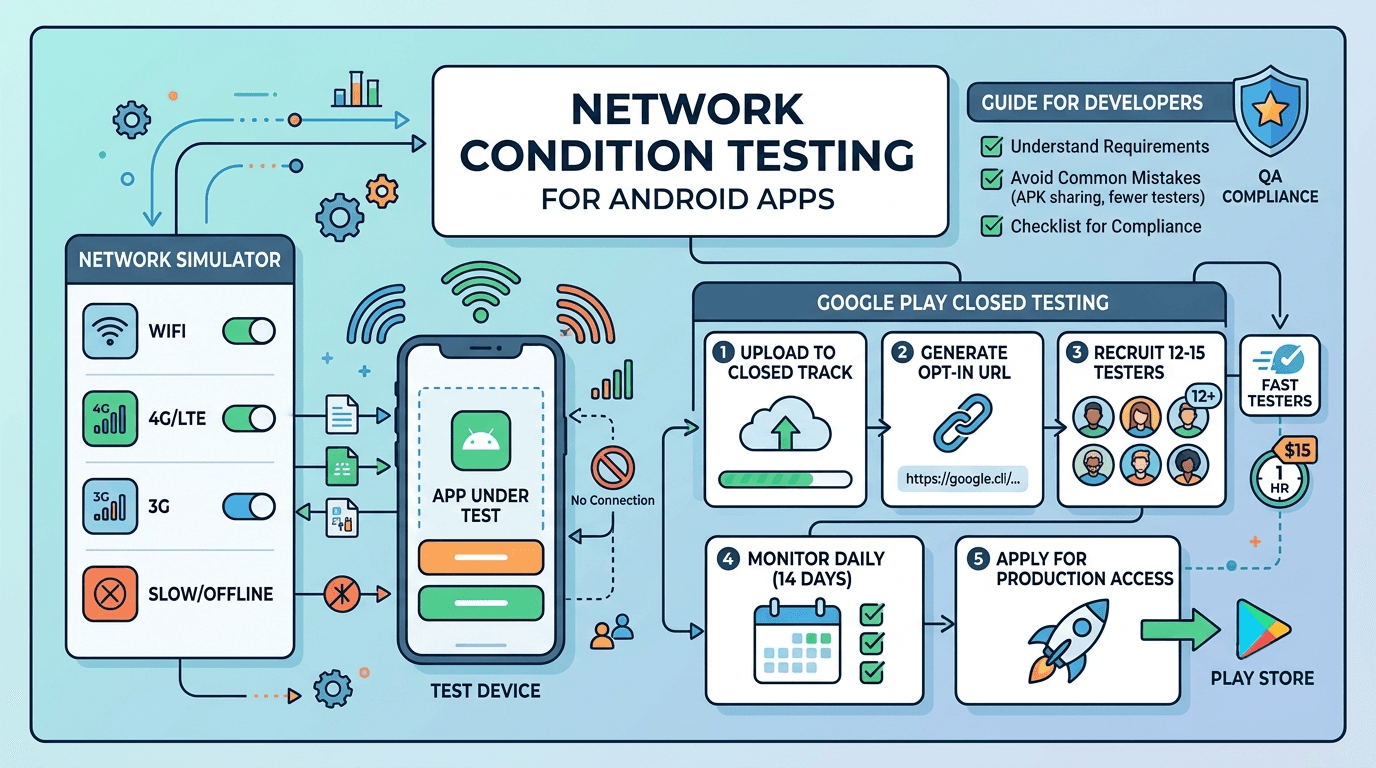
Building a flawless Android application means preparing for the unpredictable. In the real world, your users aren't always tied to high-speed 5G networks. They ride through tunnels, board airplanes, and experience sudden data drops. For developers navigating the Google Play closed testing milestones, robust network condition testing is no longer optional—it is a critical requirement to ensure your app behaves gracefully under pressure.
This comprehensive guide explores how to handle offline network QA efficiently, avoid structural pitfalls, and fulfill your release track parameters without delaying your timeline.
Why Network QA Matters for Production Access
Personal developer accounts created after November 2023 face a rigorous hurdle before launching publicly: you must run a closed testing track with at least 12 testers for 14 consecutive days. Skipping, rushing, or faking this step results in a swift rejection when you request production access.
Google's review team actively assesses how your application manages state transitions, background operations, and connectivity failures during the closed tracking window.
If your application crashes or locks up the UI the moment a tester turns off their Wi-Fi, negative telemetry and crash reports are generated. Real user engagement metrics are logged by the Play Console, and poor stability under low or intermittent network conditions signals to Google that your app is not production-ready.
Simulating Adverse Networks in Android Studio
Before passing your build over to a remote QA fleet, you should simulate bad connectivity locally. The Android Emulator provides native tools to throttle data speeds and introduce synthetic latency.

Key Scenarios to Verify:
- The Edge Case (Offline State): Turn off cellular data and Wi-Fi entirely. Ensure your application triggers a clean fallback UI rather than an uncaught exception.
- High Latency (GPRS/2G Profiles): Test how your API timeouts respond when a packet takes several seconds to round-trip.
- Intermittent Drops: Toggle connection states mid-stream during heavy payloads or asset downloads to test your retry mechanisms.
What Google Evaluates During Closed Testing Tracks
Google verifies structural compliance through automated telemetry and human checks on your Play Console dashboard. They specifically monitor whether real users opt into your closed testing track, install the package cleanly from the store front, and interact with the application consistently across the full two-week lifecycle.
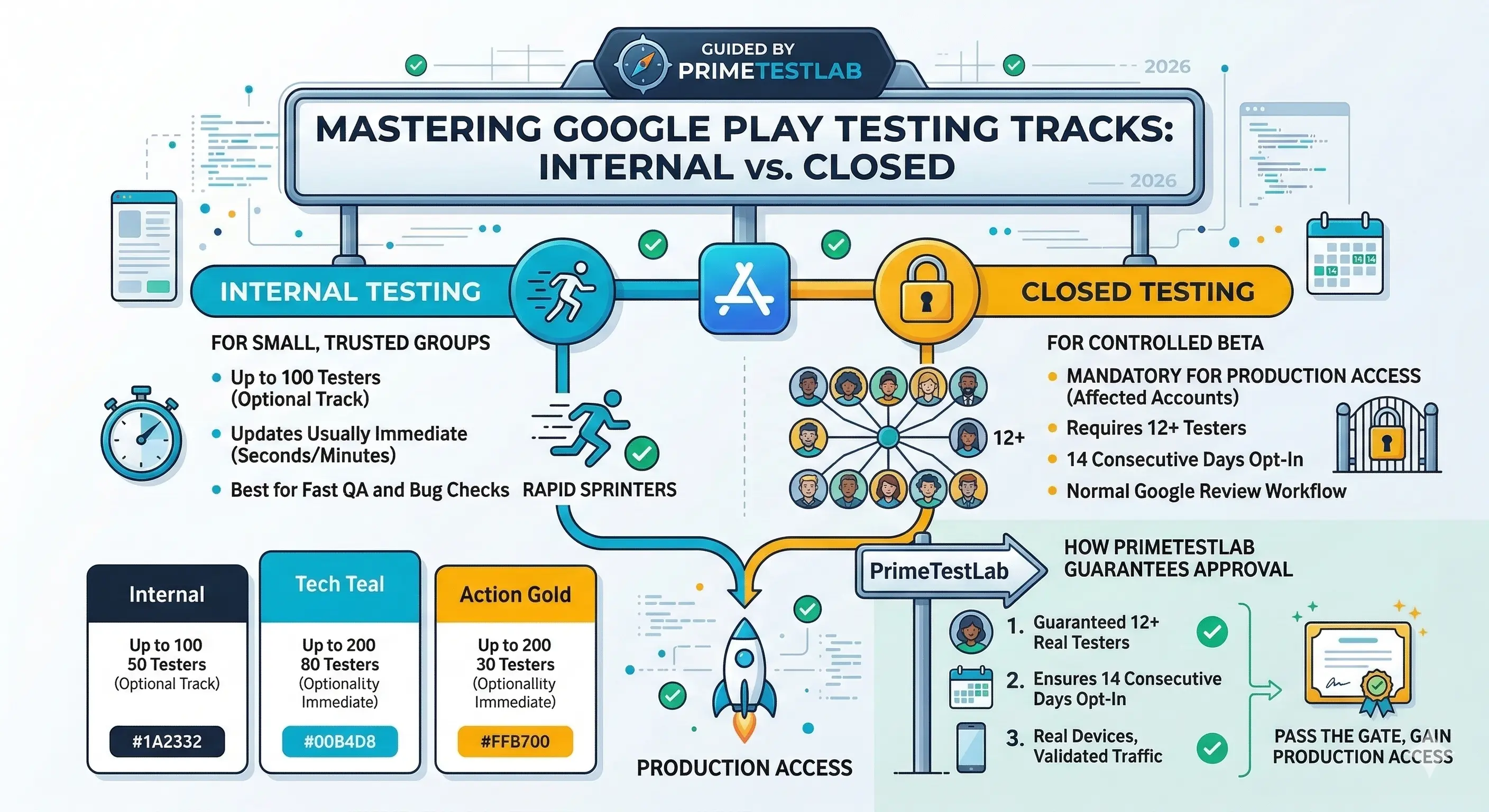
Automated scripts or fake install farms will fail these verification systems. Because of this, testing must occur on physical devices deployed across diverse real-world environments.
Step-by-Step Path to Production Compliance
- Prepare the Build: Optimize your network interceptors and error boundaries inside your app codebase.
- Configure Play Console: Upload your App Bundle (.aab) to the official Closed testing track.
- Generate Link: Retrieve your web or mobile opt-in URL from the "Testers" tab configuration window.
- Deploy Your Testers: Recruit 12 to 15 reliable target testers. Service platforms like Fast Testers assign 15 real Android QA professionals to your app track within approximately one hour.
- Run the Track: Monitor active installs daily across 14 consecutive days while checking crash logs for unexpected network failures.
- Apply: Submit your production access application accompanied by clean testing data summaries.
Common Mistakes That Block App Approvals
- Confusing Tracks: Deploying to an Internal testing track instead of the mandated Closed testing track. Internal tracks do not count toward your production milestone.
- Tester Attrition: Falling below 12 active opt-in users mid-period. If a tester uninstalls the app on day 7, the 14-day clock can stall or reset.
- Premature Application: Requesting production authorization on or before day 13. Ensure day 14 has completely concluded.
- Sideloading Packages: Sharing raw APK files directly with peers. Testers must join via the official Play Store opt-in links to register valid metrics.
Streamline Your Launch with Fast Testers
Fulfilling the closed testing constraint independently shouldn't mean turning into a full-time project manager. Fast Testers removes the logistical headache by providing a dedicated, compliant alternative designed for modern independent developers.
For a straightforward, one-time fee of $15 per app—with no recurring subscription traps—Fast Testers provides 15 real human Android QA testers to engage with your application over the required 14-day timeline. You gain comprehensive dashboard analytics, clean reports, and a solid production access assurance strategy that has driven over 1,500 apps to a 99.9% launch success rate.
Ready to Pass Your Google Play Review?
Acquire 15 professional Android testers within one hour and secure production track compliance safely.
Start Closed Testing →Frequently Asked Questions
How quickly do testers begin operations?
Your closed testing track assignments typically launch within one hour of submitting your valid Play Store opt-in URL through the platform dashboard.
Is utilizing external testers compliant with Google Play Policy?
Yes. Inviting external alpha and beta testers via explicit email lists or Google Groups is a foundational, standard workflow officially documented and supported by the Google Play Console team.
What happens if my application is rejected due to policy issues?
Policy adjustments do not erase your testing track efforts. If Google highlights an issue in your privacy policy or store copy, simply update the metadata and resubmit. Your completed 14-day interactive testing window remains valid for the production request.
The testing window is your network lab
The mandatory closed test — 12 testers opted in for 14 continuous days before production for new personal accounts — puts your app on real devices across real networks, which is exactly what you need to validate behavior on slow, flaky, and offline connections. A lab on fast office Wi-Fi hides the failures that plague users on congested mobile networks, so use the window to observe how your app copes when connectivity is imperfect. Ask testers to use the app on mobile data and in poor-signal areas and report what breaks. See our closed testing guide and low-end device testing.
Geographic and carrier diversity among testers matters here, since network realities differ hugely by region and provider. If you need a device- and network-diverse tester group to surface these issues, you can submit your app. See testing requirements by country.
Conditions your app must handle
Beyond fast Wi-Fi, your app must handle slow 3G, high latency, intermittent drops, captive portals, and complete offline. Test how it behaves when a request times out, when the connection drops mid-operation, and when the user has no connectivity at all — does it show a helpful message, retry sensibly, and preserve the user's work, or does it hang, crash, or lose data? Android's network APIs and tools let you simulate constrained conditions, and testers on real networks confirm the reality. See Google's connectivity guidance and offline-first testing.
Pay special attention to failure states, because they are where poor apps reveal themselves. Graceful timeouts, clear error messaging, automatic retries with backoff, and queued actions that sync when connectivity returns separate a robust app from a fragile one. Validate all of these during your window. See this guide.
Data efficiency and cost
In many markets, mobile data is expensive and metered, so an app that downloads aggressively or re-fetches unnecessarily costs users real money and gets uninstalled. Minimize payload sizes, cache intelligently, compress transfers, and avoid background data use the user did not ask for. Respect Android's data-saver settings and offer options to defer large downloads to Wi-Fi. Testing actual data consumption with testers on metered plans during your window reveals whether your app is a considerate citizen or a data hog. See battery usage testing and Android App Bundle.
Efficient network use also improves perceived performance, since less data means faster loads on slow connections. Optimizing for constrained networks therefore helps every user, not only those on tight data plans. See post-launch monitoring.
Designing for offline resilience
The strongest apps assume connectivity is unreliable and design accordingly: cache content for offline reading, queue user actions to sync later, and clearly indicate connection status so users are never confused about why something is not updating. An offline-first mindset turns network problems from crashes into minor, well-communicated delays. Even if your app is fundamentally online, handling brief disconnections gracefully dramatically improves the experience on mobile networks. Validate these behaviors thoroughly during your window with testers who will inevitably hit real dead zones. See offline-first testing and turning feedback into improvements.
Carry this into updates: new features that assume connectivity can regress your offline resilience, so re-test network behavior before each release. An app that stays robust on poor networks keeps its global audience. See updating after release.
Related guides and resources
- Offline-first app testing
- Low-end device testing
- Battery usage testing
- Android connectivity (Google)
Network testing FAQ
Why test on poor networks?
Fast Wi-Fi hides failures that hit users on slow, flaky mobile networks. Testing constrained conditions reveals timeouts, crashes, and data loss before launch.
What conditions should I test?
Slow 3G, high latency, intermittent drops, captive portals, and full offline, focusing on how the app handles failure states and recovery.
Why does data efficiency matter?
Data is expensive and metered in many markets. A data-hungry app costs users money and gets uninstalled, so minimize payloads and cache well.
What is offline-first design?
Assuming connectivity is unreliable: caching content, queuing actions to sync later, and clearly showing connection status so disconnections are minor, not fatal.
How do I simulate poor networks?
Use Android's network tools to throttle and drop connections, and confirm with testers on real mobile networks in varied regions and carriers.
Should I re-test networks on updates?
Yes. New features can assume connectivity and regress your offline resilience, so re-test network behavior before each release.
Why does efficient networking improve speed?
Less data means faster loads on slow connections, so optimizing for constrained networks improves perceived performance for every user, not just those on tight plans.
Bottom line
Real users are on imperfect networks, so your app must handle slow, flaky, and offline connectivity gracefully — with clear messaging, sensible retries, efficient data use, and offline resilience. The closed-testing window puts your app on real networks in real hands, making it the ideal time to find and fix these issues before launch. To recruit a device- and network-diverse tester group, you can submit your app. See offline-first testing to go further.
Expanded for topical authority — additional practical sections below. Original guide content above is unchanged.
Quick answer
Network Condition Testing for Android Apps matters because Google Play production access for many new personal developer accounts depends on a successful closed test: at least 12 real testers opted in for 14 continuous days, plus a policy-compliant, stable app. Use this guide to execute the steps correctly, avoid streak-breaking mistakes, and decide whether DIY recruitment or a managed closed testing service is the better path for your deadline.
Key takeaways
- Network Condition Testing for Android Apps should be treated as a practical Play Console workflow, not just theory.
- For many new personal accounts, 12 opted-in testers × 14 continuous days on closed testing gates production access.
- Opt-in + install from Play beats “emails invited” every time — verify counts in Console.
- Use the window for QA, listing, and compliance work so review is the only remaining gate.
- Prefer real testers and a buffer above 12; avoid anything that looks like fake engagement.
Real-world scenarios: who this matters for
The guidance in this article on Network Condition Testing for Android Apps applies across many Android product types. Use these scenarios to map the advice to your situation.
| Developer type | Typical challenge | Practical focus |
|---|---|---|
| Indie / solo | Limited tester network and time | Start closed testing early; keep a buffer above 12 opted-in testers; parallelize listing + Data safety work |
| Startup | Launch deadline vs 14-day rule | Treat the window as fixed; recruit in parallel with QA; avoid last-minute track setup |
| Agency / white-label | Multiple client apps, each needing its own test | One closed test per app; standardize opt-in onboarding; track eligibility dates per client |
| Flutter / React Native | Cross-platform build + Play Console quirks | Ship a signed AAB to closed testing; verify installs from Play, not sideload; watch vitals on mid-range devices |
| Native Kotlin | Device/API fragmentation | Cover API levels and OEMs in your tester mix; fix crashes before requesting production |
| Game / Unity | Performance + retention during 14 days | Keep testers engaged so count never dips below 12; monitor ANRs and battery |
| E-commerce / fintech | Policy + payment flows | Test checkout, permissions, and declarations carefully before production access |
| Healthcare / kids / education | Sensitive policies (Families, data) | Align listing, privacy, and content rating with real app behavior during the test window |
Visual placeholder: Scenario matrix infographic — Indie / Startup / Agency / Cross-platform paths for Network Condition Testing for Android Apps.
Comparison: DIY recruitment vs managed closed testing
When your goal is Google Play production access, the path you choose for testers affects time, risk, and feedback quality. Use this comparison while deciding how to apply Network Condition Testing for Android Apps.
| Approach | Time to 12 opted-in | Cost | Dropout risk | Feedback quality | Best when |
|---|---|---|---|---|---|
| Friends & family | Days–weeks | $0 | High | Mixed | Tiny MVP, flexible timeline |
| Reddit / Discord / Telegram | Unpredictable | $0–low | High | Variable | You can manage onboarding daily |
| Peer community exchange | Variable | $0 | Medium | Developer-biased | You can test others’ apps in return |
| Managed closed testing (e.g. Fast Testers) | ~1 hour after valid link | $15 one-time / app | Low (buffer of 15) | Real Play installs | You need speed + continuity for 14 days |
Decision tip: If a broken streak would delay revenue or a client deadline, prioritize reliability over $0 recruitment. DIY is fine when you already have engaged testers and can monitor Play Console daily.
Visual placeholder: Comparison diagram — DIY vs community vs managed testing for Network Condition Testing for Android Apps.
Common mistakes (and how to avoid them)
These mistakes repeatedly show up when developers work through Network Condition Testing for Android Apps:
- Confusing invited vs opted-in testers — Only testers who open the opt-in link and install from Play count toward 12. Check the opted-in number in Play Console, not your email list.
- Recruiting exactly 12 with no buffer — One uninstall can break continuity. Aim for ~15 active opted-in testers.
- Starting the counted clock late — Listing assets, Data safety, and privacy work should run during the 14 days, not after.
- Using sideloaded APKs or fake installs — They do not satisfy Play’s closed testing expectations and can create account risk.
- Ignoring tester feedback until day 14 — Crashes that drive uninstalls threaten your streak and your review outcome.
- Requesting production access before the continuous streak completes — Eligibility checks fail even if calendar time has passed.
Troubleshooting checklist
If something feels “stuck” while applying Network Condition Testing for Android Apps, walk this list before changing strategy:
| Symptom | Likely cause | Fix |
|---|---|---|
| Console shows < 12 testers | Invites sent but not opted in | Resend opt-in link; confirm install from Play |
| “Not eligible” after 14 calendar days | Count dipped below 12 mid-window | Restore 12+ and complete a full continuous streak |
| Tester cannot join | Wrong account, Group lag, or track not published | Verify Google account, Group membership, track release |
| App fails to install | Device/API mismatch or signing issue | Check AAB, minSDK, Play App Signing |
| Production still rejected after testing | Policy, declarations, or stability — not the clock | Read the exact reason; fix that category completely |
Visual placeholder: Troubleshooting flowchart for Network Condition Testing for Android Apps.
Action checklist
Use this checklist alongside the rest of this guide on Network Condition Testing for Android Apps:
- ☐ Closed testing track created with a signed release (AAB)
- ☐ Opt-in link tested on a fresh Google account
- ☐ At least 12 testers opted in (prefer ~15)
- ☐ Daily check that opted-in count stays ≥ 12 for 14 continuous days
- ☐ Core flows exercised (login, main feature, permissions, offline/online)
- ☐ Crashes / ANRs triaged from tester reports and vitals
- ☐ Store listing, screenshots, and feature graphic drafted
- ☐ Privacy policy + Data safety + content rating aligned with real behavior
- ☐ Production access requested only after eligibility is green
- ☐ Staged rollout plan ready for first public release
Additional FAQs developers ask about Network Condition Testing for Android Apps
Quick answer: what should I do first?
Confirm you are on a closed testing track with real opted-in installs, keep 12+ testers for 14 continuous days, and fix policy/stability issues in parallel. Then use the detailed sections above for Network Condition Testing for Android Apps.
Does this apply to organization (company) accounts?
The classic 12×14 closed testing gate is primarily associated with new personal developer accounts. Always verify your account type and current Play Console eligibility messaging for your app.
Do friends and family count as testers?
Yes — if they opt in via your closed testing link and install from Google Play. They only help if they stay opted in for the continuous period.
Can I update the app during the 14 days?
You can usually push updates on the closed track, but unstable releases that cause uninstalls can threaten your tester count. Prefer polishing via internal testing first when possible.
What if production access is still rejected?
Read the exact reason. Incomplete testing is only one category — policy, Data safety mismatches, and crashes are common. Fix the cited issue fully before reapplying.
Is paying for testers allowed?
Using real people who install from Play is what matters. Avoid fake install farms. A one-time managed service that supplies real closed testers is a practical option when DIY recruitment is too slow.
How is Fast Testers different from free communities?
Free communities trade time and mutual availability. Fast Testers assigns about 15 real testers after you submit a valid closed testing link (one-time $15 per app) and includes a production access guarantee under its refund terms.
Where should I go next?
Review the related guides below, then either finish DIY recruitment or start closed testing if you need speed and continuity.
Sources, updates, and how to use this guide
This article on Network Condition Testing for Android Apps is maintained for Android developers preparing Google Play closed testing and production access. Always cross-check eligibility text inside your own Play Console, because Google’s UI labels and account rules can vary by account type and date.
- Primary official references: Google Play closed testing help, Developer Program Policies, and Play Console eligibility messaging for your app.
- Practical experience lens: guidance here reflects common failure modes indie developers and agencies hit when recruiting testers, maintaining the 14-day streak, and recovering from production-access rejections.
- Last reviewed focus: 12×14 closed testing continuity, real vs fake testers, and parallel listing/compliance work during the window.
Related guides and next steps
Continue building topical depth around Network Condition Testing for Android Apps with these Fast Testers resources:
- Android Tv Apps And Google Play Testing Tracks
- Ar Vr Android Apps And Closed Testing Requirements
- E Commerce Android Apps Play Store Testing Tips
- Functional Testing For Android Apps
- Google Play Closed Testing For Saas Android Apps
- Kotlin Android Apps Closed Testing Best Practices
- Localization Testing Guide For Android Apps
- Oauth Login Testing For Android Apps
- Pricing — $15 closed testing
- How Fast Testers works
- FAQ
- Developer reviews
- Case studies
- Submit your app / start closed testing
Need reliable testers so your 14-day streak does not stall? Educate first with the guides above, then start when you are ready — one-time pricing, real Play installs, dashboard tracking.
Internal navigation hub — added to strengthen topical connections. Original article content above is unchanged.
Continue learning
- Functional Testing for Android Apps — A practical guide to functional testing for Android apps: what to test, how to structure test cases, common pi.
- Localization Testing Guide for Android Apps — A localization testing guide for Android apps: translations, layouts, formats, RTL languages, and cultural fit.
- Performance Testing Guide for Android Apps — A performance testing guide for Android apps: startup time, responsiveness, memory, battery, and network — plu.
- Regression Testing for Android Apps — A guide to regression testing for Android apps: why updates break things, what to re-test, how to prioritize, .
- Security Testing for Android Apps — A security testing guide for Android apps: data storage, network security, authentication, permissions, and th.
- Finance Apps: Google Play Testing and Compliance — Learn about finance app requirements for Google Play closed testing. Complete guide for Android developers pub.
Next steps
- Ready to run closed testing with real Android testers? Submit your app or see pricing ($15 one-time).
- Compare options on our testing service comparison page, or read developer reviews and case studies.
- Still deciding? Review how Fast Testers works and the FAQ.