
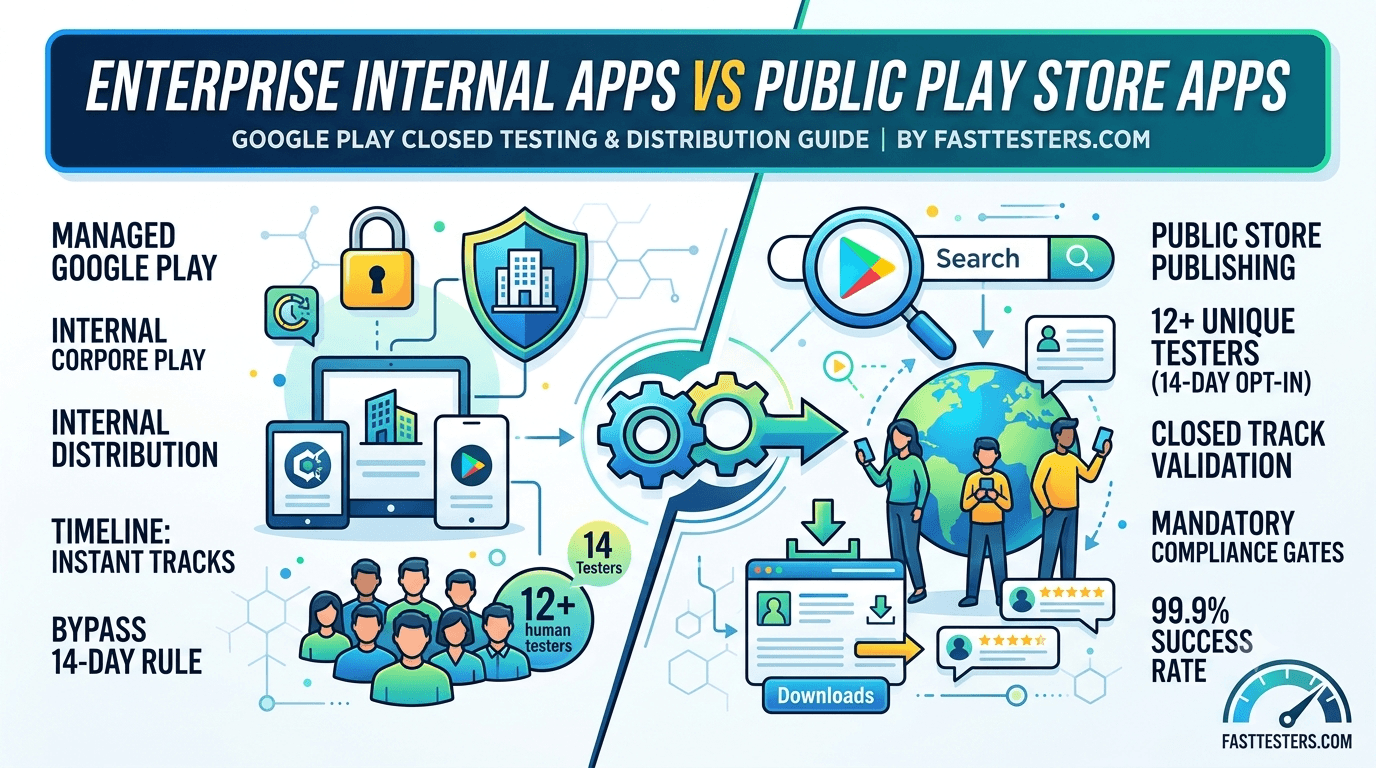
When engineering an Android ecosystem strategy, choosing the right deployment path dramatically affects your timeline and testing criteria. Developers often confuse the lenient requirements of enterprise internal apps with the strict publishing protocols governing public Play Store apps. If you are deploying an app using a personal developer account, understanding these differences is critical to avoiding compliance delays.
Google Play closed testing is now a mandatory step for almost all new individual publishers. This complete guide breaks down the core structural contrasts between enterprise distribution tracks and public store releases, detailing how to safely clear Google's verification gates.
Why This Matters: The New Regulatory Baseline
To curb low-quality software deployments, Google enforces specific friction steps for personal developer accounts created after November 2023. These publishers are required to run a formal closed testing track containing a minimum of 12 unique human testers who remain consistently opted into the track for 14 consecutive days before public production access is unlocked.
While large organizations utilizing Managed Google Play or corporate enterprise profiles bypass these rules for internal workforce apps, independent developers looking to list public Play Store apps must face this validation bottleneck head-on.
Architectural Comparison: Internal Tracks vs. Public Tracks
Choosing an incorrect track structure inside the Google Play Console can stall your launch for weeks. Here is how enterprise-grade distribution environments match up against standard consumer app setups:
| Feature Metric | Enterprise Internal Apps (Private) | Public Play Store Apps (Standard) |
|---|---|---|
| Target Audience | Specific corporate orgs / Whitelisted teams | Global Android consumer base |
| Publishing Requirements | No minimum test track rules for production | Mandatory 12 testers for 14 straight days |
| Distribution Method | Managed Google Play or MDM environments | Open, searchable Google Play Store indexing |
| Testing Loop Boundaries | Immediate internal testing deployment | Rigid verification gates before public release |
What Google's Automation Systems Inspect
During your 14-day tracking window, automated compliance algorithms constantly analyze your incoming device telemetry. Attempting to bypass these checks leads to immediate production application failure. Google actively validates:
- Authentic Device Identifiers: Every single install must resolve to distinct, active Android hardware profiles. Cloud-hosted virtual emulators and organized install farms are programmatically flagged and discarded.
- Store-Driven Opt-In Sequences: Testers must join your testing track directly through your console's web or mobile opt-in URL link. Sidestepping this by compiling and sharing manual, external APK files renders the track completely invalid.
- Continuous Baseline Floor: The 12-user floor cannot fluctuate. If an uncoordinated tester drops out or leaves the track on day 11, the entire 14-day clock immediately resets to zero.
Step-by-Step Compliance Protocol
- Initialize Your Release: Compile your app bundle (.aab) and push it directly into the Closed testing track inside your Google Play Console.
- Acquire Opt-In Assets: Move to your track's Testers management sub-menu and copy the secure, system-generated web invite link.
- Deploy the Testing Cohort: Coordinate a reliable team of 12 to 15 real users. For an instant solution, Fast Testers assigns a redundant pool of 15 automated professional testers within roughly 1 hour for a flat fee of $15.
- Maintain Consistent Build Metrics: Monitor your console daily to ensure absolute continuity for 14 consecutive days without drops.
- Apply for Production Access: Submit your formal application, complete with your historical debugging summaries and version telemetry.
The Risk of Track Confusion
A common pitfall for solo engineers is running an internal testing track instead of a closed testing track. Google's internal testing track allows lightning-fast distribution to 100 internal developers but does *not* accumulate credits toward public production validation. To clear public store reviews, you must run a formal Closed Track.
Common Compliance Mistakes to Avoid
- Early Submission: Pushing your final application request on day 13 or right before a full 336-hour logging cycle completes results in automated rejections.
- Allowing Pool Drops: Recruiting exactly 12 users leaves zero margin for error. If one device goes offline, your track fails. Always recruit a safe buffer pool of at least 15 active devices.
- Sharing Direct Packages: Sideloading APK files breaks the automated telemetry line. Your testers must use the official Play Store link.
How Fast Testers Speeds Up Your Public Launch
Fast Testers removes the logistical headaches of app validation by offering an efficient, professional optimization service tailored for independent developers. For a single, transparent fee of $15 per application—with absolutely no hidden subscription models—the platform coordinates 15 active, real-world Android testers on your behalf. Providing clean dashboard metrics and safe tracking reports, Fast Testers has successfully advanced over 1,500 apps to live production with a 99.9% approval rating.
Frequently Asked Questions
Which path triggers the testing requirement
A key decision for enterprises is whether to distribute an app privately to employees or publish it publicly on Google Play, and that choice determines whether the closed-testing requirement applies. Public apps from new personal accounts must complete a closed test with 12 testers opted in for 14 continuous days before production, whereas private enterprise distribution through managed channels follows a different model. Understanding this early lets you pick the right distribution path for your app's audience and avoid surprises about testing obligations. See our closed testing guide and Google's managed Google Play documentation.
If you do go the public route, you can remove tester recruitment as a bottleneck by sourcing verified real testers — you can submit your app. See where to find real testers.
Private enterprise distribution
For apps meant only for a company's own employees, managed Google Play and enterprise mobility management (EMM) tools let you distribute privately without a public listing. This suits internal line-of-business apps — the kind employees use for work, not the public — and keeps them off the public store entirely. Private distribution avoids public discovery, public reviews, and the public-listing requirements, though you still must build, sign, and manage the app responsibly. Choose this path when your audience is strictly internal and you want centralized control over who installs the app. See government and controlled distribution and app signing.
Even internal apps benefit from testing, of course — you should validate them with a pilot group before rolling out company-wide — but the specific public closed-testing requirement is oriented toward public store apps. Match your testing approach to your distribution model. See internal vs closed testing.
Public Play Store apps
If your app is for the general public, you publish it on the public store, which brings the full set of requirements: a public listing with quality assets, accurate declarations, a privacy policy, content rating, and — for new personal accounts — the mandatory closed test before production. Public apps gain discovery, reviews, and reach, but must meet every public-facing policy and quality bar. If your enterprise product is a public-facing SaaS or consumer app, plan for these requirements and use the testing window to validate on the diverse real-world devices your public users will have. See store listing optimization and low-end device testing.
Some enterprises run both models: a public app for customers and private internal tools for staff. In that case, apply the public requirements to the public app and manage the internal ones through EMM, keeping the two workflows distinct. See testing multiple apps.
Choosing and combining models
The right model follows from your audience and goals. Internal-only tools belong in private managed distribution; public products belong on the public store with all its requirements; and many enterprises need both. Decide per app, considering who the users are, whether you want discovery, and what compliance you must meet. Getting this decision right up front avoids mismatched effort — such as building a public listing for an app only employees will use, or trying to distribute a consumer app purely through EMM. Align distribution with audience, then follow the corresponding testing and compliance path. See this guide and the agency guide.
Whichever path, keep the app well-tested and maintained, using staged rollouts and monitoring for updates. Distribution model changes who sees the app, not your responsibility to ship quality. See post-launch monitoring.
Related guides and resources
- Internal vs closed testing
- Government app distribution
- Testing multiple apps on one account
- Managed Google Play (Google)
Enterprise apps FAQ
Do internal enterprise apps need the public closed test?
The public 12-tester, 14-day requirement targets public store apps. Private enterprise distribution through managed Google Play follows a different model.
How do I distribute an app only to employees?
Use managed Google Play and EMM tools to distribute privately without a public listing, keeping the app off the public store.
Can I run both public and private apps?
Yes. Many enterprises publish a public app for customers and manage internal tools privately, keeping the two workflows distinct.
Bottom line
Whether your app is a private internal tool or a public product determines its distribution path and whether the public closed-testing requirement applies. Match the model to your audience: private managed distribution for employee-only tools, the public store (with its full requirements, including the 14-day test for new personal accounts) for consumer products, and both where needed. If you take the public route, you can remove the tester bottleneck by choosing to submit your app. See internal vs closed testing for the track details.
Expanded for topical authority — additional practical sections below. Original guide content above is unchanged.
Quick answer
Enterprise Internal Apps vs Public Play Store Apps matters because Google Play production access for many new personal developer accounts depends on a successful closed test: at least 12 real testers opted in for 14 continuous days, plus a policy-compliant, stable app. Use this guide to execute the steps correctly, avoid streak-breaking mistakes, and decide whether DIY recruitment or a managed closed testing service is the better path for your deadline.
Key takeaways
- Enterprise Internal Apps vs Public Play Store Apps should be treated as a practical Play Console workflow, not just theory.
- For many new personal accounts, 12 opted-in testers × 14 continuous days on closed testing gates production access.
- Opt-in + install from Play beats “emails invited” every time — verify counts in Console.
- Use the window for QA, listing, and compliance work so review is the only remaining gate.
- Prefer real testers and a buffer above 12; avoid anything that looks like fake engagement.
Real-world scenarios: who this matters for
The guidance in this article on Enterprise Internal Apps vs Public Play Store Apps applies across many Android product types. Use these scenarios to map the advice to your situation.
| Developer type | Typical challenge | Practical focus |
|---|---|---|
| Indie / solo | Limited tester network and time | Start closed testing early; keep a buffer above 12 opted-in testers; parallelize listing + Data safety work |
| Startup | Launch deadline vs 14-day rule | Treat the window as fixed; recruit in parallel with QA; avoid last-minute track setup |
| Agency / white-label | Multiple client apps, each needing its own test | One closed test per app; standardize opt-in onboarding; track eligibility dates per client |
| Flutter / React Native | Cross-platform build + Play Console quirks | Ship a signed AAB to closed testing; verify installs from Play, not sideload; watch vitals on mid-range devices |
| Native Kotlin | Device/API fragmentation | Cover API levels and OEMs in your tester mix; fix crashes before requesting production |
| Game / Unity | Performance + retention during 14 days | Keep testers engaged so count never dips below 12; monitor ANRs and battery |
| E-commerce / fintech | Policy + payment flows | Test checkout, permissions, and declarations carefully before production access |
| Healthcare / kids / education | Sensitive policies (Families, data) | Align listing, privacy, and content rating with real app behavior during the test window |
Visual placeholder: Scenario matrix infographic — Indie / Startup / Agency / Cross-platform paths for Enterprise Internal Apps vs Public Play Store Apps.
Closed testing vs other Play tracks (quick reference)
Context for Enterprise Internal Apps vs Public Play Store Apps: choose the right track so you do not waste the 14-day window on the wrong workflow.
| Track | Purpose | Counts toward 12×14? | Typical use |
|---|---|---|---|
| Internal testing | Fast private builds | No | Shake out bugs before the counted window |
| Closed testing | Private / invite testers | Yes (for new personal accounts) | Meet production-access requirement + QA |
| Open testing | Public beta | Not a substitute for the closed requirement | Broader feedback after closed eligibility |
| Production | Public release | N/A | After access approved + review |
Visual placeholder: Timeline — Internal → Closed (14 days) → Production request → Staged rollout.
Common mistakes (and how to avoid them)
These mistakes repeatedly show up when developers work through Enterprise Internal Apps vs Public Play Store Apps:
- Confusing invited vs opted-in testers — Only testers who open the opt-in link and install from Play count toward 12. Check the opted-in number in Play Console, not your email list.
- Recruiting exactly 12 with no buffer — One uninstall can break continuity. Aim for ~15 active opted-in testers.
- Starting the counted clock late — Listing assets, Data safety, and privacy work should run during the 14 days, not after.
- Using sideloaded APKs or fake installs — They do not satisfy Play’s closed testing expectations and can create account risk.
- Ignoring tester feedback until day 14 — Crashes that drive uninstalls threaten your streak and your review outcome.
- Requesting production access before the continuous streak completes — Eligibility checks fail even if calendar time has passed.
Troubleshooting checklist
If something feels “stuck” while applying Enterprise Internal Apps vs Public Play Store Apps, walk this list before changing strategy:
| Symptom | Likely cause | Fix |
|---|---|---|
| Console shows < 12 testers | Invites sent but not opted in | Resend opt-in link; confirm install from Play |
| “Not eligible” after 14 calendar days | Count dipped below 12 mid-window | Restore 12+ and complete a full continuous streak |
| Tester cannot join | Wrong account, Group lag, or track not published | Verify Google account, Group membership, track release |
| App fails to install | Device/API mismatch or signing issue | Check AAB, minSDK, Play App Signing |
| Production still rejected after testing | Policy, declarations, or stability — not the clock | Read the exact reason; fix that category completely |
Visual placeholder: Troubleshooting flowchart for Enterprise Internal Apps vs Public Play Store Apps.
Action checklist
Use this checklist alongside the rest of this guide on Enterprise Internal Apps vs Public Play Store Apps:
- ☐ Closed testing track created with a signed release (AAB)
- ☐ Opt-in link tested on a fresh Google account
- ☐ At least 12 testers opted in (prefer ~15)
- ☐ Daily check that opted-in count stays ≥ 12 for 14 continuous days
- ☐ Core flows exercised (login, main feature, permissions, offline/online)
- ☐ Crashes / ANRs triaged from tester reports and vitals
- ☐ Store listing, screenshots, and feature graphic drafted
- ☐ Privacy policy + Data safety + content rating aligned with real behavior
- ☐ Production access requested only after eligibility is green
- ☐ Staged rollout plan ready for first public release
Additional FAQs developers ask about Enterprise Internal Apps vs Public Play Store Apps
Quick answer: what should I do first?
Confirm you are on a closed testing track with real opted-in installs, keep 12+ testers for 14 continuous days, and fix policy/stability issues in parallel. Then use the detailed sections above for Enterprise Internal Apps vs Public Play Store Apps.
Does this apply to organization (company) accounts?
The classic 12×14 closed testing gate is primarily associated with new personal developer accounts. Always verify your account type and current Play Console eligibility messaging for your app.
Do friends and family count as testers?
Yes — if they opt in via your closed testing link and install from Google Play. They only help if they stay opted in for the continuous period.
Can I update the app during the 14 days?
You can usually push updates on the closed track, but unstable releases that cause uninstalls can threaten your tester count. Prefer polishing via internal testing first when possible.
What if production access is still rejected?
Read the exact reason. Incomplete testing is only one category — policy, Data safety mismatches, and crashes are common. Fix the cited issue fully before reapplying.
Is paying for testers allowed?
Using real people who install from Play is what matters. Avoid fake install farms. A one-time managed service that supplies real closed testers is a practical option when DIY recruitment is too slow.
How is Fast Testers different from free communities?
Free communities trade time and mutual availability. Fast Testers assigns about 15 real testers after you submit a valid closed testing link (one-time $15 per app) and includes a production access guarantee under its refund terms.
Where should I go next?
Review the related guides below, then either finish DIY recruitment or start closed testing if you need speed and continuity.
Sources, updates, and how to use this guide
This article on Enterprise Internal Apps vs Public Play Store Apps is maintained for Android developers preparing Google Play closed testing and production access. Always cross-check eligibility text inside your own Play Console, because Google’s UI labels and account rules can vary by account type and date.
- Primary official references: Google Play closed testing help, Developer Program Policies, and Play Console eligibility messaging for your app.
- Practical experience lens: guidance here reflects common failure modes indie developers and agencies hit when recruiting testers, maintaining the 14-day streak, and recovering from production-access rejections.
- Last reviewed focus: 12×14 closed testing continuity, real vs fake testers, and parallel listing/compliance work during the window.
Related guides and next steps
Continue building topical depth around Enterprise Internal Apps vs Public Play Store Apps with these Fast Testers resources:
- Background Location Apps And Play Store Review
- Biometric Login Apps And Play Store Compliance
- Coppa And Kids Apps On Google Play Store
- E Commerce Android Apps Play Store Testing Tips
- Testing Utility Apps Play Store Compliance Tips
- Wear Os Companion Apps And Play Store Testing
- Accessibility Testing Before Play Store Launch
- Ad Supported Apps And Google Play Ad Policy Testing
- Pricing — $15 closed testing
- How Fast Testers works
- FAQ
- Developer reviews
- Case studies
- Submit your app / start closed testing
Need reliable testers so your 14-day streak does not stall? Educate first with the guides above, then start when you are ready — one-time pricing, real Play installs, dashboard tracking.
Internal navigation hub — added to strengthen topical connections. Original article content above is unchanged.
Continue learning
- COPPA and Kids Apps on Google Play Store — Learn about COPPA compliance for Google Play closed testing. Complete guide for Android developers publishing .
- Testing Utility Apps: Play Store Compliance Tips — Learn about utility app testing for Google Play closed testing. Complete guide for Android developers publishi.
- GDPR Compliance for Android Apps on Google Play — Learn about GDPR requirements for Google Play closed testing. Complete guide for Android developers publishing.
- Handling User Reviews After Play Store Launch — Learn about review management for Google Play closed testing. Complete guide for Android developers publishing.
- Refund Policy Page Requirements for Play Store — Learn about refund policy setup for Google Play closed testing. Complete guide for Android developers publishi.
- Screenshot and Video Assets for Play Store Listing — Learn about store asset creation for Google Play closed testing. Complete guide for Android developers publish.
Next steps
- Ready to run closed testing with real Android testers? Submit your app or see pricing ($15 one-time).
- Compare options on our testing service comparison page, or read developer reviews and case studies.
- Still deciding? Review how Fast Testers works and the FAQ.