
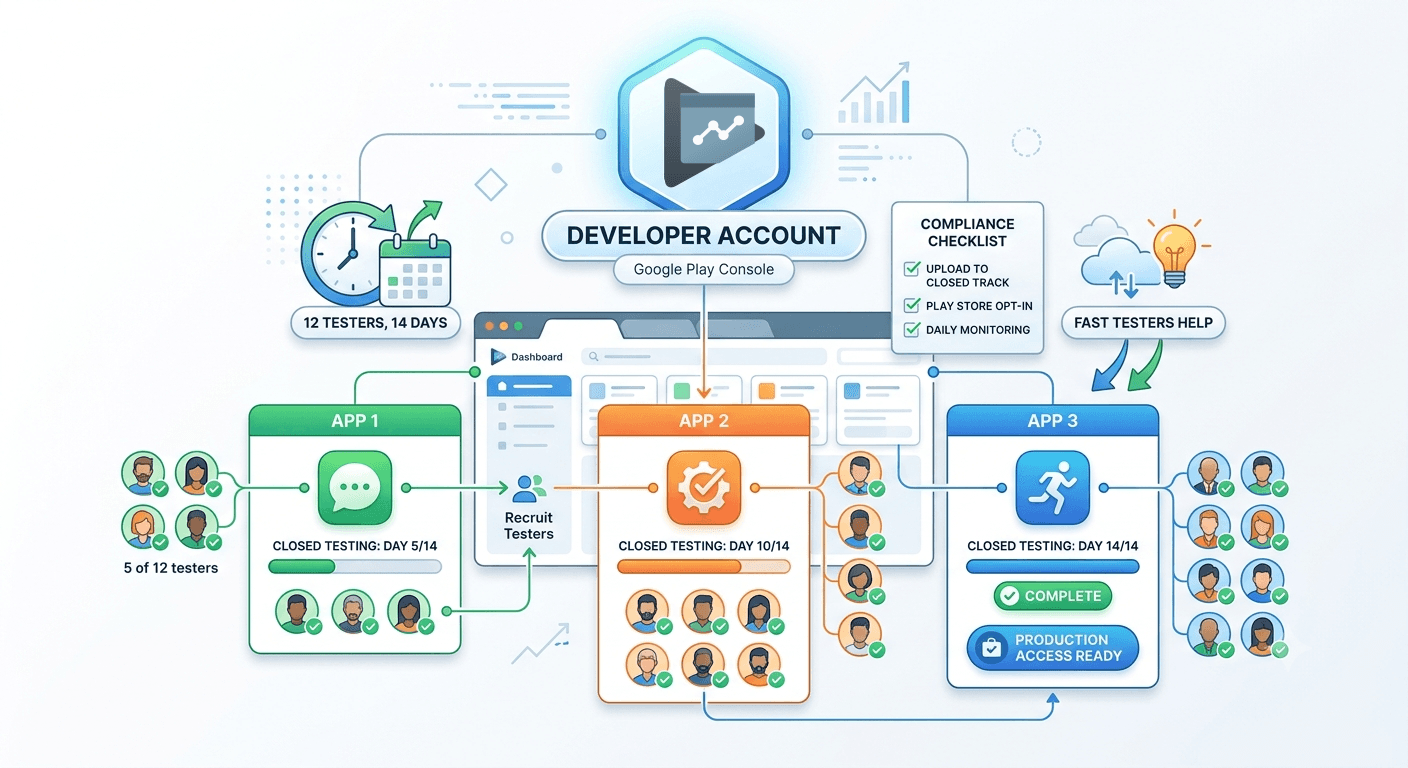
Google Play closed testing is a mandatory step for most new personal developer accounts. But what happens when you are an indie creator or a software shop running multiple apps on one developer account? Managing separate testing tracks concurrently can be an operational headache if you rely entirely on organic outreach or standard testing circles.
This comprehensive guide covers how multi-app developer configurations function under Google's policies, how the rigorous 14-day criteria apply to each app package, and how you can seamlessly scale your compliance tracking without your launch timeline collapsing.
Crucial Policy Reminder: Personal developer accounts created after November 2023 must run a closed testing track with a minimum of 20 testers who have actively opted in for at least 14 consecutive days before requesting full production access. This requirement applies individually to each unique app package ID you intend to publish.
Why Multi-App Management Matters in Google Play
Google Play does not grant your developer account global production rights just because your first app safely passed evaluation. The restriction applies on a per-app basis. If you run multiple projects side-by-side inside the same Play Console ecosystem, each application must independently complete its unique closed testing track criteria before moving to the live storefront.
Isolated Tracks
Tester groups, opt-in metrics, and release stability graphs are evaluated cleanly per package ID. Progress on App A does not cross-contaminate App B.
Simultaneous Reviews
You are fully allowed to run testing tracks for completely different apps simultaneously under one console dashboard without issue.
What Google Verifies During Application Review
When you click the "Apply for Production" button, automated systems alongside human reviewers meticulously inspect your historical testing engagement logs. Google checks specific behavior to prevent gaming of the system:
- Unique Opt-In Accounts: Genuine, distinct Google Accounts opting into the specific track via web or Android-native portals.
- Continuous Device Heartbeats: Google Play verifies that devices pull background updates and maintain an active relationship with the platform over the 14-day window. Emulators, artificial device clusters, and click farms will trigger a quick automated refusal.
- No Crash Loops: High uninstallation rates triggered by massive Day-1 or Day-2 crashes suggest unvetted, unpolished builds which negatively impact review success.

Step-by-Step Multi-App Compliance Framework
To safely scale your release pipeline when coordinating multiple application projects, follow this linear operational framework:
- Upload Separate Builds: Generate separate, unique package namespaces and upload your dynamic app bundles separately to the internal or Closed testing tracks in the Play Console.
- Generate Unique Web Opt-In URLs: Navigate cleanly into the Testers configuration tab inside each app space to harvest your independent invitation and web links.
- Provision Testing Pools: Recruit separate tester groups. For multiple apps, this step becomes exponentially hard. Platforms like Fast Testers can assign distinct, verified blocks of device profiles in under an hour.
- Consistently Monitor Interaction: Keep an eye on daily active installation metrics for 14 continuous days without breaking the streak.
- File the Production Questionnaire: Answer the final production application accurately, displaying detailed qualitative evidence gathered from your testing feedback windows.
Crucial Traps to Avoid When Stacking Apps
Publishing teams scaling outward often run into systemic errors that restart their 14-day timer or lock them out of production pipelines indefinitely:
Confusing Internal vs. Closed Tracks: Internal testing tracks (up to 100 internal developers) do not fulfill the required public/private policy milestones. Only official *Closed testing* pools fulfill Google's rigorous policy constraints.
Tester Retraction Deficits: If your total active tester drop count dips beneath the mandatory limits mid-cycle, the 14-day window resets automatically. Always over-provision with a buffer (aim for 25 to 30 active participants).
Premature Production Applications: Submitting a application on Day 13 or running calculations precisely down to the exact second frequently flags structural errors. Let the track run safely into Day 15 or 16 to secure ironclad data metrics.
How Fast Testers Streamlines Your Development Scale
If you are coordinating multiple app rollouts, relying on family or social networks to test 3, 4, or 5 separate apps simultaneously is nearly impossible. Fast Testers removes this logistical friction entirely.
With an economical, fixed flat rate of just $15 per unique application package and zero monthly subscription loops, you receive immediate access to professional, dedicated Android environments. You gain deep analytical transparency with an integrated dashboard tracking daily device health logs, guaranteed uptime metrics, and a 99.9% historic success rate covering more than 1,500 safely published applications globally.
Frequently Asked Questions
Accelerate Your Multi-App Deployment Today
Stop chasing down individuals to install your testing builds. Secure predictable, fully compliant testing circles for all your application configurations instantly.
The 14-day rule applies to each new app
A single developer account can host many apps, but the closed-testing requirement is evaluated per app, so each new app that needs production access must complete its own closed test with 12 testers opted in for 14 continuous days (for the account types the rule covers). Publishing your second or third app does not exempt it because your first one launched; each is a separate submission with its own testing obligation. Understanding this shapes how you schedule multiple launches from one account. See our closed testing guide and the 12-testers policy.
Running several tests means several tester groups, which is where a repeatable pipeline pays off. Rather than scrambling for fresh testers each time, you can submit each app to source verified real testers on demand. See where to find real testers.
Organizing multiple apps cleanly
Managing several apps under one account rewards organization. Use clear, consistent naming and internal identifiers, keep each app's builds and version codes straight, and maintain separate listings, declarations, and legal pages tailored to each app. The Play Console lets you switch between apps, but the discipline of keeping each app's assets and compliance distinct is on you. Mixing them up — reusing a privacy policy that does not match a given app, for instance — is a common source of rejection. See privacy policy requirements and the Console beginner guide.
Signing and account standing apply at the account level, so a policy problem with one app can have consequences for your account and thus your other apps. Keep every app compliant to protect the whole portfolio. See account safety.
Running windows in parallel
If you launch several apps close together, you may run multiple 14-day windows simultaneously, which is manageable with tracking. Record each app's window start, active tester count, and readiness in a shared view so none silently stalls — a tester count slipping below 12 on one app can reset its progress while you focus on another. Staggering launches slightly can ease the load, but parallel windows are entirely feasible with a reliable tester source and daily monitoring. See keeping testers engaged and the agency guide.
Standardize your process across apps: the same checklist, the same tester pipeline, and the same monitoring cadence turn multiple launches into a repeatable routine rather than a series of one-off efforts. See closed testing for white-label apps.
Maintaining a growing portfolio
Every app you launch adds ongoing maintenance: updates, monitoring, and support. As your portfolio grows, watch each app's Android vitals and reviews centrally so a problem in one does not go unnoticed, and push every update through your testing tracks and staged rollouts. Policy changes such as target API level updates affect all your apps at once, so plan to update them together when Google shifts requirements. A portfolio maintained proactively stays healthy; one neglected accumulates problems across many apps simultaneously. See post-launch monitoring and target API level requirements.
Reusing components, testers, and processes across apps is the efficiency that makes a multi-app strategy sustainable for a small team. Build the reusable pipeline once and every subsequent launch gets easier. See updating after release.
Related guides and resources
- Agency guide to testing client apps
- Closed testing for white-label apps
- The 12-testers policy
- Closed testing (Google)
Multiple apps FAQ
Does each app on my account need its own closed test?
Yes. The requirement is evaluated per app, so each new app needing production access completes its own 12-tester, 14-day window.
Can I run multiple test windows at once?
Yes, with tracking. Record each app's window start, tester count, and readiness so none stalls, and a reliable tester source makes parallel windows feasible.
Can one app's policy problem affect the others?
Yes. Standing applies at the account level, so keep every app compliant to protect your whole portfolio.
Bottom line
Hosting many apps on one account is efficient, but each new app carries its own closed-testing requirement, and account-level standing links their fates. Stay organized with distinct listings and declarations, run parallel windows with careful tracking, standardize your process, and maintain the whole portfolio proactively. A repeatable tester pipeline is what makes multiple launches sustainable — you can submit each app. See the agency guide for scaling further.
Expanded for topical authority — additional practical sections below. Original guide content above is unchanged.
Quick answer
Testing Multiple Apps on One Developer Account matters because Google Play production access for many new personal developer accounts depends on a successful closed test: at least 12 real testers opted in for 14 continuous days, plus a policy-compliant, stable app. Use this guide to execute the steps correctly, avoid streak-breaking mistakes, and decide whether DIY recruitment or a managed closed testing service is the better path for your deadline.
Key takeaways
- Testing Multiple Apps on One Developer Account should be treated as a practical Play Console workflow, not just theory.
- For many new personal accounts, 12 opted-in testers × 14 continuous days on closed testing gates production access.
- Opt-in + install from Play beats “emails invited” every time — verify counts in Console.
- Use the window for QA, listing, and compliance work so review is the only remaining gate.
- Prefer real testers and a buffer above 12; avoid anything that looks like fake engagement.
Real-world scenarios: who this matters for
The guidance in this article on Testing Multiple Apps on One Developer Account applies across many Android product types. Use these scenarios to map the advice to your situation.
| Developer type | Typical challenge | Practical focus |
|---|---|---|
| Indie / solo | Limited tester network and time | Start closed testing early; keep a buffer above 12 opted-in testers; parallelize listing + Data safety work |
| Startup | Launch deadline vs 14-day rule | Treat the window as fixed; recruit in parallel with QA; avoid last-minute track setup |
| Agency / white-label | Multiple client apps, each needing its own test | One closed test per app; standardize opt-in onboarding; track eligibility dates per client |
| Flutter / React Native | Cross-platform build + Play Console quirks | Ship a signed AAB to closed testing; verify installs from Play, not sideload; watch vitals on mid-range devices |
| Native Kotlin | Device/API fragmentation | Cover API levels and OEMs in your tester mix; fix crashes before requesting production |
| Game / Unity | Performance + retention during 14 days | Keep testers engaged so count never dips below 12; monitor ANRs and battery |
| E-commerce / fintech | Policy + payment flows | Test checkout, permissions, and declarations carefully before production access |
| Healthcare / kids / education | Sensitive policies (Families, data) | Align listing, privacy, and content rating with real app behavior during the test window |
Visual placeholder: Scenario matrix infographic — Indie / Startup / Agency / Cross-platform paths for Testing Multiple Apps on One Developer Account.
Comparison: DIY recruitment vs managed closed testing
When your goal is Google Play production access, the path you choose for testers affects time, risk, and feedback quality. Use this comparison while deciding how to apply Testing Multiple Apps on One Developer Account.
| Approach | Time to 12 opted-in | Cost | Dropout risk | Feedback quality | Best when |
|---|---|---|---|---|---|
| Friends & family | Days–weeks | $0 | High | Mixed | Tiny MVP, flexible timeline |
| Reddit / Discord / Telegram | Unpredictable | $0–low | High | Variable | You can manage onboarding daily |
| Peer community exchange | Variable | $0 | Medium | Developer-biased | You can test others’ apps in return |
| Managed closed testing (e.g. Fast Testers) | ~1 hour after valid link | $15 one-time / app | Low (buffer of 15) | Real Play installs | You need speed + continuity for 14 days |
Decision tip: If a broken streak would delay revenue or a client deadline, prioritize reliability over $0 recruitment. DIY is fine when you already have engaged testers and can monitor Play Console daily.
Visual placeholder: Comparison diagram — DIY vs community vs managed testing for Testing Multiple Apps on One Developer Account.
Common mistakes (and how to avoid them)
These mistakes repeatedly show up when developers work through Testing Multiple Apps on One Developer Account:
- Confusing invited vs opted-in testers — Only testers who open the opt-in link and install from Play count toward 12. Check the opted-in number in Play Console, not your email list.
- Recruiting exactly 12 with no buffer — One uninstall can break continuity. Aim for ~15 active opted-in testers.
- Starting the counted clock late — Listing assets, Data safety, and privacy work should run during the 14 days, not after.
- Using sideloaded APKs or fake installs — They do not satisfy Play’s closed testing expectations and can create account risk.
- Ignoring tester feedback until day 14 — Crashes that drive uninstalls threaten your streak and your review outcome.
- Requesting production access before the continuous streak completes — Eligibility checks fail even if calendar time has passed.
Troubleshooting checklist
If something feels “stuck” while applying Testing Multiple Apps on One Developer Account, walk this list before changing strategy:
| Symptom | Likely cause | Fix |
|---|---|---|
| Console shows < 12 testers | Invites sent but not opted in | Resend opt-in link; confirm install from Play |
| “Not eligible” after 14 calendar days | Count dipped below 12 mid-window | Restore 12+ and complete a full continuous streak |
| Tester cannot join | Wrong account, Group lag, or track not published | Verify Google account, Group membership, track release |
| App fails to install | Device/API mismatch or signing issue | Check AAB, minSDK, Play App Signing |
| Production still rejected after testing | Policy, declarations, or stability — not the clock | Read the exact reason; fix that category completely |
Visual placeholder: Troubleshooting flowchart for Testing Multiple Apps on One Developer Account.
Action checklist
Use this checklist alongside the rest of this guide on Testing Multiple Apps on One Developer Account:
- ☐ Closed testing track created with a signed release (AAB)
- ☐ Opt-in link tested on a fresh Google account
- ☐ At least 12 testers opted in (prefer ~15)
- ☐ Daily check that opted-in count stays ≥ 12 for 14 continuous days
- ☐ Core flows exercised (login, main feature, permissions, offline/online)
- ☐ Crashes / ANRs triaged from tester reports and vitals
- ☐ Store listing, screenshots, and feature graphic drafted
- ☐ Privacy policy + Data safety + content rating aligned with real behavior
- ☐ Production access requested only after eligibility is green
- ☐ Staged rollout plan ready for first public release
Additional FAQs developers ask about Testing Multiple Apps on One Developer Account
Quick answer: what should I do first?
Confirm you are on a closed testing track with real opted-in installs, keep 12+ testers for 14 continuous days, and fix policy/stability issues in parallel. Then use the detailed sections above for Testing Multiple Apps on One Developer Account.
Does this apply to organization (company) accounts?
The classic 12×14 closed testing gate is primarily associated with new personal developer accounts. Always verify your account type and current Play Console eligibility messaging for your app.
Do friends and family count as testers?
Yes — if they opt in via your closed testing link and install from Google Play. They only help if they stay opted in for the continuous period.
Can I update the app during the 14 days?
You can usually push updates on the closed track, but unstable releases that cause uninstalls can threaten your tester count. Prefer polishing via internal testing first when possible.
What if production access is still rejected?
Read the exact reason. Incomplete testing is only one category — policy, Data safety mismatches, and crashes are common. Fix the cited issue fully before reapplying.
Is paying for testers allowed?
Using real people who install from Play is what matters. Avoid fake install farms. A one-time managed service that supplies real closed testers is a practical option when DIY recruitment is too slow.
How is Fast Testers different from free communities?
Free communities trade time and mutual availability. Fast Testers assigns about 15 real testers after you submit a valid closed testing link (one-time $15 per app) and includes a production access guarantee under its refund terms.
Where should I go next?
Review the related guides below, then either finish DIY recruitment or start closed testing if you need speed and continuity.
Sources, updates, and how to use this guide
This article on Testing Multiple Apps on One Developer Account is maintained for Android developers preparing Google Play closed testing and production access. Always cross-check eligibility text inside your own Play Console, because Google’s UI labels and account rules can vary by account type and date.
- Primary official references: Google Play closed testing help, Developer Program Policies, and Play Console eligibility messaging for your app.
- Practical experience lens: guidance here reflects common failure modes indie developers and agencies hit when recruiting testers, maintaining the 14-day streak, and recovering from production-access rejections.
- Last reviewed focus: 12×14 closed testing continuity, real vs fake testers, and parallel listing/compliance work during the window.
Related guides and next steps
Continue building topical depth around Testing Multiple Apps on One Developer Account with these Fast Testers resources:
- Ad Supported Apps And Google Play Ad Policy Testing
- Agency Guide Testing Client Apps On Google Play
- Analytics Sdk Testing During Closed Testing
- Android Tv Apps And Google Play Testing Tracks
- Ar Vr Android Apps And Closed Testing Requirements
- Camera And Microphone Apps Testing Checklist
- Closed Testing Vs Open Testing On Google Play
- E Commerce Android Apps Play Store Testing Tips
- Pricing — $15 closed testing
- How Fast Testers works
- FAQ
- Developer reviews
- Case studies
- Submit your app / start closed testing
Need reliable testers so your 14-day streak does not stall? Educate first with the guides above, then start when you are ready — one-time pricing, real Play installs, dashboard tracking.
Internal navigation hub — added to strengthen topical connections. Original article content above is unchanged.
Continue learning
- Google Play Closed Testing for Flutter Apps — Learn about Flutter app testing for Google Play closed testing. Complete guide for Android developers publishi.
- Google Play Closed Testing for React Native Apps — Learn about React Native testing for Google Play closed testing. Complete guide for Android developers publish.
- Google Play Closed Testing for SaaS Android Apps — Learn about SaaS app testing for Google Play closed testing. Complete guide for Android developers publishing .
- Google Play Closed Testing for White-Label Apps — Learn about white-label testing for Google Play closed testing. Complete guide for Android developers publishi.
- Kotlin Android Apps: Closed Testing Best Practices — Learn about native Android testing for Google Play closed testing. Complete guide for Android developers publi.
- VPN Apps and Google Play Closed Testing Challenges — Learn about VPN app testing for Google Play closed testing. Complete guide for Android developers publishing o.
Next steps
- Ready to run closed testing with real Android testers? Submit your app or see pricing ($15 one-time).
- Compare options on our testing service comparison page, or read developer reviews and case studies.
- Still deciding? Review how Fast Testers works and the FAQ.