

Navigating your first app deployment on the Android ecosystem can be daunting. With recent changes to developer policies, configuring a Google Play closed testing framework is a mandatory gatekeeper sequence for most newly registered personal developer accounts before hitting general availability.
One critical piece that catches engineers off-guard during this deployment cycle is understanding exactly how to handle user reviews inside pre-production pipelines. This guide clarifies review visibility mechanics and highlights how streamlined testing models fulfill stringent criteria without manual recruitment cycles.
Why Pre-Production Review Management Matters
Personal developer accounts instantiated after November 2023 must strictly execute a closed test sequence involving at least 12 testers engaged continuously for 14 consecutive days before requesting production authorization. Simply finding installations is not enough; tracking engagement behavior through active feedback pipelines is how Google confirms an app is ready for scale.
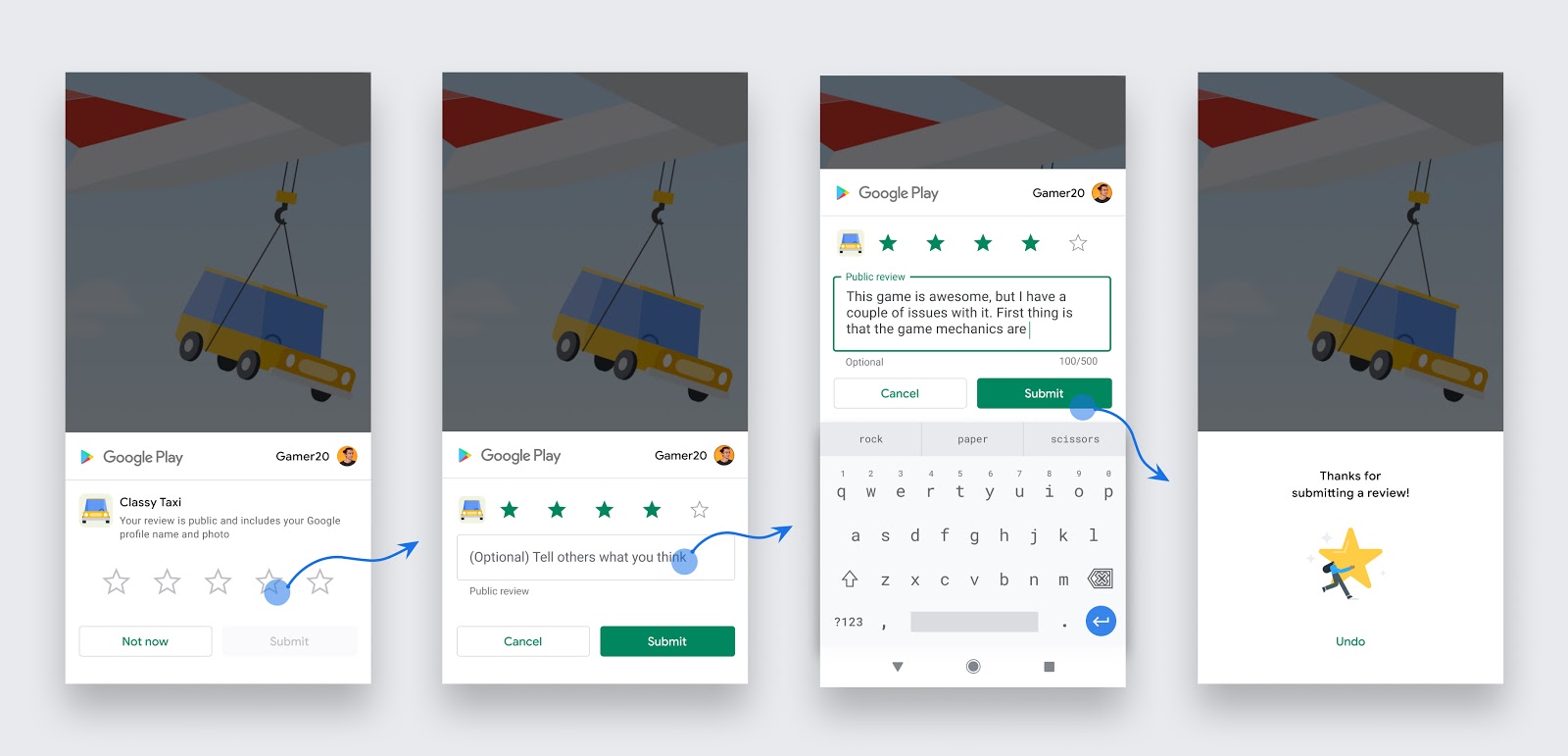
Crucial Distinction: Feedback submitted inside a Google Play closed testing track does not affect your public star ratings. They are completely isolated, private interactions routed strictly between your opted-in testers and your Google Play Console dashboard.
Public vs. Private Feedback Streams
When you release an app to the public production track, user reviews are indexed immediately, influencing your visible Store Ranking positions and overall conversions. However, feedback pathways display very differently inside closed test channels:
Closed Track Private Reviews
When active users download your software using a targeted tester invite link, the typical "Write a Review" section on the Play Store app listing is replaced with a private feedback panel. This system prevents early-stage runtime bugs, rendering quirks, or formatting anomalies from damaging your public ranking metrics before your official consumer launch.
What Google Validates During Policy Audits
When you fill out your production application, humans and algorithms analyze your console datasets to confirm authentic, functional interaction occurred during your testing timeframe. Google directly checks the following items:
- Opt-In Authenticity: Authentic consumer profiles accessing your build via dynamic opt-in pages rather than side-channeled device installations.
- Device Fingerprinting: Varied device models interacting over native network nodes (emulator-heavy installations or click-farm packages cause automated rejections).
- Continuous Tracking: Constant system presence across a minimum 14-day timeline. If your user pool thins out below the 12-user boundary for even an hour, your sequence resets.
Step-by-Step Closed Testing Framework
To successfully transition your product through the pre-launch environment and securely harvest safe review feedback, deploy this precise sequential checklist:
- Target Closed Track Distribution: Upload your app package (.aab bundle) specifically inside the Closed testing menu environment within your Play Console.
- Configure Test Pool Lists: Organize your target access via an email list layout or an managed Google Groups directory structure inside the "Testers" tab.
- Generate Opt-In URLs: Extract the dynamic web link provided by the system. Testers must tap this specific route to authorize their access rights.
- Onboard Compliant Users: Secure your baseline user group. Utilizing specialized systems like Fast Testers safely provisions 15 real, globally distinct profiles in roughly 1 hour.
- Collect Private Feedback: Monitor incoming diagnostic bug summaries and internal text reviews directly within your developer interface backend.
- Initiate Final Review Request: On day 15, compile your qualitative summary responses and formally request transition clearance.
Critical Missteps to Avoid
Mistakes made early in your testing pipeline can waste weeks of development time. Avoid these major anti-patterns to keep your launch on track:
- Confusing Tracks: Using open or internal diagnostic tracks which do not advance the primary 12-user baseline checklist required for real personal accounts.
- Tester Attrition: Allowing your testing pool to drop below 12 active users mid-way through the track, which completely invalidates your progress.
- Direct File Distribution: Sharing raw APK installations manually via external drives, skipping the critical web opt-in registration loop entirely.
- Premature Application: Clicking the final review submittal option on day 13 or 14 rather than letting 14 full, consecutive 24-hour testing periods settle out completely.
Accelerating Launch Metrics with Fast Testers
Manually coordinating 12 contacts to continuously install, test, and offer feedback for half a month is an administrative headache. Fast Testers offers a seamless, one-time $15 per app solution with zero monthly recurring charges.
The framework immediately distributes your private registration endpoints to 15 verified, individual real-world devices, generating the exact activity history Google's auditing mechanisms require. With an established track record across thousands of applications and a 99.9% optimization throughput rating, your pathway to final production approvals is fully guaranteed.
Frequently Asked Questions
Unlock Production Access Seamlessly
Skip the stress of finding testers. Access 15 professional Android users instantly and pass your Play Store launch requirements on your very first try.
Start Your Closed Test Track NowReview skills start in the testing window
Handling public reviews well is a skill you can practice during the mandatory closed test — 12 testers opted in for 14 continuous days before production. Your testers give you feedback in a low-stakes setting, letting you rehearse listening, triaging, and responding before that feedback becomes public and rating-affecting. Developers who treat tester feedback seriously arrive at launch already good at turning criticism into fixes, which is exactly what review management demands. See our closed testing guide and turning feedback into improvements.
A strong closed test also prevents many negative reviews outright, by catching the crashes and confusions that would otherwise become one-star complaints. Real, device-diverse testers are key to this — you can submit your app to get them. See real vs fake testers.
Responding to reviews effectively
Responding to reviews is one of the highest-leverage, lowest-cost things a developer can do. Thank positive reviewers to reinforce goodwill, and address negative ones with empathy, a concrete fix or workaround, and a support contact for follow-up. A calm, helpful public reply often converts an angry reviewer into a loyal user and, just as importantly, shows every prospective installer reading the reviews that you are attentive and responsive. Avoid defensive or dismissive replies, which do the opposite. Respond promptly, especially to reviews that flag a bug affecting many users. See Google's reply to reviews guidance and support setup.
When you fix an issue a reviewer raised, reply to tell them, and consider mentioning it in your release notes. Users who see their feedback acted on frequently update their rating upward, directly improving your score. See updating after release.
Mining reviews for product insight
Reviews are a continuous, free stream of product feedback. Look for patterns: several reviews mentioning the same bug point to a fix that will lift your rating; repeated confusion about a feature signals a UX problem; recurring feature requests reveal demand. Categorize and track this feedback so it informs your roadmap rather than disappearing. The reviews that sting the most often contain the most valuable signal, so read them for information, not just morale. An app that visibly evolves in response to its reviews earns a reputation for quality. See post-launch monitoring and this guide.
Correlate review spikes with releases: a sudden drop in rating after an update points straight to a regression to investigate and hotfix. Reviews thus double as an early-warning system for your latest release. See staged rollouts.
Managing your rating over time
Your overall rating is a durable asset that influences installs, so manage it deliberately. Prompt satisfied users to rate the app at natural moments of success (never nag or manipulate, which violates policy), fix the issues that generate low ratings, and respond consistently to reviews. Avoid prohibited tactics like incentivized or fake reviews, which risk enforcement and provide no real benefit. Over time, a genuinely good app plus attentive review management produces a rating that markets itself. See account safety and listing and conversion.
Remember that ratings recover: a rough early period improves as you fix issues and satisfied users accumulate, especially with Google's rating models weighting recent reviews. Persistence and responsiveness, not gaming, are what build a strong long-term rating. See recovering from setbacks.
Related guides and resources
- Customer support setup
- Post-launch monitoring
- Turning tester feedback into improvements
- Reply to reviews (Google)
User reviews FAQ
Should I respond to negative reviews?
Yes, with empathy, a concrete fix or workaround, and a support contact. It can convert critics and shows prospects you are responsive.
Can I ask users to rate my app?
Yes, at natural moments of success, but never nag, manipulate, or incentivize ratings, which violates policy and risks enforcement.
Do reviews help me find bugs?
Yes. Clusters of reviews mentioning the same issue point to fixes that will lift your rating, and a post-update rating drop signals a regression.
Bottom line
Reviews are simultaneously a growth lever, a product-feedback stream, and an early-warning system. Respond to them with empathy and concrete help, mine them for patterns that guide your roadmap, and manage your rating through genuine quality and responsiveness rather than prohibited tactics. The skill starts in your closed-testing window, where a strong test also prevents many negative reviews outright. To recruit real testers who catch issues before users do, you can submit your app. See post-launch monitoring to tie it together.
Expanded for topical authority — additional practical sections below. Original guide content above is unchanged.
Quick answer
Handling User Reviews After Play Store Launch matters because Google Play production access for many new personal developer accounts depends on a successful closed test: at least 12 real testers opted in for 14 continuous days, plus a policy-compliant, stable app. Use this guide to execute the steps correctly, avoid streak-breaking mistakes, and decide whether DIY recruitment or a managed closed testing service is the better path for your deadline.
Key takeaways
- Handling User Reviews After Play Store Launch should be treated as a practical Play Console workflow, not just theory.
- For many new personal accounts, 12 opted-in testers × 14 continuous days on closed testing gates production access.
- Opt-in + install from Play beats “emails invited” every time — verify counts in Console.
- Use the window for QA, listing, and compliance work so review is the only remaining gate.
- Prefer real testers and a buffer above 12; avoid anything that looks like fake engagement.
Real-world scenarios: who this matters for
The guidance in this article on Handling User Reviews After Play Store Launch applies across many Android product types. Use these scenarios to map the advice to your situation.
| Developer type | Typical challenge | Practical focus |
|---|---|---|
| Indie / solo | Limited tester network and time | Start closed testing early; keep a buffer above 12 opted-in testers; parallelize listing + Data safety work |
| Startup | Launch deadline vs 14-day rule | Treat the window as fixed; recruit in parallel with QA; avoid last-minute track setup |
| Agency / white-label | Multiple client apps, each needing its own test | One closed test per app; standardize opt-in onboarding; track eligibility dates per client |
| Flutter / React Native | Cross-platform build + Play Console quirks | Ship a signed AAB to closed testing; verify installs from Play, not sideload; watch vitals on mid-range devices |
| Native Kotlin | Device/API fragmentation | Cover API levels and OEMs in your tester mix; fix crashes before requesting production |
| Game / Unity | Performance + retention during 14 days | Keep testers engaged so count never dips below 12; monitor ANRs and battery |
| E-commerce / fintech | Policy + payment flows | Test checkout, permissions, and declarations carefully before production access |
| Healthcare / kids / education | Sensitive policies (Families, data) | Align listing, privacy, and content rating with real app behavior during the test window |
Visual placeholder: Scenario matrix infographic — Indie / Startup / Agency / Cross-platform paths for Handling User Reviews After Play Store Launch.
Closed testing vs other Play tracks (quick reference)
Context for Handling User Reviews After Play Store Launch: choose the right track so you do not waste the 14-day window on the wrong workflow.
| Track | Purpose | Counts toward 12×14? | Typical use |
|---|---|---|---|
| Internal testing | Fast private builds | No | Shake out bugs before the counted window |
| Closed testing | Private / invite testers | Yes (for new personal accounts) | Meet production-access requirement + QA |
| Open testing | Public beta | Not a substitute for the closed requirement | Broader feedback after closed eligibility |
| Production | Public release | N/A | After access approved + review |
Visual placeholder: Timeline — Internal → Closed (14 days) → Production request → Staged rollout.
Common mistakes (and how to avoid them)
These mistakes repeatedly show up when developers work through Handling User Reviews After Play Store Launch:
- Confusing invited vs opted-in testers — Only testers who open the opt-in link and install from Play count toward 12. Check the opted-in number in Play Console, not your email list.
- Recruiting exactly 12 with no buffer — One uninstall can break continuity. Aim for ~15 active opted-in testers.
- Starting the counted clock late — Listing assets, Data safety, and privacy work should run during the 14 days, not after.
- Using sideloaded APKs or fake installs — They do not satisfy Play’s closed testing expectations and can create account risk.
- Ignoring tester feedback until day 14 — Crashes that drive uninstalls threaten your streak and your review outcome.
- Requesting production access before the continuous streak completes — Eligibility checks fail even if calendar time has passed.
Troubleshooting checklist
If something feels “stuck” while applying Handling User Reviews After Play Store Launch, walk this list before changing strategy:
| Symptom | Likely cause | Fix |
|---|---|---|
| Console shows < 12 testers | Invites sent but not opted in | Resend opt-in link; confirm install from Play |
| “Not eligible” after 14 calendar days | Count dipped below 12 mid-window | Restore 12+ and complete a full continuous streak |
| Tester cannot join | Wrong account, Group lag, or track not published | Verify Google account, Group membership, track release |
| App fails to install | Device/API mismatch or signing issue | Check AAB, minSDK, Play App Signing |
| Production still rejected after testing | Policy, declarations, or stability — not the clock | Read the exact reason; fix that category completely |
Visual placeholder: Troubleshooting flowchart for Handling User Reviews After Play Store Launch.
Action checklist
Use this checklist alongside the rest of this guide on Handling User Reviews After Play Store Launch:
- ☐ Closed testing track created with a signed release (AAB)
- ☐ Opt-in link tested on a fresh Google account
- ☐ At least 12 testers opted in (prefer ~15)
- ☐ Daily check that opted-in count stays ≥ 12 for 14 continuous days
- ☐ Core flows exercised (login, main feature, permissions, offline/online)
- ☐ Crashes / ANRs triaged from tester reports and vitals
- ☐ Store listing, screenshots, and feature graphic drafted
- ☐ Privacy policy + Data safety + content rating aligned with real behavior
- ☐ Production access requested only after eligibility is green
- ☐ Staged rollout plan ready for first public release
Additional FAQs developers ask about Handling User Reviews After Play Store Launch
Quick answer: what should I do first?
Confirm you are on a closed testing track with real opted-in installs, keep 12+ testers for 14 continuous days, and fix policy/stability issues in parallel. Then use the detailed sections above for Handling User Reviews After Play Store Launch.
Does this apply to organization (company) accounts?
The classic 12×14 closed testing gate is primarily associated with new personal developer accounts. Always verify your account type and current Play Console eligibility messaging for your app.
Do friends and family count as testers?
Yes — if they opt in via your closed testing link and install from Google Play. They only help if they stay opted in for the continuous period.
Can I update the app during the 14 days?
You can usually push updates on the closed track, but unstable releases that cause uninstalls can threaten your tester count. Prefer polishing via internal testing first when possible.
What if production access is still rejected?
Read the exact reason. Incomplete testing is only one category — policy, Data safety mismatches, and crashes are common. Fix the cited issue fully before reapplying.
Is paying for testers allowed?
Using real people who install from Play is what matters. Avoid fake install farms. A one-time managed service that supplies real closed testers is a practical option when DIY recruitment is too slow.
How is Fast Testers different from free communities?
Free communities trade time and mutual availability. Fast Testers assigns about 15 real testers after you submit a valid closed testing link (one-time $15 per app) and includes a production access guarantee under its refund terms.
Where should I go next?
Review the related guides below, then either finish DIY recruitment or start closed testing if you need speed and continuity.
Sources, updates, and how to use this guide
This article on Handling User Reviews After Play Store Launch is maintained for Android developers preparing Google Play closed testing and production access. Always cross-check eligibility text inside your own Play Console, because Google’s UI labels and account rules can vary by account type and date.
- Primary official references: Google Play closed testing help, Developer Program Policies, and Play Console eligibility messaging for your app.
- Practical experience lens: guidance here reflects common failure modes indie developers and agencies hit when recruiting testers, maintaining the 14-day streak, and recovering from production-access rejections.
- Last reviewed focus: 12×14 closed testing continuity, real vs fake testers, and parallel listing/compliance work during the window.
Related guides and next steps
Continue building topical depth around Handling User Reviews After Play Store Launch with these Fast Testers resources:
- Accessibility Testing Before Play Store Launch
- Bootstrapped Developer Play Store Launch On 15
- Customer Support Setup Before Play Store Launch
- Google Play Store Listing Optimization Before Launch
- Low End Device Testing For Global Play Store Launch
- Startup Guide Launch Android App On Play Store Fast
- Background Location Apps And Play Store Review
- Battery Usage Testing And Play Store Vitals
- Pricing — $15 closed testing
- How Fast Testers works
- FAQ
- Developer reviews
- Case studies
- Submit your app / start closed testing
Need reliable testers so your 14-day streak does not stall? Educate first with the guides above, then start when you are ready — one-time pricing, real Play installs, dashboard tracking.
Internal navigation hub — added to strengthen topical connections. Original article content above is unchanged.
Continue learning
- Startup Guide: Launch Android App on Play Store Fast — Learn about startup launch strategy for Google Play closed testing. Complete guide for Android developers publ.
- COPPA and Kids Apps on Google Play Store — Learn about COPPA compliance for Google Play closed testing. Complete guide for Android developers publishing .
- Enterprise Internal Apps vs Public Play Store Apps — Learn about enterprise distribution for Google Play closed testing. Complete guide for Android developers publ.
- Refund Policy Page Requirements for Play Store — Learn about refund policy setup for Google Play closed testing. Complete guide for Android developers publishi.
- Screenshot and Video Assets for Play Store Listing — Learn about store asset creation for Google Play closed testing. Complete guide for Android developers publish.
- Testing Utility Apps: Play Store Compliance Tips — Learn about utility app testing for Google Play closed testing. Complete guide for Android developers publishi.
Next steps
- Ready to run closed testing with real Android testers? Submit your app or see pricing ($15 one-time).
- Compare options on our testing service comparison page, or read developer reviews and case studies.
- Still deciding? Review how Fast Testers works and the FAQ.