

Optimized Strategy Guide for Google Play Closed Testing and App Optimization
Launching a successful application on the Google Play Store demands more than clean code. Today, smart deployment requires strategic competitor analysis for Android app launch frameworks to carve out market space and meet Google's strict verification criteria. In particular, aligning your pre-launch testing strategy with historical competitor baselines gives your development cycle an unfair advantage.
A crucial component of this modern release strategy is navigating the mandatory Google Play closed testing lifecycle. Understanding how rival apps survive early internal phases lets you reverse-engineer a stress-free route to production access.
Why Competitor Research Changes the Game
Before initiating your testing timeline, analyzing functional competitor apps helps reveal real-world feature benchmarks, user pain points, and layout patterns. Knowing what top-performing alternatives look like means you can target specific design vulnerabilities during early release iterations.
Furthermore, evaluating competitors highlights common friction points in user retention. Incorporating these findings directly impacts how you design your user onboarding and performance goals prior to inviting external testers into your closed tracks.
The Google Play Closed Testing Mandate
For personal developer accounts established after November 2023, Google implemented rigorous quality policies to keep substandard apps out of search results. You can no longer publish a brand-new app directly to public production tracks without proving stable user engagement first.
Google evaluates user stability analytics on these closed tracks. Organic developer teams struggle heavily with this phase because relying on friends or casual professional circles frequently causes drops below the daily 12-user engagement baseline.
What Google Evaluates During Testing
The Play Console automatic monitoring algorithms verify several telemetry vectors to confirm authentic usage. Attempting to bypass these parameters triggers immediate application rejections:
Step-by-Step Compliance Checklist
To systematically secure production access on your first attempt, follow this structural track layout:
- Build Target Verification: Upload your fully compiled production bundle (AAB) straight to the Closed testing lane inside your Play Console dashboard.
- Generate Web Invites: Navigate to your active track's "Testers" management sub-tab and copy the designated web opt-in URL string.
- Onboard Stable Testers: Assemble 12 to 15 reliable, verified physical hardware testers. Services like Fast Testers can instantly deploy 15 real Android testers to your track in under an hour.
- Maintain Engagement Telemetry: Keep the application actively deployed on tracking devices for 14 consecutive days without configuration disruptions.
- Apply for Production: Complete the standard end-of-test questionnaire within the Console interface, attaching your telemetry logs as verification evidence.
Critical Mistakes to Avoid
Avoid these catastrophic workflow errors to prevent long delays during the review cycle:
- Confounding Internal with Closed Tracks: Internal testing lanes provide speed but do not count toward your mandatory 14-day timeline.
- Allowing Team Churn: Falling below 12 active hardware connections for even a single day resets your 14-day timeline to zero.
- Premature Applications: Submitting a request on day 13 or before the full 14-day matrix completes triggers immediate system flags.
- Distributing Standalone Android Package Files (APKs): Side-loading apps strips out track telemetry, making Google completely blind to user actions.
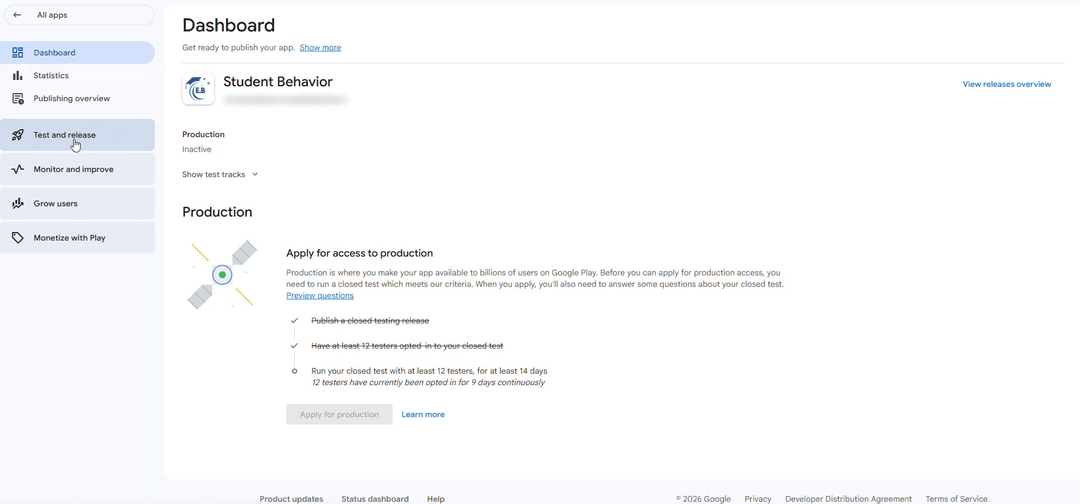
Accelerating Launch with Fast Testers
You don't need to spend weeks hunting for testers on community forums or social media groups. Fast Testers streamlines this process by managing your entire compliance phase with zero stress.
For a flat, one-time investment of $15 per app, Fast Testers connects your deployment with 15 real human-operated Android test devices. The system tracks your metrics through an intuitive user dashboard, provides clean analytics records, and includes a full production access guarantee. With more than 1,500 apps successfully launched and an outstanding 99.9% approval rating, it's the smartest choice for independent developers looking to publish without delays.
Streamline Your Google Play Verification
Pass the mandatory 14-day closed testing requirement smoothly. Secure 15 professional Android testers instantly and protect your application launch timeline today.
Start Closed Testing →Frequently Asked Questions
Use the testing window to study competitors
Because a new personal account must complete a closed test with 12 testers opted in for 14 continuous days before production, you have a natural window to conduct competitor analysis before launch. While the clock runs, study the apps you will compete with — their listings, reviews, features, and positioning — so your launch is informed rather than blind. This research directly shapes your store listing, feature priorities, and differentiation, all of which you can finalize during the mandatory period. See our closed testing guide and store listing optimization.
Your testers can even help: ask which competing apps they use and why, turning your closed test into a source of competitive insight. If you need a group of real testers who reflect your target users, you can submit your app. See where to find real testers.
What to analyze about competitors
Effective analysis covers several dimensions: the keywords competitors rank for and use in their titles and descriptions; their screenshots, feature graphics, and positioning; their pricing and monetization; and, most valuably, their reviews. Competitor reviews are a goldmine — the complaints reveal gaps you can fill, and the praise reveals table-stakes features you must match. Read one- and two-star reviews especially, because they map the unmet needs your app could address. Document these findings and let them guide both your product and your listing. See title and description SEO and handling user reviews.
Also assess their update cadence and responsiveness: a competitor that rarely updates or ignores reviews is vulnerable to an attentive newcomer. Understanding how active and responsive your rivals are tells you where consistent effort can win you users. See post-launch monitoring.
Turning analysis into differentiation
The point of competitor analysis is not to copy but to differentiate. Identify what competitors do well (match it), what they do poorly (beat it), and what they ignore (own it). Then position your listing and product around a clear, defensible difference — a feature they lack, a better experience for a specific audience, or superior responsiveness. A launch that stakes out distinct ground converts better than a me-too app lost among established rivals. Use your window to refine this positioning and test it on your testers before going public. See feature graphic tips and turning feedback into improvements.
Be realistic about where you can win as a newcomer: pick achievable niches and keywords rather than attacking entrenched giants head-on. Focused differentiation in a reachable segment beats broad competition you cannot yet sustain. See MVP launch strategy.
Making analysis an ongoing practice
Competitor analysis is not a one-time pre-launch task. Markets shift, rivals update, and new entrants appear, so revisit your analysis periodically after launch to keep your positioning sharp. Watch competitors' updates and reviews for emerging gaps and threats, and adjust your roadmap and listing accordingly. An app that continuously learns from its competitive landscape stays relevant, while one that analyzes once and forgets drifts out of step. Fold this into your regular monitoring routine. See policy changes to watch and updating after release.
Track your own performance relative to competitors too — your ranking for shared keywords, your rating versus theirs — so you can see whether your differentiation is working and double down where it is. See Android vitals.
Related guides and resources
Competitor analysis FAQ
When should I analyze competitors?
Before launch, ideally during your closed-testing window, so the insights shape your listing, features, and positioning in time.
What's the most valuable thing to study?
Competitor reviews. Complaints reveal gaps you can fill and praise reveals table-stakes features you must match.
Should I copy successful competitors?
No. Match what they do well, beat what they do poorly, and own what they ignore, positioning your app around a clear, defensible difference.
Bottom line
Competitor analysis turns a blind launch into an informed one: study rivals' keywords, listings, pricing, and especially reviews, then differentiate by matching their strengths, beating their weaknesses, and owning what they neglect. The closed-testing window is the ideal time to do this and test your positioning on real users. To recruit testers who reflect your target market and reveal competitive insight, you can submit your app. See store listing optimization to apply what you learn.
Expanded for topical authority — additional practical sections below. Original guide content above is unchanged.
Quick answer
Competitor Analysis for Android App Launch matters because Google Play production access for many new personal developer accounts depends on a successful closed test: at least 12 real testers opted in for 14 continuous days, plus a policy-compliant, stable app. Use this guide to execute the steps correctly, avoid streak-breaking mistakes, and decide whether DIY recruitment or a managed closed testing service is the better path for your deadline.
Key takeaways
- Competitor Analysis for Android App Launch should be treated as a practical Play Console workflow, not just theory.
- For many new personal accounts, 12 opted-in testers × 14 continuous days on closed testing gates production access.
- Opt-in + install from Play beats “emails invited” every time — verify counts in Console.
- Use the window for QA, listing, and compliance work so review is the only remaining gate.
- Prefer real testers and a buffer above 12; avoid anything that looks like fake engagement.
Real-world scenarios: who this matters for
The guidance in this article on Competitor Analysis for Android App Launch applies across many Android product types. Use these scenarios to map the advice to your situation.
| Developer type | Typical challenge | Practical focus |
|---|---|---|
| Indie / solo | Limited tester network and time | Start closed testing early; keep a buffer above 12 opted-in testers; parallelize listing + Data safety work |
| Startup | Launch deadline vs 14-day rule | Treat the window as fixed; recruit in parallel with QA; avoid last-minute track setup |
| Agency / white-label | Multiple client apps, each needing its own test | One closed test per app; standardize opt-in onboarding; track eligibility dates per client |
| Flutter / React Native | Cross-platform build + Play Console quirks | Ship a signed AAB to closed testing; verify installs from Play, not sideload; watch vitals on mid-range devices |
| Native Kotlin | Device/API fragmentation | Cover API levels and OEMs in your tester mix; fix crashes before requesting production |
| Game / Unity | Performance + retention during 14 days | Keep testers engaged so count never dips below 12; monitor ANRs and battery |
| E-commerce / fintech | Policy + payment flows | Test checkout, permissions, and declarations carefully before production access |
| Healthcare / kids / education | Sensitive policies (Families, data) | Align listing, privacy, and content rating with real app behavior during the test window |
Visual placeholder: Scenario matrix infographic — Indie / Startup / Agency / Cross-platform paths for Competitor Analysis for Android App Launch.
Closed testing vs other Play tracks (quick reference)
Context for Competitor Analysis for Android App Launch: choose the right track so you do not waste the 14-day window on the wrong workflow.
| Track | Purpose | Counts toward 12×14? | Typical use |
|---|---|---|---|
| Internal testing | Fast private builds | No | Shake out bugs before the counted window |
| Closed testing | Private / invite testers | Yes (for new personal accounts) | Meet production-access requirement + QA |
| Open testing | Public beta | Not a substitute for the closed requirement | Broader feedback after closed eligibility |
| Production | Public release | N/A | After access approved + review |
Visual placeholder: Timeline — Internal → Closed (14 days) → Production request → Staged rollout.
Common mistakes (and how to avoid them)
These mistakes repeatedly show up when developers work through Competitor Analysis for Android App Launch:
- Confusing invited vs opted-in testers — Only testers who open the opt-in link and install from Play count toward 12. Check the opted-in number in Play Console, not your email list.
- Recruiting exactly 12 with no buffer — One uninstall can break continuity. Aim for ~15 active opted-in testers.
- Starting the counted clock late — Listing assets, Data safety, and privacy work should run during the 14 days, not after.
- Using sideloaded APKs or fake installs — They do not satisfy Play’s closed testing expectations and can create account risk.
- Ignoring tester feedback until day 14 — Crashes that drive uninstalls threaten your streak and your review outcome.
- Requesting production access before the continuous streak completes — Eligibility checks fail even if calendar time has passed.
Troubleshooting checklist
If something feels “stuck” while applying Competitor Analysis for Android App Launch, walk this list before changing strategy:
| Symptom | Likely cause | Fix |
|---|---|---|
| Console shows < 12 testers | Invites sent but not opted in | Resend opt-in link; confirm install from Play |
| “Not eligible” after 14 calendar days | Count dipped below 12 mid-window | Restore 12+ and complete a full continuous streak |
| Tester cannot join | Wrong account, Group lag, or track not published | Verify Google account, Group membership, track release |
| App fails to install | Device/API mismatch or signing issue | Check AAB, minSDK, Play App Signing |
| Production still rejected after testing | Policy, declarations, or stability — not the clock | Read the exact reason; fix that category completely |
Visual placeholder: Troubleshooting flowchart for Competitor Analysis for Android App Launch.
Action checklist
Use this checklist alongside the rest of this guide on Competitor Analysis for Android App Launch:
- ☐ Closed testing track created with a signed release (AAB)
- ☐ Opt-in link tested on a fresh Google account
- ☐ At least 12 testers opted in (prefer ~15)
- ☐ Daily check that opted-in count stays ≥ 12 for 14 continuous days
- ☐ Core flows exercised (login, main feature, permissions, offline/online)
- ☐ Crashes / ANRs triaged from tester reports and vitals
- ☐ Store listing, screenshots, and feature graphic drafted
- ☐ Privacy policy + Data safety + content rating aligned with real behavior
- ☐ Production access requested only after eligibility is green
- ☐ Staged rollout plan ready for first public release
Additional FAQs developers ask about Competitor Analysis for Android App Launch
Quick answer: what should I do first?
Confirm you are on a closed testing track with real opted-in installs, keep 12+ testers for 14 continuous days, and fix policy/stability issues in parallel. Then use the detailed sections above for Competitor Analysis for Android App Launch.
Does this apply to organization (company) accounts?
The classic 12×14 closed testing gate is primarily associated with new personal developer accounts. Always verify your account type and current Play Console eligibility messaging for your app.
Do friends and family count as testers?
Yes — if they opt in via your closed testing link and install from Google Play. They only help if they stay opted in for the continuous period.
Can I update the app during the 14 days?
You can usually push updates on the closed track, but unstable releases that cause uninstalls can threaten your tester count. Prefer polishing via internal testing first when possible.
What if production access is still rejected?
Read the exact reason. Incomplete testing is only one category — policy, Data safety mismatches, and crashes are common. Fix the cited issue fully before reapplying.
Is paying for testers allowed?
Using real people who install from Play is what matters. Avoid fake install farms. A one-time managed service that supplies real closed testers is a practical option when DIY recruitment is too slow.
How is Fast Testers different from free communities?
Free communities trade time and mutual availability. Fast Testers assigns about 15 real testers after you submit a valid closed testing link (one-time $15 per app) and includes a production access guarantee under its refund terms.
Where should I go next?
Review the related guides below, then either finish DIY recruitment or start closed testing if you need speed and continuity.
Sources, updates, and how to use this guide
This article on Competitor Analysis for Android App Launch is maintained for Android developers preparing Google Play closed testing and production access. Always cross-check eligibility text inside your own Play Console, because Google’s UI labels and account rules can vary by account type and date.
- Primary official references: Google Play closed testing help, Developer Program Policies, and Play Console eligibility messaging for your app.
- Practical experience lens: guidance here reflects common failure modes indie developers and agencies hit when recruiting testers, maintaining the 14-day streak, and recovering from production-access rejections.
- Last reviewed focus: 12×14 closed testing continuity, real vs fake testers, and parallel listing/compliance work during the window.
Related guides and next steps
Continue building topical depth around Competitor Analysis for Android App Launch with these Fast Testers resources:
- Startup Guide Launch Android App On Play Store Fast
- Accessibility Testing Before Play Store Launch
- Android App Release Checklist
- Android Beta Testing Best Practices
- Android Tv Apps And Google Play Testing Tracks
- Ar Vr Android Apps And Closed Testing Requirements
- Best Way To Find Android Beta Testers In 2026
- Bootstrapped Developer Play Store Launch On 15
- Pricing — $15 closed testing
- How Fast Testers works
- FAQ
- Developer reviews
- Case studies
- Submit your app / start closed testing
Need reliable testers so your 14-day streak does not stall? Educate first with the guides above, then start when you are ready — one-time pricing, real Play installs, dashboard tracking.
Internal navigation hub — added to strengthen topical connections. Original article content above is unchanged.
Continue learning
- Google Play Store Listing Optimization Before Launch — Learn about ASO before production for Google Play closed testing. Complete guide for Android developers publis.
- Startup Guide: Launch Android App on Play Store Fast — Learn about startup launch strategy for Google Play closed testing. Complete guide for Android developers publ.
- Accessibility Testing Before Play Store Launch — Learn about a11y compliance for Google Play closed testing. Complete guide for Android developers publishing o.
- Android App Release Checklist (2026) — A complete Android app release checklist for 2026 — from build signing and store listing to closed testing and.
- Android Beta Testing Best Practices — Android beta testing best practices: choosing the right track, recruiting real testers, gathering feedback, av.
- Android TV Apps and Google Play Testing Tracks — Learn about Android TV testing for Google Play closed testing. Complete guide for Android developers publishin.
Next steps
- Ready to run closed testing with real Android testers? Submit your app or see pricing ($15 one-time).
- Compare options on our testing service comparison page, or read developer reviews and case studies.
- Still deciding? Review how Fast Testers works and the FAQ.