

Navigating the steps required for a successful Android app publication on the Google Play Store can be complex. For individual creators and small studios, recent updates to the Google Play policy changes have transformed the pre-launch workflow. Google Play closed testing is now a mandatory checkpoint for new personal developer accounts before production access is granted.
This comprehensive guide details the precise requirements, reveals common policy pitfalls, and showcases how optimization tools like Fast Testers streamline your path to a global launch without forcing you to spend weeks recruiting an organic test cohort.
Why Google Play Closed Testing is Mandatory
In an effort to elevate overall app quality and cut down on security vulnerabilities, Google altered its core rules for personal developer accounts created after November 2023. These accounts are strictly required to run a comprehensive Google Play closed testing track prior to going live.
Skipping this phase or attempting to circumvent it using illicit strategies results in a direct rejection when you hit the Apply for Production button, leaving your release timeline at a standstill.
Anatomy of the Play Console Testing Requirements
When you prepare your dashboard for verification, automated evaluation parameters review user metrics closely. Google checks for signals showing real, human engagement over the two-week testing buffer.
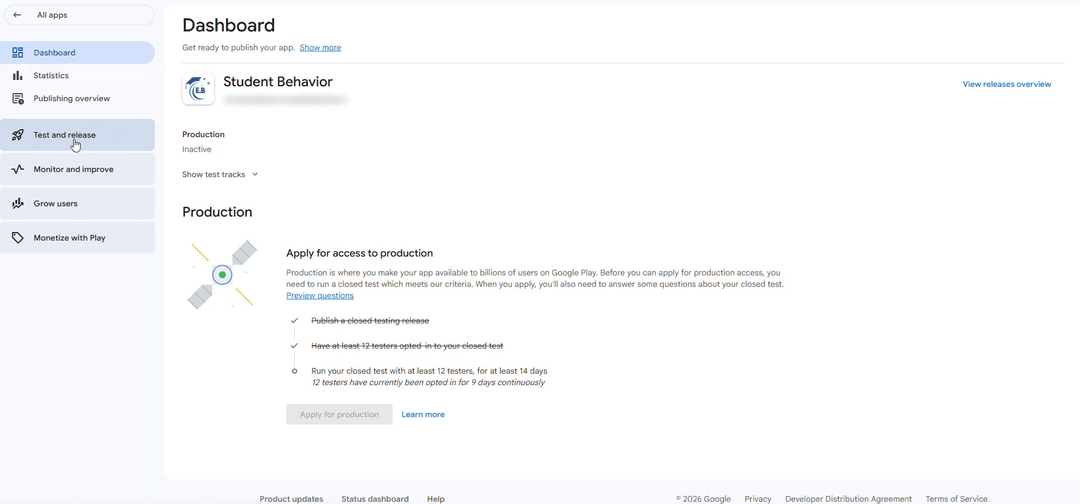
To pass Google's review, your testing framework must align with the following rules:
- Verified Opt-ins: Users must join your testing track natively via a dedicated web link or Android app link generated directly by your Play Console.
- Hardware Verification: Installs originating from Android emulators, untrusted sideloaded APK files, or click farms are detected and discarded.
- Consistency: If your active user count falls below the required threshold at any point during the 14-day window, the internal countdown timer resets.
Step-by-Step Blueprint for Closed Testing Compliance
Achieving compliance doesn't have to break your release cycle. Follow this systematic approach to secure production access:
- Upload Your App Bundle: Compile your production-ready Android App Bundle (.aab) and push it directly to the Closed testing track inside the Google Play Console.
- Configure the Web Opt-in URL: Head over to the 'Testers' tab within your track configuration. Designate your target tracking cohort (typically via a dedicated Google Group or specific email lists) to unlock your unique web opt-in URL.
- Onboard Reliable Testers: Gather your testing circle. If recruiting 20 distinct users proves difficult, platforms like Fast Testers can provision a fully compliant testing cohort in roughly an hour.
- Monitor Daily Activity: Check your console statistics consistently to verify that your testers remain actively enrolled and that background dropouts do not impact your metrics.
- Apply for Production Access: Once the 14-day timer finishes without interruption, complete the detailed Production Access questionnaire in your Play Console, highlighting the feedback collected from your testers.
Critical Pitfalls That Reset Your Progress
Many development teams hit unnecessary friction during review due to preventable mistakes. Avoid these specific structural errors:
- Confusing Internal & Closed Testing: Internal testing tracks do not satisfy Google’s 14-day deployment policy. You must utilize the official Closed testing option.
- Premature Application Submissions: Filing a production application request on day 13 or earlier will trigger an automated system rejection, resetting your timeline evaluation parameters.
- Distributing Bare APK Files: Directing testers to sideload raw build files completely bypasses the Play Console tracker, invalidating their feedback and installation status.
Accelerate Your Launch Safely with Fast Testers
For independent developers or agile startup teams, finding 20 dedicated Android users to manually coordinate installations across distinct time zones is a significant operational bottleneck. Fast Testers eliminates this friction via an automated, policy-compliant verification engine.
For a clear, flat rate of $15 per app, Fast Testers connects your deployment track to 20 real, active Android users. This setup ensures continuous background verification, automated retention, and provides full dashboard analytics to support your production application questionnaire perfectly. With thousands of successfully published apps, it provides a reliable, streamlined path past Google’s testing requirements.
Ready to Pass Your Closed Testing Phase?
Skip the stress of finding individual testers. Onboard 20 verified users with Fast Testers in under an hour and keep your product launch on track.
Start Closed Testing Now →Frequently Asked Questions
Typically within one hour after you submit your closed testing link through our dashboard. Fast Testers automates the allocation of active Android users seamlessly.
No. Google Play policy explicitly permits and encourages inviting external testers via email lists or Google Groups. Fast Testers facilitates onboarding authentic, unique devices matching Google's compliance parameters.
If Google flags a content or design policy issue, you can patch your code, submit a new build, and update the track. Your completed testing timeline carries over once the build compliance is resolved.
One thing that stays constant: the testing requirement
Google Play's policies evolve constantly, but one requirement has become a fixture for new developers: a new personal account must complete a closed test with 12 testers opted in for 14 continuous days before production access. Amid shifting rules, this testing requirement is a stable anchor you can plan around, and understanding it well means one major part of your launch process does not change under you. As you track policy updates, treat the closed-testing requirement as a known constant while you adapt to the moving parts. See our closed testing guide and the 12-testers policy.
Because it is stable, you can build a repeatable process around it, including a reliable tester source. To remove recruitment as a variable, you can submit your app. See where to find real testers.
Target API level and technical requirements
Among the most predictable and impactful policy changes are annual target API level requirements: Google raises the minimum API level apps must target to receive updates or, for new apps, to publish. Missing a target API deadline can prevent you from shipping updates, so watch these announcements and plan migrations ahead of the cutoff. Related technical requirements — the Android App Bundle format, 64-bit support, and permissions restrictions — also tighten over time. Staying current on these keeps your app publishable. See target API level requirements and Google's target API level policy.
These changes affect every app you maintain at once, so portfolio developers especially should track them and schedule updates across their apps together. Treat target API compliance as recurring maintenance, not a one-time task. See testing multiple apps.
Privacy, data, and permissions changes
Google steadily tightens data and privacy rules: expansions to the Data safety form, stricter permission justifications (especially for sensitive permissions like location, and for accessibility and SMS access), and new disclosure requirements. Policy changes here often require you to update declarations, remove or justify permissions, or adjust data handling — sometimes on a deadline. Because these intersect with laws like GDPR, staying current protects you from both Play enforcement and legal exposure. Review your permissions and declarations whenever Google announces changes in this area. See the Data safety form guide and background location testing.
Ads, families, and content policies also shift regularly, so if your app touches these areas, follow the relevant updates closely. A change to ad-format rules or child-directed requirements can force real product changes. See ad policy compliance and COPPA and kids apps.
How to stay current and adapt
Staying current is a habit, not a scramble. Read the Play Console inbox and policy announcements, subscribe to Google's developer communications, and periodically review the policy pages relevant to your app. When a change is announced, assess its impact early, plan any required work with margin before the deadline, and use your testing tracks to validate changes safely before shipping them. Developers who treat policy tracking as routine absorb changes calmly; those who ignore it face last-minute crises or enforcement. Build a light, regular review into your workflow. See post-launch monitoring and account safety.
Erring toward transparency and genuine practices future-proofs you, because most policy changes push in that direction. An app already built on honest declarations and real testing adapts easily to tighter rules. See real vs fake testers.
Related guides and resources
- Target API level requirements
- Data safety form and closed testing
- Account termination risks
- Google Play developer policies
Policy changes FAQ
Which policy changes matter most?
Target API level deadlines, privacy and permission tightening, and ads/families rules. These most often force real product or declaration changes.
How do I stay current?
Read the Play Console inbox and policy announcements, follow Google's developer communications, and periodically review the policies relevant to your app.
Does the closed-testing requirement keep changing?
It has been a stable fixture for new personal accounts, so you can treat it as a known constant and plan a repeatable process around it.
Bottom line
Google Play policies evolve constantly — target API levels, privacy and permissions, ads and families rules — so tracking them is ongoing maintenance, not a one-off. The closed-testing requirement, by contrast, is a stable anchor you can build a repeatable process around. Stay current, assess changes early, validate them on your tracks, and err toward transparency to future-proof your app. To keep tester recruitment a non-variable in that process, you can submit your app. See target API level requirements for the most predictable change.
Expanded for topical authority — additional practical sections below. Original guide content above is unchanged.
Quick answer
Google Play Policy Changes Developers Should Watch matters because Google Play production access for many new personal developer accounts depends on a successful closed test: at least 12 real testers opted in for 14 continuous days, plus a policy-compliant, stable app. Use this guide to execute the steps correctly, avoid streak-breaking mistakes, and decide whether DIY recruitment or a managed closed testing service is the better path for your deadline.
Key takeaways
- Google Play Policy Changes Developers Should Watch should be treated as a practical Play Console workflow, not just theory.
- For many new personal accounts, 12 opted-in testers × 14 continuous days on closed testing gates production access.
- Opt-in + install from Play beats “emails invited” every time — verify counts in Console.
- Use the window for QA, listing, and compliance work so review is the only remaining gate.
- Prefer real testers and a buffer above 12; avoid anything that looks like fake engagement.
Real-world scenarios: who this matters for
The guidance in this article on Google Play Policy Changes Developers Should Watch applies across many Android product types. Use these scenarios to map the advice to your situation.
| Developer type | Typical challenge | Practical focus |
|---|---|---|
| Indie / solo | Limited tester network and time | Start closed testing early; keep a buffer above 12 opted-in testers; parallelize listing + Data safety work |
| Startup | Launch deadline vs 14-day rule | Treat the window as fixed; recruit in parallel with QA; avoid last-minute track setup |
| Agency / white-label | Multiple client apps, each needing its own test | One closed test per app; standardize opt-in onboarding; track eligibility dates per client |
| Flutter / React Native | Cross-platform build + Play Console quirks | Ship a signed AAB to closed testing; verify installs from Play, not sideload; watch vitals on mid-range devices |
| Native Kotlin | Device/API fragmentation | Cover API levels and OEMs in your tester mix; fix crashes before requesting production |
| Game / Unity | Performance + retention during 14 days | Keep testers engaged so count never dips below 12; monitor ANRs and battery |
| E-commerce / fintech | Policy + payment flows | Test checkout, permissions, and declarations carefully before production access |
| Healthcare / kids / education | Sensitive policies (Families, data) | Align listing, privacy, and content rating with real app behavior during the test window |
Visual placeholder: Scenario matrix infographic — Indie / Startup / Agency / Cross-platform paths for Google Play Policy Changes Developers Should Watch.
Comparison: rejection / eligibility categories
Problems related to Google Play Policy Changes Developers Should Watch usually fall into a few buckets. Classify first, then fix — mixing categories wastes review cycles.
| Category | What Google is signaling | Primary fix | Avoid |
|---|---|---|---|
| Testing eligibility | Closed test incomplete / not continuous | Restore 12+ opted-in for 14 continuous days | Requesting production early |
| Policy / content | App or listing violates Play policy | Change product/listing to comply | Resubmitting unchanged |
| Declarations | Data safety, permissions, or rating mismatch | Align forms with real behavior | Copy-pasting inaccurate answers |
| Stability / quality | Crashes, broken core flows | Fix build; re-test on closed track | Ignoring tester crash reports |
| Metadata / listing | Misleading or stuffed listing | Clean title, description, graphics | Keyword stuffing |
Visual placeholder: Flowchart — diagnose rejection category → fix → retest → re-request.
Common mistakes (and how to avoid them)
These mistakes repeatedly show up when developers work through Google Play Policy Changes Developers Should Watch:
- Confusing invited vs opted-in testers — Only testers who open the opt-in link and install from Play count toward 12. Check the opted-in number in Play Console, not your email list.
- Recruiting exactly 12 with no buffer — One uninstall can break continuity. Aim for ~15 active opted-in testers.
- Starting the counted clock late — Listing assets, Data safety, and privacy work should run during the 14 days, not after.
- Using sideloaded APKs or fake installs — They do not satisfy Play’s closed testing expectations and can create account risk.
- Ignoring tester feedback until day 14 — Crashes that drive uninstalls threaten your streak and your review outcome.
- Requesting production access before the continuous streak completes — Eligibility checks fail even if calendar time has passed.
Troubleshooting checklist
If something feels “stuck” while applying Google Play Policy Changes Developers Should Watch, walk this list before changing strategy:
| Symptom | Likely cause | Fix |
|---|---|---|
| Console shows < 12 testers | Invites sent but not opted in | Resend opt-in link; confirm install from Play |
| “Not eligible” after 14 calendar days | Count dipped below 12 mid-window | Restore 12+ and complete a full continuous streak |
| Tester cannot join | Wrong account, Group lag, or track not published | Verify Google account, Group membership, track release |
| App fails to install | Device/API mismatch or signing issue | Check AAB, minSDK, Play App Signing |
| Production still rejected after testing | Policy, declarations, or stability — not the clock | Read the exact reason; fix that category completely |
Visual placeholder: Troubleshooting flowchart for Google Play Policy Changes Developers Should Watch.
Action checklist
Use this checklist alongside the rest of this guide on Google Play Policy Changes Developers Should Watch:
- ☐ Closed testing track created with a signed release (AAB)
- ☐ Opt-in link tested on a fresh Google account
- ☐ At least 12 testers opted in (prefer ~15)
- ☐ Daily check that opted-in count stays ≥ 12 for 14 continuous days
- ☐ Core flows exercised (login, main feature, permissions, offline/online)
- ☐ Crashes / ANRs triaged from tester reports and vitals
- ☐ Store listing, screenshots, and feature graphic drafted
- ☐ Privacy policy + Data safety + content rating aligned with real behavior
- ☐ Production access requested only after eligibility is green
- ☐ Staged rollout plan ready for first public release
Additional FAQs developers ask about Google Play Policy Changes Developers Should Watch
Quick answer: what should I do first?
Confirm you are on a closed testing track with real opted-in installs, keep 12+ testers for 14 continuous days, and fix policy/stability issues in parallel. Then use the detailed sections above for Google Play Policy Changes Developers Should Watch.
Does this apply to organization (company) accounts?
The classic 12×14 closed testing gate is primarily associated with new personal developer accounts. Always verify your account type and current Play Console eligibility messaging for your app.
Do friends and family count as testers?
Yes — if they opt in via your closed testing link and install from Google Play. They only help if they stay opted in for the continuous period.
Can I update the app during the 14 days?
You can usually push updates on the closed track, but unstable releases that cause uninstalls can threaten your tester count. Prefer polishing via internal testing first when possible.
What if production access is still rejected?
Read the exact reason. Incomplete testing is only one category — policy, Data safety mismatches, and crashes are common. Fix the cited issue fully before reapplying.
Is paying for testers allowed?
Using real people who install from Play is what matters. Avoid fake install farms. A one-time managed service that supplies real closed testers is a practical option when DIY recruitment is too slow.
How is Fast Testers different from free communities?
Free communities trade time and mutual availability. Fast Testers assigns about 15 real testers after you submit a valid closed testing link (one-time $15 per app) and includes a production access guarantee under its refund terms.
Where should I go next?
Review the related guides below, then either finish DIY recruitment or start closed testing if you need speed and continuity.
Sources, updates, and how to use this guide
This article on Google Play Policy Changes Developers Should Watch is maintained for Android developers preparing Google Play closed testing and production access. Always cross-check eligibility text inside your own Play Console, because Google’s UI labels and account rules can vary by account type and date.
- Primary official references: Google Play closed testing help, Developer Program Policies, and Play Console eligibility messaging for your app.
- Practical experience lens: guidance here reflects common failure modes indie developers and agencies hit when recruiting testers, maintaining the 14-day streak, and recovering from production-access rejections.
- Last reviewed focus: 12×14 closed testing continuity, real vs fake testers, and parallel listing/compliance work during the window.
Related guides and next steps
Continue building topical depth around Google Play Policy Changes Developers Should Watch with these Fast Testers resources:
- Ad Supported Apps And Google Play Ad Policy Testing
- Google Play 12 Testers Explained For Indie Developers
- Google Play 12 Testers Policy
- Google Play Policy Violations During Closed Testing
- Kids Apps And Google Play Families Policy Testing
- Privacy Policy Requirements For Google Play Apps
- Agency Guide Testing Client Apps On Google Play
- Android Tv Apps And Google Play Testing Tracks
- Pricing — $15 closed testing
- How Fast Testers works
- FAQ
- Developer reviews
- Case studies
- Submit your app / start closed testing
Need reliable testers so your 14-day streak does not stall? Educate first with the guides above, then start when you are ready — one-time pricing, real Play installs, dashboard tracking.
Internal navigation hub — added to strengthen topical connections. Original article content above is unchanged.
Continue learning
- Google Play – 12 Testers for 14 Days — Everything you need to know about Google Play's closed testing requirement..
- COPPA and Kids Apps on Google Play Store — Learn about COPPA compliance for Google Play closed testing. Complete guide for Android developers publishing .
- GDPR Compliance for Android Apps on Google Play — Learn about GDPR requirements for Google Play closed testing. Complete guide for Android developers publishing.
- Google Play Closed Testing Guide: How to Get 12 Testers for 14 Days — Stuck on the Google Play Console closed testing track? Learn how to successfully recruit 12 active testers, ma.
- Google Play Compliance Guide for Developers — A Google Play compliance guide covering data safety, privacy, permissions, content policy, target API level, a.
- Google Play Data Safety Form and Closed Testing — Learn about data safety requirements for Google Play closed testing. Complete guide for Android developers pub.
Next steps
- Ready to run closed testing with real Android testers? Submit your app or see pricing ($15 one-time).
- Compare options on our testing service comparison page, or read developer reviews and case studies.
- Still deciding? Review how Fast Testers works and the FAQ.