
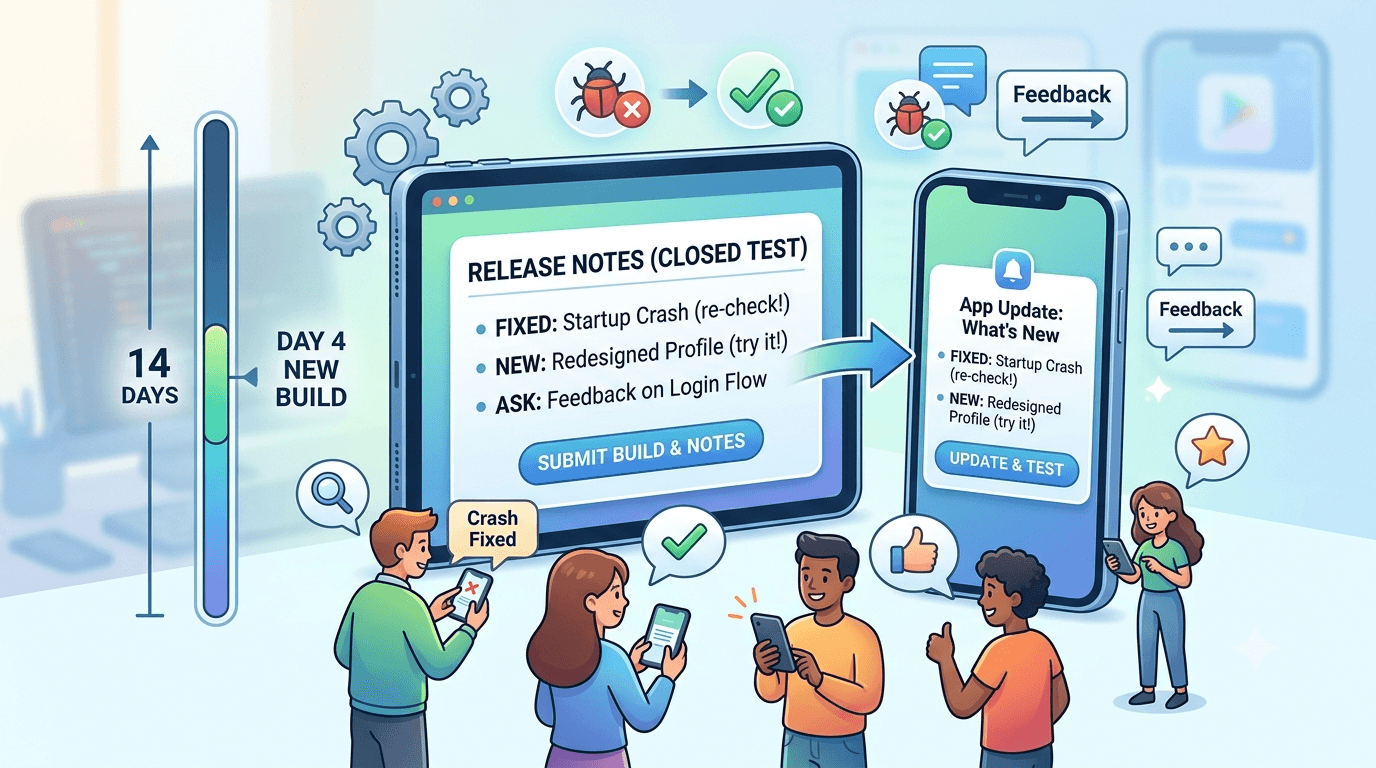
Release notes — the "What's new" text attached to each build — are easy to treat as an afterthought, but during closed testing they are a direct communication channel to your testers, guiding what to try, flagging what changed, and signaling that the app is actively improving. Good release notes make your test more productive and your testers more engaged; vague or absent ones waste the opportunity. Because any app from a new personal account must complete a closed test with at least 12 testers opted in for 14 continuous days before production access, this guide explains how to write closed-testing release notes that get the most from your window.
The requirement gives you 14 days of real testers, and release notes are a lever for directing their attention and sustaining their engagement. Writing them well turns each build into a focused testing prompt.
Release notes in the closed-testing context
The closed-testing requirement is tied to your developer account type, so any app on a new personal account must complete a closed test with 12+ testers for 14 continuous days before production access. See the closed testing guide. During this window you may ship multiple builds as you fix issues, and each carries release notes your testers can see. Unlike production release notes aimed at users, testing release notes are a tool to steer your testers — telling them what to focus on and confirming that their feedback led to changes. Review Google's release notes guidance.
Used well, release notes reduce confusion, direct testing effort where you need it, and keep testers feeling involved — all of which support both the requirement and the quality of feedback you get.
What testing release notes are for
Testing release notes serve several purposes at once. They tell testers what changed since the last build, so testers are not surprised or confused by new behavior. They direct attention to what you most want tested — a new feature, a reworked flow, a fixed bug to re-check. And they signal momentum: a stream of thoughtful updates shows testers the app is alive and their participation matters, which sustains engagement across the two weeks. Missing all this by leaving notes blank or generic wastes a free communication channel.
| Release note goal | How it helps your test |
|---|---|
| State what changed | Prevents confusion over new behavior |
| Direct testing focus | Gets feedback where you need it |
| Confirm fixes | Prompts testers to re-verify |
| Show momentum | Keeps testers engaged |
Treat each build's notes as a mini brief to your testers. See tester email templates.
How to write them well
Good testing release notes are clear, specific, and testerfacing. Write in plain language your testers understand, not internal jargon or ticket numbers. Lead with what you want them to do or notice — "New: try the redesigned sign-up" or "Fixed the crash some of you saw on startup, please confirm." Keep them concise but concrete, so a tester skimming knows exactly what changed and what to check. Avoid empty notes like "bug fixes and improvements," which tell testers nothing and squander the channel.
Structure helps: a short list of what is new, what is fixed, and what you specifically want tested reads faster than a paragraph. If you fixed something a tester reported, calling that out ("Thanks to feedback, fixed X") both directs re-testing and rewards the tester. Because these notes are a testing tool, optimize them for guiding action, not for marketing polish. See fixing crashes before production.
Example release notes
Here are patterns you can adapt. For an early build: "Welcome and thank you for testing! Please sign up, explore the main features, and try [core flow]. Let me know anything that's confusing or breaks on your device." For a fix build: "Fixed the crash on startup some testers hit on certain phones — please confirm the app now opens fine for you. Also improved loading speed on the home screen." For a feature build: "New: [feature] is now live — please try it and tell me what you think. Everything else should work as before."
Each of these tells testers precisely what to do, references their prior experience where relevant, and stays short. Contrast that with "Various bug fixes," which gives testers no reason to re-engage or any idea what to check. The specific versions cost only a moment more to write and materially improve the feedback and re-testing you get back. See updating mid-testing.
Cadence and updating during the window
You can update your app during the 14-day window without resetting your requirement clock, so use builds and their notes to iterate. A reasonable cadence is to ship fixes as you address meaningful feedback, each with notes that explain the change and prompt re-testing, rather than sitting silent for two weeks. This keeps the app improving and testers engaged, and it demonstrates responsiveness that encourages people to keep reporting issues. Do not ship so frequently that testers feel churned, but a few well-noted updates across the window are ideal.
Pair release notes with your other communication — an email or message pointing to a new build reinforces the notes and ensures testers actually update and re-check. Together, release notes and direct messages form a communication rhythm that sustains a productive test. See keeping testers engaged.
Transitioning to production release notes
As you approach launch, your release notes shift audience from testers to the public. Production "What's new" text is marketing- and user-facing: it should highlight benefits, be polished, and read well to prospective and current users, not contain tester instructions. Prepare your first production release notes during the window so they are ready at launch, and remember they serve a different purpose than the testing notes you have been writing. The habit of thoughtful notes carries over, but the tone and content change from "please test this" to "here's what's new for you."
Keep future production notes clear and benefit-focused too, since users do read them and blank or generic notes look careless. The discipline you build writing good testing notes sets you up to write good production notes. See listing optimization.
Getting the most from your notes
Because you are shipping builds during the window anyway, writing thoughtful release notes costs almost nothing and returns better-directed testing and higher engagement. Treat each build's notes as a brief: state what changed, point testers at what matters, confirm fixes, and keep momentum. Combined with clear emails and a stable build, good notes make your window materially more productive and your testers more willing to keep contributing.
Enter production having used your notes to steer a focused, responsive test, and prepare polished user-facing notes for launch. Small effort, real payoff. See the Play Console beginner guide.
Notes on the internal track too
The internal testing track also supports release notes, so if you stabilize builds there first, use notes to brief your internal testers just as you will your closed ones. This is good practice for your note-writing and ensures your internal group knows what to check before you promote a build. Clear notes at every stage keep whoever is testing pointed at the right things. See internal vs closed testing.
Then carry the same clear, action-oriented notes into the closed track where your counted testers rely on them. See where to find real testers.
After launch: notes keep working
Once live, release notes accompany every update and remain a communication tool — now with users. Use them to tell users what is new and improved, which can encourage updates and show an actively maintained app. Keep them clear and benefit-focused rather than generic. The habit you formed during closed testing of writing purposeful notes pays off for the life of your app, keeping users informed and engaged with each release. See updating your app after release and post-launch monitoring.
Length, formatting, and localization
Release notes have a character limit and are read on small screens, so keep them tight and scannable. Short lines or a brief bulleted structure read far better than a dense paragraph, especially since testers often glance at notes in a notification or on the store page rather than studying them. Front-load the most important item — what you want tested or the key fix — so it registers even if the reader stops after the first line. Formatting for a quick skim respects your testers' attention and increases the odds your guidance actually lands.
If your testers span multiple languages, consider that release notes can be localized per language, just like your listing. For a testing phase this may be less critical than for production, but if a chunk of your testers read another language, providing notes they understand improves their engagement and the quality of their feedback. At minimum, write in clear, simple language that non-native speakers can follow easily, avoiding idioms and jargon that obscure your meaning. See multi-language app testing.
Common release-note mistakes
Several mistakes blunt the usefulness of testing release notes. The most common is the empty "bug fixes and improvements," which tells testers nothing and wastes the channel. Others include writing for yourself rather than testers (internal ticket references, jargon), burying the key ask in a long block, failing to confirm fixes so testers do not know to re-check, and never updating the notes across multiple builds so testers cannot tell what changed. Each squanders an easy opportunity to direct and engage your testers.
The fixes are straightforward: be specific, write for testers, lead with the ask, call out fixes, and keep notes current with each build. A minute of thought per release turns a neglected field into a genuine testing tool. Auditing your notes against these mistakes before you ship each build ensures you consistently get the direction and engagement benefits they offer. See fixing crashes before production.
Fitting notes into your build workflow
To make good notes a habit rather than an afterthought, fold them into your release workflow. Before you upload each build, jot down what changed and what you want tested while it is fresh, and paste that into the release notes as part of shipping. Pair the note with a matching message on your tester channel so people actually see it and update. Over a window with several builds, this rhythm — change, note, notify — keeps testers oriented and engaged without much extra effort on your part.
Keeping a running log of what each build addressed also helps you track your own progress through the window and prepare an accurate picture of what you fixed. By the time you reach production, you will have a clear history of improvements and a polished, user-facing note ready for launch. Building this small discipline now pays off for every release you ever ship. See updating mid-testing.
Key takeaways
- Testing release notes are a tool to direct and engage your testers.
- State what changed and what to test in plain, specific language.
- Confirm fixes so testers re-verify reported issues.
- Avoid generic "bug fixes" notes that waste the channel.
- Prepare user-facing production notes for launch separately.
Frequently asked questions
Do release notes matter during closed testing?
Yes. They tell testers what changed and what to check, confirm fixes, and signal momentum, making your test more productive and engaging.
What should testing release notes include?
What's new, what's fixed, and specifically what you want testers to try or re-verify, in plain, concise language.
Can I update my app during the window?
Yes, without resetting your requirement clock. Ship fixes with clear notes to iterate and keep testers engaged.
Should testing and production notes be the same?
No. Testing notes direct testers; production notes are user- and marketing-facing, highlighting benefits. Prepare production notes separately for launch.
Is "bug fixes and improvements" okay?
For production it is weak; for testing it is a wasted opportunity. Be specific so testers know what changed and what to check.
How often should I ship builds with notes?
As you address meaningful feedback — a few well-noted updates across the window — without churning testers with constant releases.
Do notes help engagement?
Yes. Thoughtful notes showing steady progress and responding to feedback keep testers feeling involved and willing to keep reporting.
How long should release notes be?
Short and scannable. Front-load the key item, use brief lines or bullets, and remember testers often only glance at them on small screens.
Should I localize testing release notes?
For production it helps; for testing it is optional but useful if testers read another language. At minimum, write in clear, simple, jargon-free language.
How do I make good notes a habit?
Fold them into your build workflow — note what changed and what to test as you upload, and pair each note with a message on your tester channel.
Expanded for topical authority — additional practical sections below. Original guide content above is unchanged.
Quick answer
How to Write Closed Testing Release Notes matters because Google Play production access for many new personal developer accounts depends on a successful closed test: at least 12 real testers opted in for 14 continuous days, plus a policy-compliant, stable app. Use this guide to execute the steps correctly, avoid streak-breaking mistakes, and decide whether DIY recruitment or a managed closed testing service is the better path for your deadline.
Real-world scenarios: who this matters for
The guidance in this article on How to Write Closed Testing Release Notes applies across many Android product types. Use these scenarios to map the advice to your situation.
| Developer type | Typical challenge | Practical focus |
|---|---|---|
| Indie / solo | Limited tester network and time | Start closed testing early; keep a buffer above 12 opted-in testers; parallelize listing + Data safety work |
| Startup | Launch deadline vs 14-day rule | Treat the window as fixed; recruit in parallel with QA; avoid last-minute track setup |
| Agency / white-label | Multiple client apps, each needing its own test | One closed test per app; standardize opt-in onboarding; track eligibility dates per client |
| Flutter / React Native | Cross-platform build + Play Console quirks | Ship a signed AAB to closed testing; verify installs from Play, not sideload; watch vitals on mid-range devices |
| Native Kotlin | Device/API fragmentation | Cover API levels and OEMs in your tester mix; fix crashes before requesting production |
| Game / Unity | Performance + retention during 14 days | Keep testers engaged so count never dips below 12; monitor ANRs and battery |
| E-commerce / fintech | Policy + payment flows | Test checkout, permissions, and declarations carefully before production access |
| Healthcare / kids / education | Sensitive policies (Families, data) | Align listing, privacy, and content rating with real app behavior during the test window |
Visual placeholder: Scenario matrix infographic — Indie / Startup / Agency / Cross-platform paths for How to Write Closed Testing Release Notes.
Comparison: DIY recruitment vs managed closed testing
When your goal is Google Play production access, the path you choose for testers affects time, risk, and feedback quality. Use this comparison while deciding how to apply How to Write Closed Testing Release Notes.
| Approach | Time to 12 opted-in | Cost | Dropout risk | Feedback quality | Best when |
|---|---|---|---|---|---|
| Friends & family | Days–weeks | $0 | High | Mixed | Tiny MVP, flexible timeline |
| Reddit / Discord / Telegram | Unpredictable | $0–low | High | Variable | You can manage onboarding daily |
| Peer community exchange | Variable | $0 | Medium | Developer-biased | You can test others’ apps in return |
| Managed closed testing (e.g. Fast Testers) | ~1 hour after valid link | $15 one-time / app | Low (buffer of 15) | Real Play installs | You need speed + continuity for 14 days |
Decision tip: If a broken streak would delay revenue or a client deadline, prioritize reliability over $0 recruitment. DIY is fine when you already have engaged testers and can monitor Play Console daily.
Visual placeholder: Comparison diagram — DIY vs community vs managed testing for How to Write Closed Testing Release Notes.
Common mistakes (and how to avoid them)
These mistakes repeatedly show up when developers work through How to Write Closed Testing Release Notes:
- Confusing invited vs opted-in testers — Only testers who open the opt-in link and install from Play count toward 12. Check the opted-in number in Play Console, not your email list.
- Recruiting exactly 12 with no buffer — One uninstall can break continuity. Aim for ~15 active opted-in testers.
- Starting the counted clock late — Listing assets, Data safety, and privacy work should run during the 14 days, not after.
- Using sideloaded APKs or fake installs — They do not satisfy Play’s closed testing expectations and can create account risk.
- Ignoring tester feedback until day 14 — Crashes that drive uninstalls threaten your streak and your review outcome.
- Requesting production access before the continuous streak completes — Eligibility checks fail even if calendar time has passed.
Troubleshooting checklist
If something feels “stuck” while applying How to Write Closed Testing Release Notes, walk this list before changing strategy:
| Symptom | Likely cause | Fix |
|---|---|---|
| Console shows < 12 testers | Invites sent but not opted in | Resend opt-in link; confirm install from Play |
| “Not eligible” after 14 calendar days | Count dipped below 12 mid-window | Restore 12+ and complete a full continuous streak |
| Tester cannot join | Wrong account, Group lag, or track not published | Verify Google account, Group membership, track release |
| App fails to install | Device/API mismatch or signing issue | Check AAB, minSDK, Play App Signing |
| Production still rejected after testing | Policy, declarations, or stability — not the clock | Read the exact reason; fix that category completely |
Visual placeholder: Troubleshooting flowchart for How to Write Closed Testing Release Notes.
Action checklist
Use this checklist alongside the rest of this guide on How to Write Closed Testing Release Notes:
- ☐ Closed testing track created with a signed release (AAB)
- ☐ Opt-in link tested on a fresh Google account
- ☐ At least 12 testers opted in (prefer ~15)
- ☐ Daily check that opted-in count stays ≥ 12 for 14 continuous days
- ☐ Core flows exercised (login, main feature, permissions, offline/online)
- ☐ Crashes / ANRs triaged from tester reports and vitals
- ☐ Store listing, screenshots, and feature graphic drafted
- ☐ Privacy policy + Data safety + content rating aligned with real behavior
- ☐ Production access requested only after eligibility is green
- ☐ Staged rollout plan ready for first public release
Additional FAQs developers ask about How to Write Closed Testing Release Notes
Quick answer: what should I do first?
Confirm you are on a closed testing track with real opted-in installs, keep 12+ testers for 14 continuous days, and fix policy/stability issues in parallel. Then use the detailed sections above for How to Write Closed Testing Release Notes.
Does this apply to organization (company) accounts?
The classic 12×14 closed testing gate is primarily associated with new personal developer accounts. Always verify your account type and current Play Console eligibility messaging for your app.
Do friends and family count as testers?
Yes — if they opt in via your closed testing link and install from Google Play. They only help if they stay opted in for the continuous period.
Can I update the app during the 14 days?
You can usually push updates on the closed track, but unstable releases that cause uninstalls can threaten your tester count. Prefer polishing via internal testing first when possible.
What if production access is still rejected?
Read the exact reason. Incomplete testing is only one category — policy, Data safety mismatches, and crashes are common. Fix the cited issue fully before reapplying.
Is paying for testers allowed?
Using real people who install from Play is what matters. Avoid fake install farms. A one-time managed service that supplies real closed testers is a practical option when DIY recruitment is too slow.
How is Fast Testers different from free communities?
Free communities trade time and mutual availability. Fast Testers assigns about 15 real testers after you submit a valid closed testing link (one-time $15 per app) and includes a production access guarantee under its refund terms.
Where should I go next?
Review the related guides below, then either finish DIY recruitment or start closed testing if you need speed and continuity.
Sources, updates, and how to use this guide
This article on How to Write Closed Testing Release Notes is maintained for Android developers preparing Google Play closed testing and production access. Always cross-check eligibility text inside your own Play Console, because Google’s UI labels and account rules can vary by account type and date.
- Primary official references: Google Play closed testing help, Developer Program Policies, and Play Console eligibility messaging for your app.
- Practical experience lens: guidance here reflects common failure modes indie developers and agencies hit when recruiting testers, maintaining the 14-day streak, and recovering from production-access rejections.
- Last reviewed focus: 12×14 closed testing continuity, real vs fake testers, and parallel listing/compliance work during the window.
Related guides and next steps
Continue building topical depth around How to Write Closed Testing Release Notes with these Fast Testers resources:
- Analytics Sdk Testing During Closed Testing
- Closed Testing Vs Open Testing On Google Play
- Google Play Internal Testing Vs Closed Testing
- App Bundle Vs Apk For Closed Testing Releases
- App Testing Checklist Before Release
- Ar Vr Android Apps And Closed Testing Requirements
- Closed Testing Completed But Still Rejected
- Closed Testing Track Not Showing
- Pricing — $15 closed testing
- How Fast Testers works
- FAQ
- Developer reviews
- Case studies
- Submit your app / start closed testing
Need reliable testers so your 14-day streak does not stall? Educate first with the guides above, then start when you are ready — one-time pricing, real Play installs, dashboard tracking.
Internal navigation hub — added to strengthen topical connections. Original article content above is unchanged.
Continue learning
- Closed Testing Track Not Showing in Play Console? — Closed testing track not showing in Google Play Console? Learn why the track or tab is missing and how to crea.
- Closed Testing vs APK Sharing: What Counts? — Closed testing vs APK sharing for Google Play: why sideloaded APKs do not count toward production access and h.
- Closed Testing vs Firebase App Distribution — Closed testing vs Firebase App Distribution: what each is for, why Firebase does not satisfy Google Play produ.
- Closed Testing vs TestFlight: Android vs iOS Beta — Closed testing vs TestFlight: how Android and iOS beta testing differ, what each requires, and what Android de.
- Common Google Play Closed Testing Mistakes to Avoid — The most common Google Play closed testing mistakes — wrong track, too few testers, dropouts, sideloading — an.
- Google Play Android Vitals During Closed Testing — Learn about vitals monitoring for Google Play closed testing. Complete guide for Android developers publishing.
Next steps
- Ready to run closed testing with real Android testers? Submit your app or see pricing ($15 one-time).
- Compare options on our testing service comparison page, or read developer reviews and case studies.
- Still deciding? Review how Fast Testers works and the FAQ.